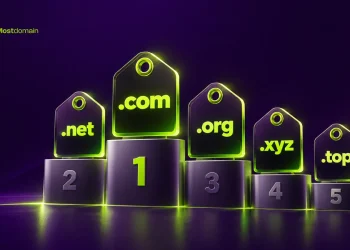
Five actions, stacked together, that’s really all domain registration comes down to. Availability gets checked first. Then you pick a registrar, hand over your details, pay, and confirm your email before ICANN’s window shuts. Skip that email step and the registrar can suspend the record on you, no exceptions made.
What matters more is the slower version. Most guides skip right past a few traps buried in this process, and one of those traps explains why people end up locked out of a domain they bought only a week before.
On purpose, this stays narrow. You won’t find brand-name brainstorming here, or a marketplace ranking, or a debate over whose dashboard looks nicer. Just the moment you decide to claim a name, and the handful of things worth doing right after.
What Happens When You Register a Domain Name
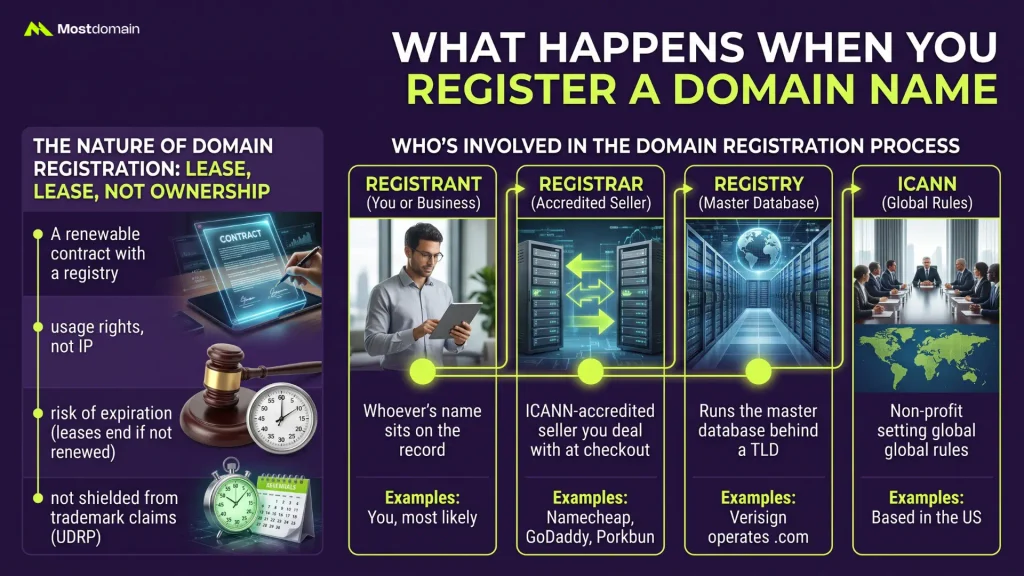
You’re leasing a name, not buying it. Registering a domain hands you the right to use that string for a set term, usually between one and ten years, through a company ICANN has accredited to sell it. Forget to renew, and the lease ends. Somebody else can grab the exact same name the moment it lapses, no grace period for hesitation.
Domain Registration vs. Domain Ownership
People toss around “I own my domain” like it’s fact. Technically, it isn’t.
- A domain registration works as a renewable contract with a registry, not a deed you can frame on the wall
- What you actually hold is usage rights, not intellectual property over the string itself
- Stop paying, break policy, or lose a dispute, and the registration can end mid-term, no matter how long you’ve held it
- A registration date doesn’t shield you from a legitimate trademark claim; through the Uniform Domain-Name Dispute-Resolution Policy, trademark holders can still challenge a name regardless of who registered it first
That distinction sounds academic until it isn’t. It explains why auto-renewal exists in the first place, and why losing your registrant email causes more damage than losing a password ever would.

Who’s Involved in the Domain Registration Process
Four parties touch every single registration. Most people only ever meet one of them face to face, so to speak.
| Role | What It Does | Example |
| Registry | Runs the master database behind a TLD | Verisign operates .com |
| Registrar | ICANN-accredited seller you actually deal with at checkout | Namecheap, GoDaddy, Porkbun |
| Registrant | Whoever’s name sits on the record, which might be you or your business | You, most likely |
| ICANN | The non-profit setting global rules everyone else has to follow | Based in the US |
You’ll only ever log into your registrar. The other three sit quietly in the background right up until something breaks.
The 9 Steps to Register a Domain Name
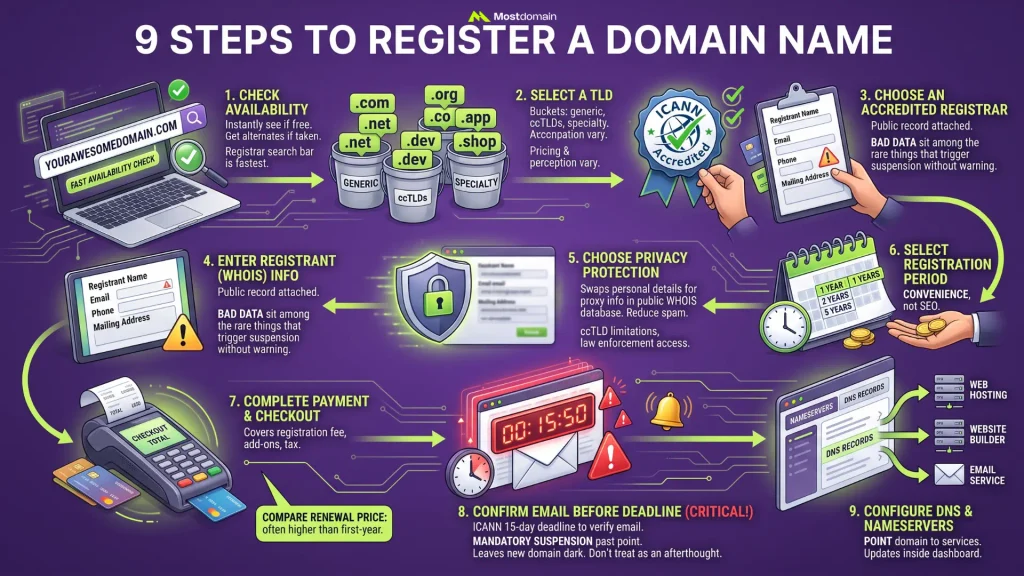
Assuming the name’s actually free, expect ten to twenty minutes from start to finish. That’s the rough window for registering a domain end to end. Below is the sequence exactly as it plays out at checkout, skipping the tidied-up version most guides prefer.




Step 1: Check Domain Name Availability
Type the exact string into a registrar’s search bar. It tells you almost instantly whether the name is free. Taken already? Most tools respond with a pile of alternate TLDs or near-miss spelling variants, whether you asked for them or not.
WHOIS lookups aren’t the tool for this. Registration history is what they’re built to dig into, not a fast yes-or-no availability check, and a registrar’s own search bar beats them on speed anyway.
Step 2: Select a Domain Extension (TLD)
The moment you run that first search, availability narrows your TLD choice. A taken .com says nothing about whether .co or .app is free too. Generic extensions (.com, .net, .org) make up one bucket. Country-code options like .us, .de, or .in form another. Newer specialty extensions, .dev, .app, .io, .shop among them, round out a third.
Pricing shifts by extension. So does how people perceive it, fair or not. A handful of TLDs also come loaded with registration rules of their own, and that’s covered further down.
Step 3: Choose an Accredited Domain Registrar
ICANN accreditation isn’t optional. Any registrar you use needs it, full stop, or the registration itself won’t hold up. Past that one filter, everything else, support quality, renewal pricing, whatever add-ons they push at checkout, comes down to preference.
This article isn’t the place for a side-by-side registrar ranking. Top 10 Best Domain Registrars covers that level of detail in full, pricing, support, and transfer policy across the major players.
Step 4: Enter Your Registrant (WHOIS) Information
Right here, your name, email, phone number, and mailing address get attached to the domain’s public registration record, permanently. Getting it accurate isn’t a nice-to-have. ICANN policy requires it, and bad WHOIS data sits among the rare things that trigger an outright suspension with no warning shot first.
WHOIS Lookup: Understanding Domain Information breaks down exactly what a WHOIS record stores and who’s able to see it.
Step 5: Choose Domain Privacy Protection
Your personal contact details get swapped for the registrar’s own proxy info in the public WHOIS record, that’s what privacy protection does. Most registrars throw it in free for year one. Past that, a handful still bill $5 to $15 annually for it.
- Skip it, and your name, email, phone number sit in a public database anyone can search
- Spam and scraping drop noticeably once it’s turned on, though law enforcement and legitimate legal requests can still reach the actual registrant behind the proxy
- A handful of ccTLDs simply don’t allow privacy protection, full stop, regardless of what you’re willing to pay
Step 6: Select Your Registration Period
One to ten years, in a single transaction, that’s the typical registration window a registrar offers. Longer terms cost more upfront. In exchange, the annual renewal deadline disappears from your radar for a while.
A persistent SEO myth claims multi-year registration signals trustworthiness to Google. On its own, it doesn’t. Term length is worth treating as a convenience decision, nothing more, and definitely not a ranking strategy.
Step 7: Complete Payment and Checkout
Payment at this stage is straightforward. You’re covering the registration fee, whatever add-ons you picked along the way, and applicable tax, all rolled into one total. Credit card, PayPal, and increasingly crypto cover most of the payment options depending on which registrar you picked.
Before hitting confirm, compare the renewal price against whatever first-year price got you excited. A $0.99 domain can renew quietly at $17.99 or more, and that figure usually sits lower on the checkout page than it should.
Step 8: Confirm Your Registrant Email Before ICANN’s Deadline
ICANN gives registrants fifteen days to verify their email on every new or transferred registration, and no registrar has the authority to waive that clock. Leave the verification email unanswered past that point, and suspension is mandatory. The domain simply stops resolving, no further warning issued.
- Check your inbox right after checkout, and check spam too, because that’s usually where it lands
- Only click a verification link sent directly by your registrar, not a forwarded copy from anyone else
- Change the registrant email down the road, and this whole requirement resets itself
- A domain suspended for non-verification doesn’t get released to the public immediately, it just goes dark until someone fixes it
Treating “check your email” as an afterthought, which most guides do, is a mistake. This single missed step ranks among the more common reasons a brand-new domain suddenly goes dark, and a footnote doesn’t do it justice.
Step 9: Configure DNS and Nameservers After Registration
A verified domain still does nothing on its own. You have to point it somewhere, toward a hosting provider, a website builder, or an email service, before it actually works for anything. That happens by updating nameservers or individual DNS records inside your registrar’s dashboard.
How to Actually Read DNS Lookup Results is the place to go if reading A records, CNAME, MX, and the rest of what comes back isn’t second nature yet.
What You’ll Pay When You Register a Domain
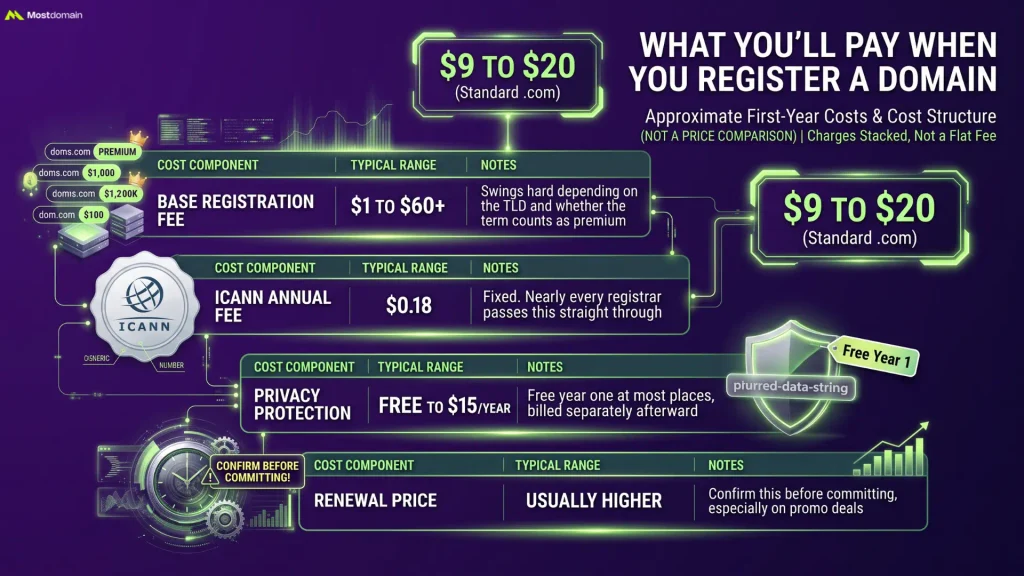
$9 to $20. That’s roughly what a standard .com registration runs for the first year at most mainstream registrars, before any add-ons get tacked on. And that number isn’t one flat fee, it’s several separate charges stacked on top of each other.
| Cost Component | Typical Range | Notes |
| Base registration fee | $1 to $60+ | Swings hard depending on the TLD and whether the term counts as premium |
| ICANN annual fee | $0.18 | Fixed. Nearly every registrar passes this straight through |
| Privacy protection | Free to $15/year | Free year one at most places, billed separately afterward |
| Renewal price | Usually higher | Confirm this before committing, especially on promo deals |
What’s laid out here is the cost structure at the moment of registration, not a price comparison across registrars. For that side of things, Best Domain Marketplaces 2026 gets into where prices actually diverge and by how much.
Should You Register a Domain as a Business or an Individual
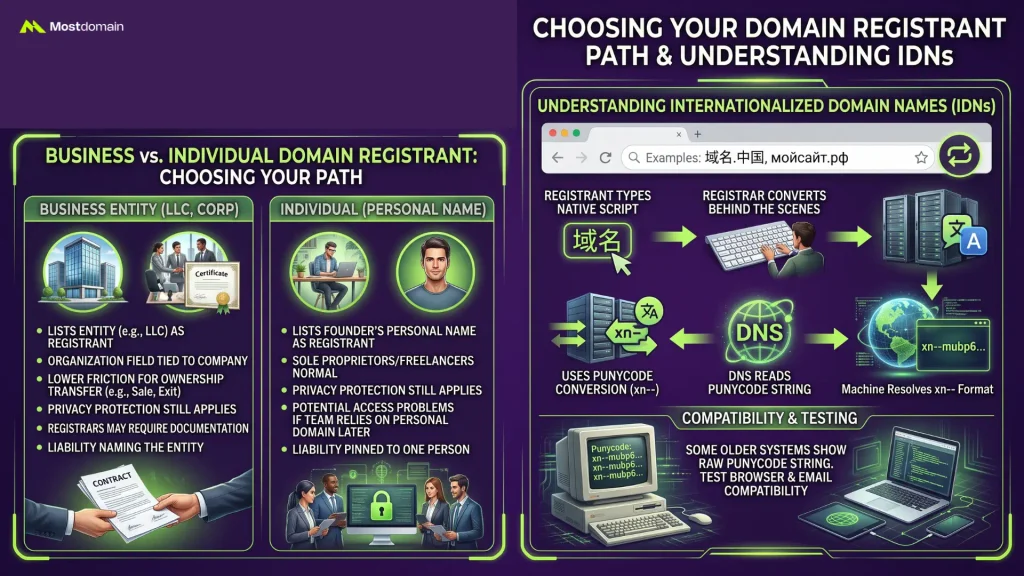
Whoever you list as the registrant decides what shows up in public records, and who’s legally on the hook for the domain. Registering under a business name isn’t required for most TLDs. It just changes the paper trail left behind.
Registering a Domain Under a Business Entity
List an LLC or corporation as the registrant instead of a founder’s personal name, and the WHOIS organization field stays tied to the company, not a person.
- Ownership transfers with a lot less friction when a founder leaves, or when the company itself gets sold
- Privacy protection still applies the same way, business registrant or not
- A few registrars ask for a business email domain or supporting documentation before they’ll verify an entity registrant
- Liability and dispute resolution, UDRP cases included, can name the entity itself rather than pinning it on one person
Personal registration is the norm for sole proprietors and freelancers, and nothing about that is wrong. The trouble surfaces later, once a domain tied to a single person’s name is quietly powering a business that no one else on the team can legally access.
Registering an Internationalized Domain Name (IDN)
Non-Latin scripts become usable domains through IDNs, think 域名.中国 or мойсайт.рф, while registrars quietly convert that string into Punycode (the xn-- format) behind the scenes so DNS can actually read it.
No separate process required, most major registrars handle IDN registration through the exact same search box you’d use for anything else. The catch sits in browser and email compatibility. Some older systems still display the raw Punycode string instead of the native characters, so test that before building an entire brand around one.
Domain Registration Rules You Need to Follow
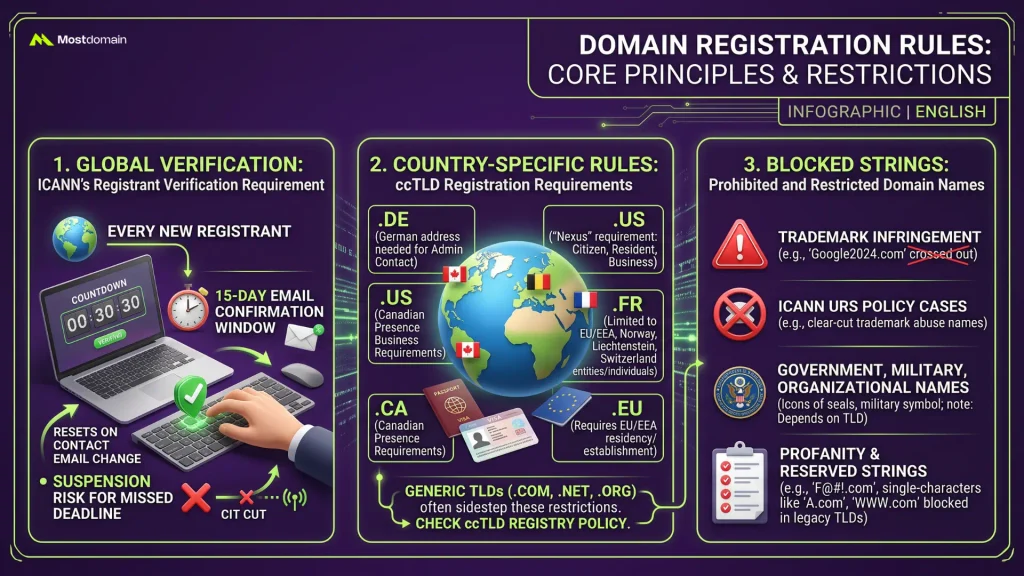
Anything but a free-for-all, registration runs on baseline rules ICANN forces every registrar to enforce, with individual country-code registries stacking their own restrictions on top.
ICANN’s Registrant Verification Requirement
Step 8 already walked through this rule, which applies globally with zero exceptions for any registrar. A 15-day window to confirm the address applies to every new registrant, and resets for anyone who changes their contact email down the line, before suspension kicks in.
Country-Code (ccTLD) Registration Requirements
Some ccTLDs restrict who’s even allowed to register in the first place. This is exactly where a lot of first-time international buyers trip up.
| ccTLD | Restriction |
| .de | Needs an administrative contact with a German address |
| .us | Registrant has to meet a “Nexus” requirement, meaning US citizen, resident, or business |
| .ca | Canadian Presence Requirements apply |
| .fr | Limited to individuals or entities based in the EU, Iceland, Norway, Liechtenstein, or Switzerland |
| .eu | Requires residency or an establishment somewhere inside the EU/EEA |
Generic TLDs like .com, .net, and .org sidestep all of this. A specific ccTLD’s registry policy is still worth checking before assuming automatic eligibility, though.
Prohibited and Restricted Domain Names
Certain strings get blocked outright by registrars, and that’s separate entirely from trademark disputes.
- Anything infringing on a protected trademark, obviously
- Terms already flagged under ICANN’s Uniform Rapid Suspension policy, usually reserved for clear-cut trademark abuse cases
- Government, military, or protected organization names, though exactly which ones depends heavily on the TLD in question
- A handful of registries also restrict profanity or reserved strings, “www” and single-character domains on some legacy TLDs fall into this bucket too
Protecting Your Domain Registration After Checkout
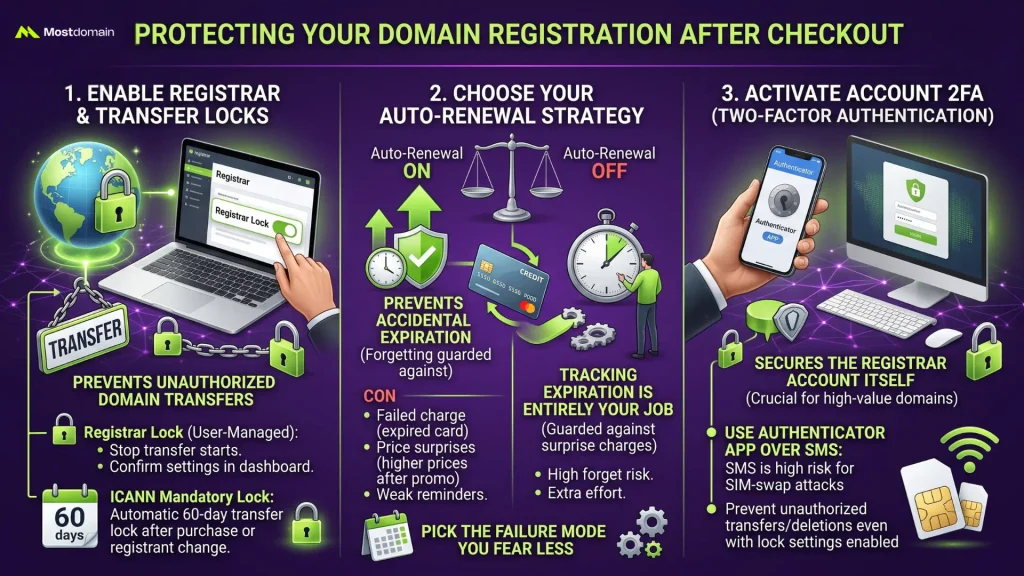
Payment isn’t where the registration process ends. A handful of settings, easy to overlook, decide whether the domain stays yours without incident for the next several years.
Enabling Registrar Lock and Transfer Lock
Registrar lock, sometimes labeled Client Transfer Prohibited, stops anyone from kicking off an unauthorized transfer to another registrar. Usually on by default after purchase. Still worth confirming inside your dashboard rather than just assuming it’s there.
A mandatory 60-day transfer lock also kicks in after initial registration or any registrant change, courtesy of ICANN policy, completely separate from whatever lock setting you manage yourself.
What Happens When You Turn On Auto-Renewal
Auto-renewal pulls from your saved payment method automatically before the domain expires. It prevents accidental loss, sure, but it trades that risk for a few of its own.
- An expired card fails the charge silently, and often nobody notices until the domain’s already down
- The renewal price frequently outpaces that promotional first-year rate, so the charge lands as a surprise more often than it should
- A single reminder email is all some registrars send, easy enough to lose in a cluttered inbox
- Turn it off, and tracking the expiration date becomes entirely your job, nobody else’s
Universally safer doesn’t describe either option here. Forgetting gets guarded against by auto-renewal; surprise charges get guarded against by doing it manually. Whichever failure mode feels more likely for you is the one worth picking against.
Two-Factor Authentication for Your Registrar Account
Most people underrate how much 2FA on the registrar account actually matters. On some platforms, anyone holding your login can transfer or delete the domain outright, registrar lock settings notwithstanding. Wherever it’s offered, an authenticator app beats SMS for this. Text-based 2FA is exactly what SIM-swap attacks go after, and a high-value domain makes a tempting target for that kind of attack.
Common Domain Registration Mistakes to Avoid
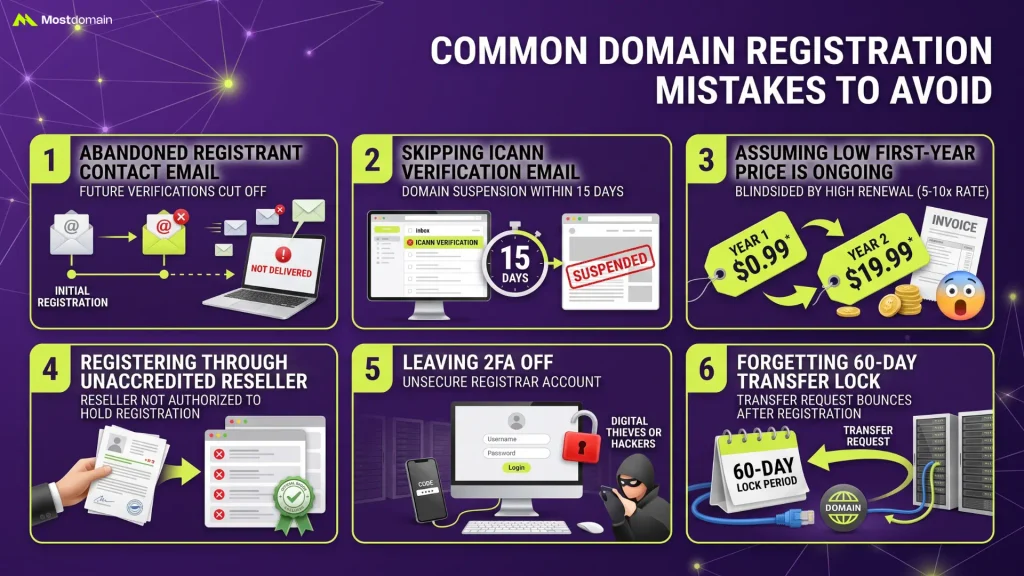
A handful of errors account for most of the domain-related support tickets a registrar ever sees.
- A registrant contact email that later gets abandoned cuts off every future verification email that would ever land there
- Skipping the ICANN verification email entirely and losing the domain to suspension within 15 days
- Assuming a low first-year price is the ongoing cost, then getting blindsided by a renewal at 5 to 10 times that rate
- Registering through an unaccredited reseller that isn’t actually authorized to hold the registration
- Leaving 2FA off on the registrar account
- Forgetting the 60-day transfer lock applies right after registration, then getting confused when a transfer request bounces back
What to Do If the Domain Name Is Already Registered
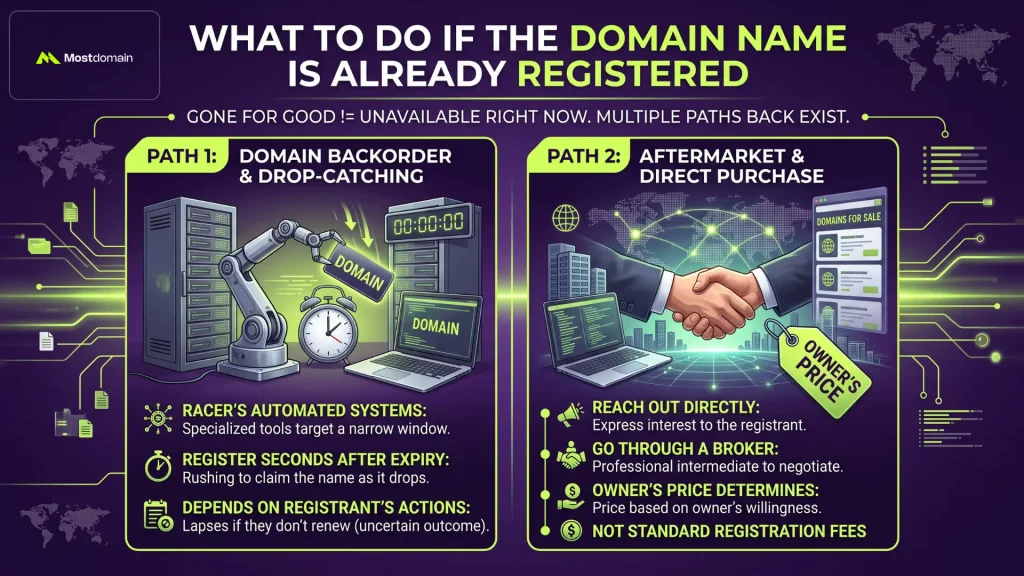
Gone for good isn’t the same thing as unavailable right now. Depending on the registration’s current status, there are still a few paths back to a name that’s already taken.
Domain Backorder and Drop-Catching Options
A backorder service races to register the name for you within seconds of it becoming available, using automated systems built specifically for that narrow window, assuming the current registration is close to expiring and the owner doesn’t renew. It only works if the current registrant actually lets it lapse, and that’s not something anyone can predict with real certainty.
Buying an Already-Registered Domain on the Aftermarket
No intention to let it expire? Then reaching out directly, or going through a broker to negotiate, becomes the only realistic option left. Pricing on the aftermarket has nothing to do with standard registration fees. It’s whatever the current owner decides they’re willing to accept, plain and simple.
FAQ
How long does it take for a domain registration to become active?
A few hours, usually, before a fresh registration propagates and becomes resolvable. Full global DNS propagation can stretch to 24 or 48 hours in some cases, depending on the TLD and your DNS provider’s TTL settings.
Can I register a domain without buying hosting?
Yes, registration and hosting run as entirely separate services. Plenty of registrars sell domains with zero hosting attached. You’ll just need to point it somewhere else, or leave it parked, once the registration goes through.
What happens if I don’t renew my domain on time?
A grace period kicks in first, and the domain’s still recoverable then at the standard renewal price. Miss that window too, and it drops into a redemption period with a steep reinstatement fee attached. Eventually, it releases back into the public pool for anyone to grab.
Is registering a domain the same thing as buying a domain?
Not exactly, no. Registering means claiming a name nobody’s holding yet, done through a registrar. Buying can mean that too, but it can also mean purchasing an already-registered domain straight from its current owner, and that’s a completely different transaction.
Can two people register the exact same domain name?
No, not on the same TLD anyway. First-come, first-served, strictly, per registry. example.com can only have one registrant at a time, though nothing stops example.net or example.org from being registered separately by someone else entirely.
Do I need to form an LLC before I can register a domain?
No, not at all. Individuals register domains under their own name all the time, no business entity required. Forming an LLC beforehand comes down to a choice about liability and ownership structure, not some technical prerequisite for the registration itself.
References
- Network Solutions, How to Register a Domain Name
- Wix, How to Register a Domain Name for Your Website
- HostAdvice, How To Register a Domain Name: Domain Registration Guide
- Domains Discovery, How to Register a Domain Name (Step-by-Step)