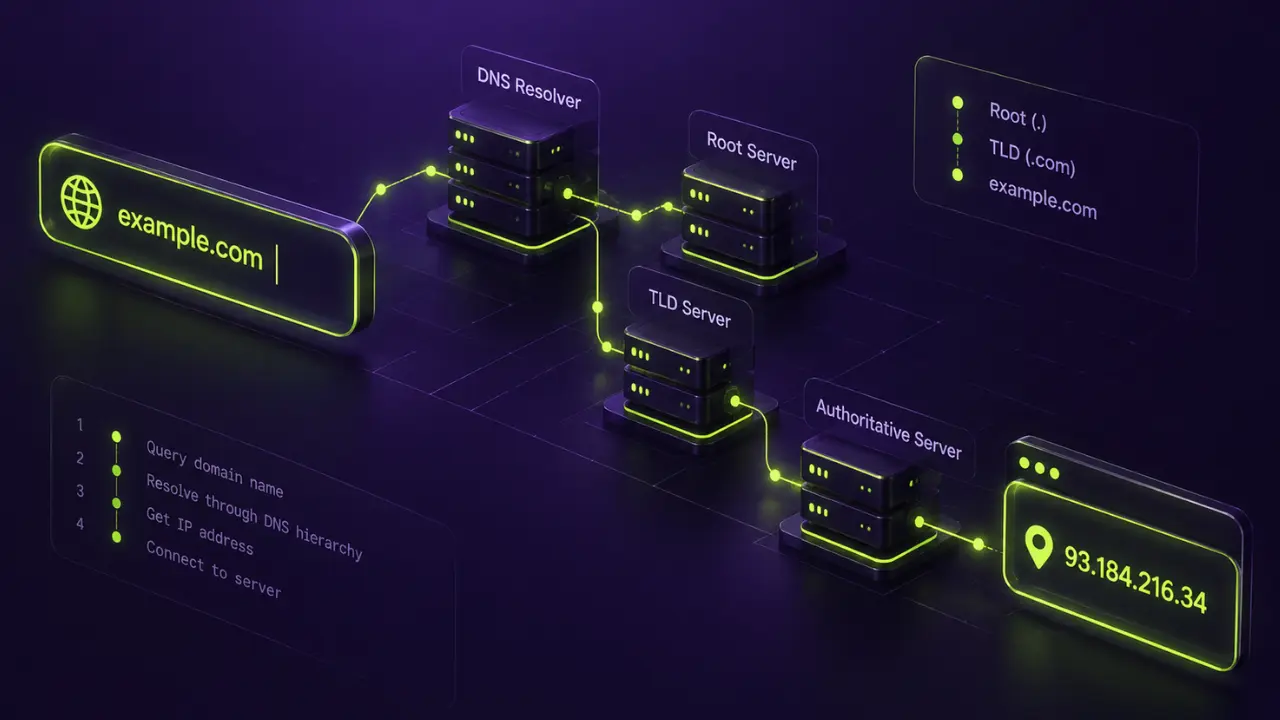
Domain name system overview, in one line: DNS works as the internet’s address book, turning names like mostdomain.com into the numeric IP addresses computers rely on to find each other. That’s the postcard version.
The rest is where most explainers go wrong in one direction or the other, either staying too shallow to actually help or drowning the reader in networking jargon nobody asked for. This one aims for the middle. Thorough enough that nothing critical gets skipped, plain enough that a CS degree isn’t a prerequisite.
Infrastructure is the entire focus here: the mechanics, what tends to break, who’s steering the ship globally. Nothing else domain-related gets pulled into this one.
What Is the Domain Name System
DNS is a distributed lookup service, and its whole job is matching human-readable domain names to the numeric IP addresses machines actually use to talk to each other. Type mostdomain.com into a browser, and somewhere in the background DNS converts that into something like 192.0.2.1, in milliseconds, with the number never once appearing on screen.
How a Domain Name Differs From DNS
People use “domain name” and “DNS” almost interchangeably in conversation. They shouldn’t, because the two aren’t remotely the same thing.
- A domain name is just the label, the string a person registers and types into a browser
- DNS is the machinery behind that label, the part that actually translates it into something a server can use
- Nothing stops anyone from owning a domain name with zero DNS configuration attached; it simply won’t resolve anywhere until records point it somewhere specific
- DNS predates any individual domain by decades, and it’ll keep running long after any single domain gets abandoned
Picture a domain name as a person’s name, and DNS as the entire phone directory connecting names to numbers across the whole network. A label sits on one side. The machinery sits on the other.

The Origin of the Domain Name System
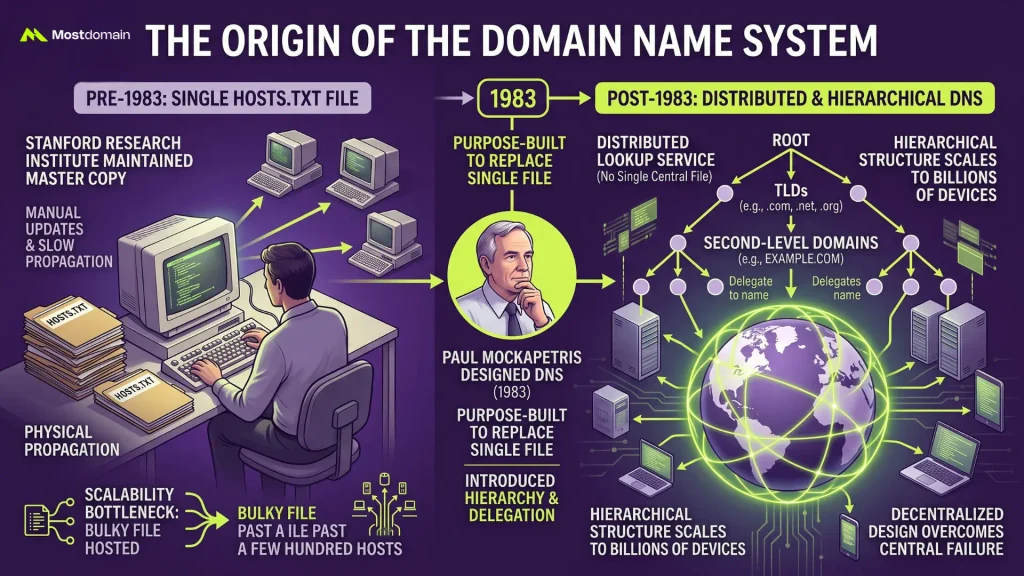
A single shared text file is the reason DNS exists at all. Before 1983, every machine on ARPANET pulled from one master file, HOSTS.TXT, updated by hand and pushed out to the whole network manually.
- Stanford Research Institute kept the master copy of HOSTS.TXT, and everyone else downloaded fresh versions straight from them
- Past a few hundred connected hosts, that file turned too bulky and too slow to keep in sync across everyone using it
- Paul Mockapetris designed DNS in 1983, purpose-built to replace that single file with something distributed and hierarchical enough to actually scale
- The underlying idea, hierarchy paired with delegation, has barely changed since, even with billions of connected devices now depending on it daily
This isn’t trivia for its own sake. It’s the reason DNS looks and behaves the way it does today: decentralized by design, since centralization was the exact failure mode it replaced.
How DNS Actually Resolves a Domain Name Step by Step
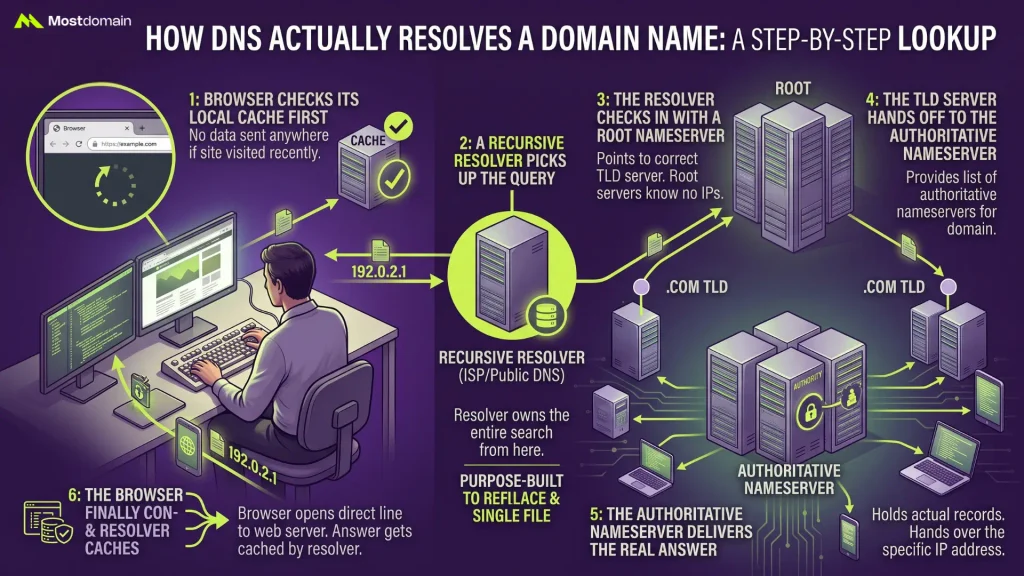
Roughly six hops make up a single DNS lookup, and the whole thing typically wraps up in well under a second despite touching four or five separate servers along the way. Here’s the real sequence, from typing a domain name to a page rendering on screen.




Step 1: The Browser Checks Its Local Cache First
Nothing gets sent anywhere until the browser checks what it already knows. Visited a site recently? The address is probably still cached locally, closing out the lookup instantly with zero additional steps.
Step 2: A Recursive Resolver Picks Up the Query
No local cache hit means the query heads to a recursive resolver, usually one run by an ISP or a public provider someone’s configured manually. From here, this resolver owns the entire search and won’t hand things back without a real answer in hand.
Step 3: The Resolver Checks in With a Root Nameserver
A root nameserver is the resolver’s first stop, and root servers genuinely don’t know the IP address in question. What they do know is precisely which server to point toward next, and that’s their entire function.
Step 4: The TLD Server Hands Off to the Authoritative Nameserver
Take a .com domain as an example. The root server sends the resolver toward a .com TLD nameserver, which keeps a list of authoritative nameservers for every registered .com name in existence. That list finally tells the resolver where a domain’s real DNS records actually live.
Step 5: The Authoritative Nameserver Delivers the Real Answer
Here’s where the genuine answer surfaces. The authoritative nameserver for that specific domain holds the actual records and hands over the IP address the resolver has been hunting for this entire time.
Step 6: The Browser Finally Connects
Address in hand, the browser opens a direct line to the web server and asks for the page. That answer gets cached too, on the resolver’s end, which is exactly why a second visit to the same site loads its address almost instantly.
The Hierarchy Behind DNS Resolution
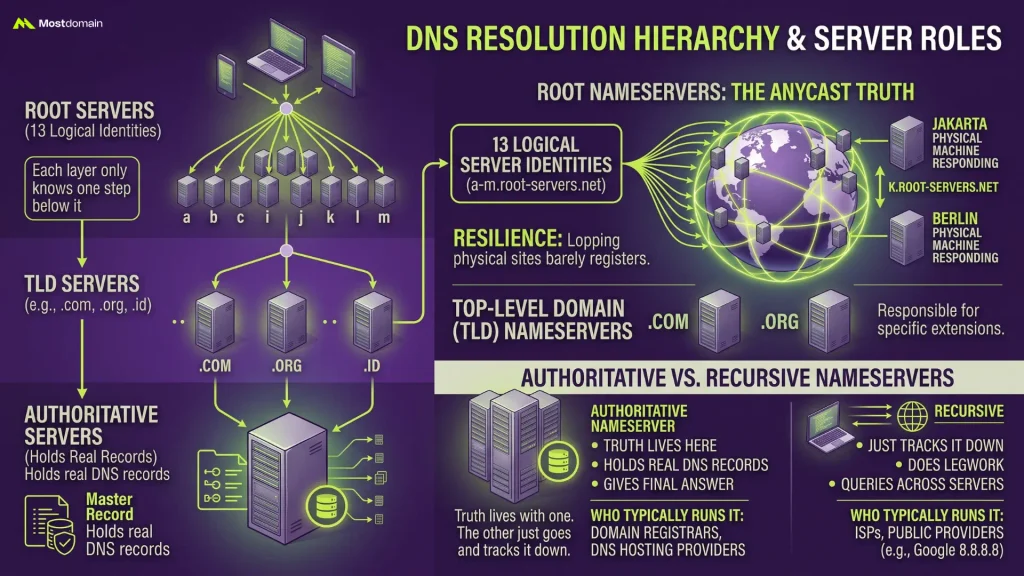
Three stacked layers make up the DNS hierarchy: root servers on top, TLD servers in the middle, authoritative servers at the bottom holding the real records. Each layer only has to know what’s one step below it, never the entire system.
Root Nameservers and the Truth About “Only 13” Servers
Thirteen root server identities exist, running from a.root-servers.net through m.root-servers.net, though quoting that number at face value undersells what’s actually happening.
- Each of those 13 labels is a logical server, not a single physical box sitting in one building somewhere
- Anycast routing lets a single logical server operate across hundreds of physical locations worldwide, all at once
- Query k.root-servers.net from Jakarta and again from Berlin, and two completely different physical machines can respond while both technically answering as the same logical server
- Resilience is the entire point of this design; losing one physical site barely registers against the system as a whole
Plenty of explainers stop at “there are 13 root servers” and leave it there, which honestly sells short how spread out the real infrastructure is.
Top-Level Domain (TLD) Nameservers
One level below root servers sit TLD nameservers, each one responsible for a specific extension, whether that’s .com, .org, or a country-code option like .id. Comparing how different extensions actually behave belongs in its own conversation, separate from what’s covered here.
Authoritative vs. Recursive Nameservers
Mixing up authoritative and recursive nameservers happens constantly, mostly because everyday conversation just lumps both under the umbrella term “DNS server.”
| Type | What It Actually Does | Who Typically Runs It |
| Authoritative nameserver | Holds the real DNS records for a domain and gives the final answer | The domain’s registrar or a DNS hosting provider |
| Recursive resolver | Does the legwork of tracking that answer down across multiple servers | ISPs, or public providers like Google’s 8.8.8.8 |
Truth lives with one. The other just goes and tracks it down.
The Record Types That Make DNS Work
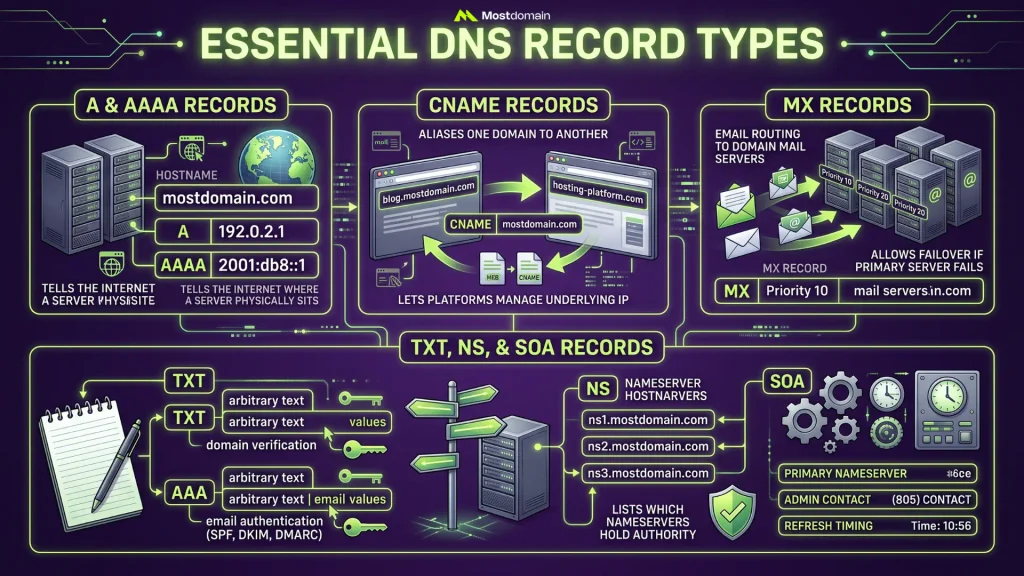
Each DNS record is a single stored instruction on an authoritative nameserver, and every record type governs a different slice of how a domain behaves online. Understanding what each one does separates actually reading a DNS setup from just staring blankly at a wall of text.
A and AAAA Records
A records point straight at an IPv4 address. AAAA records handle that exact same job for IPv6. Every working website needs at least one, since this is the record telling the internet where a server physically sits.
CNAME Records
Rather than pointing directly at an IP address, a CNAME record aliases one domain to another. blog.mostdomain.com, for instance, might CNAME over to a hosting platform’s own domain, letting that platform manage the underlying IP without anyone lifting a finger manually.
MX Records
Email routing is the entire job of MX records, specifically telling the internet which mail servers should catch messages sent to a domain. Several MX records can coexist with different priority values attached, so mail keeps flowing even if the primary server drops offline.
TXT, NS, and SOA Records
A narrower, far less visible job belongs to each of TXT, NS, and SOA records.
- TXT records store arbitrary text, most often used for domain verification plus email authentication setups like SPF, DKIM, and DMARC
- NS records list which nameservers hold authority for a domain, essentially pointing back at themselves
- SOA (Start of Authority) records carry administrative details: the primary nameserver, an admin contact, and refresh timing for the whole zone
Visiting a website never surfaces any of these directly, yet all three sit quietly in the background keeping the domain functioning correctly.
Actually reading what these records look like inside a live lookup tool is a different skill entirely. How to Actually Read DNS Lookup Results covers that practical side in full.
Caching and TTL Inside the Domain Name System
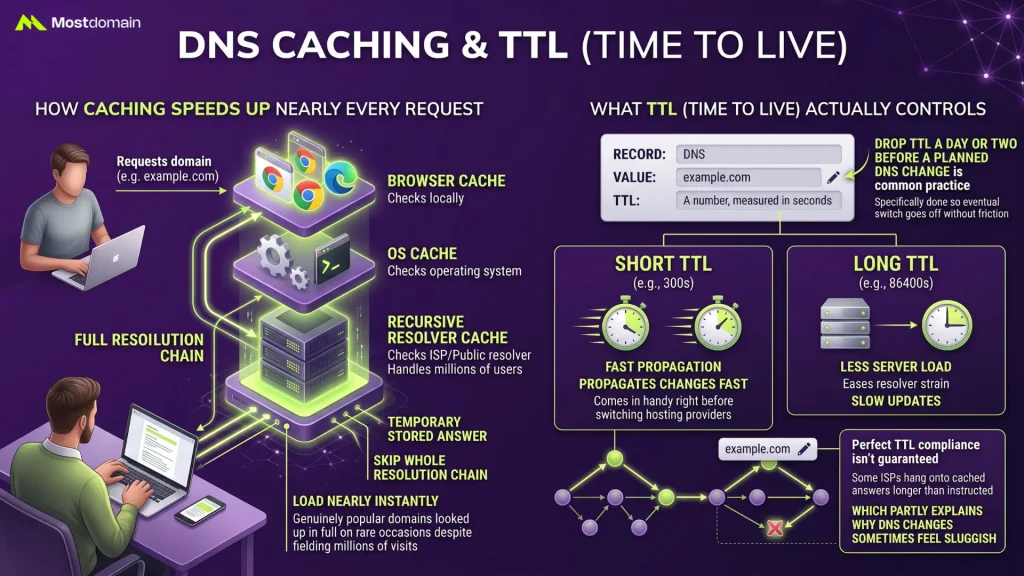
A temporary stored answer is what DNS caching provides, so repeat requests for the same domain skip the whole resolution chain and load nearly instantly the next time around.
How Caching Speeds Up Nearly Every Request
Caching happens independently at every layer of the resolution chain. Browsers cache locally, operating systems cache separately from browsers, and recursive resolvers cache on behalf of every user passing through them, which explains why a genuinely popular domain only gets looked up in full on rare occasions despite fielding millions of visits.
What TTL (Time to Live) Actually Controls
A number, measured in seconds, attaches to every DNS record as TTL, dictating exactly how long a cache should hold that answer before checking again.
- Something short, like a 300-second TTL, propagates changes fast, which comes in handy right before switching hosting providers
- Something long, like an 86400-second TTL spanning a full day, eases server load but slows down how quickly updates actually kick in
- Dropping TTL a day or two before a planned DNS change is common practice, done specifically so the eventual switch goes off without friction
- Perfect TTL compliance isn’t guaranteed; some ISPs hang onto cached answers longer than instructed, which partly explains why DNS changes sometimes feel sluggish
Where DNS Security Actually Breaks Down
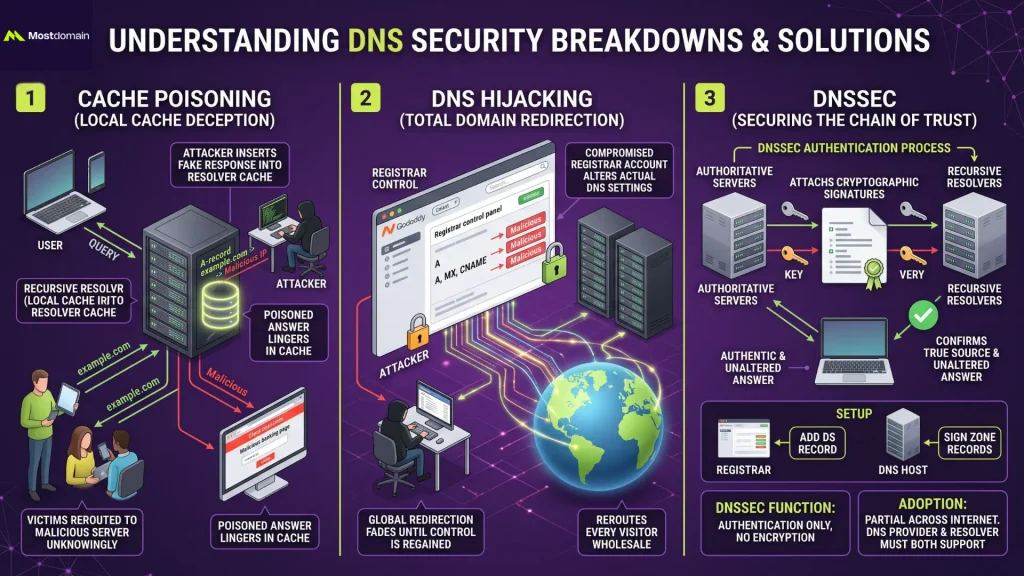
Security wasn’t a priority when DNS was originally designed, and a handful of attack types exploit that exact blind spot by going after trust in the resolution process rather than attacking a website directly.
How Cache Poisoning Actually Redirects Traffic
An attacker slipping a fake DNS response into a resolver’s cache is what cache poisoning looks like, redirecting anyone querying that domain toward a malicious server instead of the genuine one. The poisoned answer just sits in cache, so victims get rerouted without anything on their own device raising a flag.
What DNS Hijacking Looks Like in Practice
A different layer entirely is where hijacking operates, altering a domain’s actual DNS settings, often through a compromised registrar account, to reroute traffic wholesale rather than temporarily. Poisoning fades and stays localized; hijacking can redirect every visitor to a domain for as long as it takes the registrant to wrestle back control of the account.
What Problem DNSSEC Is Actually Solving
Cryptographic signatures get attached to DNS records through DNSSEC, giving resolvers a way to confirm an answer truly came from the authoritative source and wasn’t altered along the way.
- Encryption isn’t part of the deal at all; authentication is the only thing DNSSEC provides
- Adoption sits at partial across the internet, since both a domain’s DNS provider and the resolver need support baked in for it to function
- Turning it on usually means adding a DS record at the registrar and signing zone records over at the DNS host
- Skipping DNSSEC doesn’t break a domain outright. It just leaves more room for the spoofing risks covered above
Public vs. Private DNS Resolvers Compared
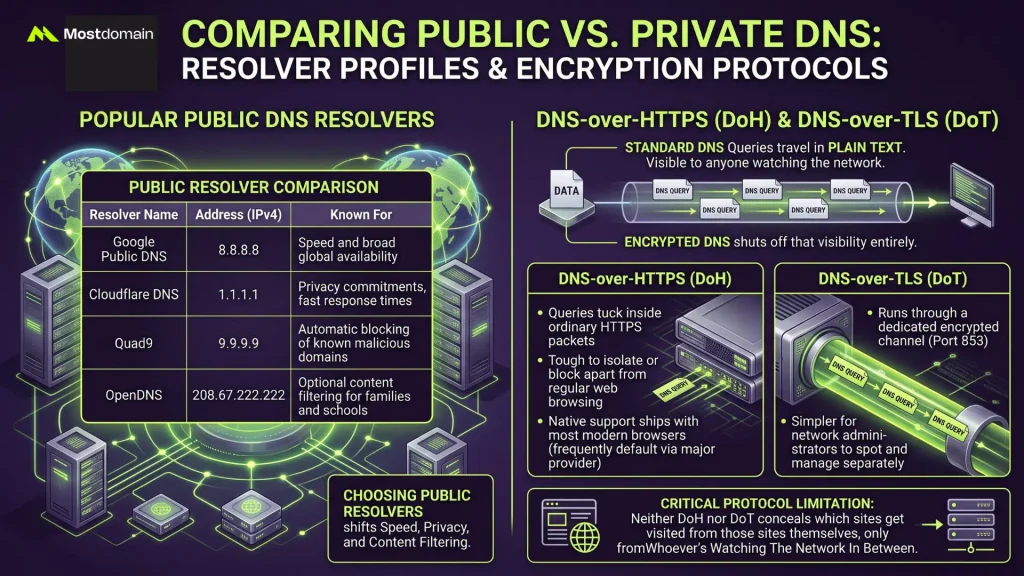
A default resolver comes with every internet connection, almost always assigned automatically by an ISP, though switching to a public one is a single settings change capable of shifting speed, privacy, and even basic content filtering.
Popular Public DNS Resolvers
Anyone can use a handful of resolvers run by major providers, and each one leans on a slightly different selling point.
| Resolver | Address | Known For |
| Google Public DNS | 8.8.8.8 | Speed and broad global availability |
| Cloudflare DNS | 1.1.1.1 | Privacy commitments, fast response times |
| Quad9 | 9.9.9.9 | Automatic blocking of known malicious domains |
| OpenDNS | 208.67.222.222 | Optional content filtering for families and schools |
DNS-over-HTTPS and DNS-over-TLS, Explained
Plain text is how standard DNS queries travel, meaning anyone watching the network, an ISP included, can see exactly which domains get looked up in real time. Both DoH and DoT encrypt that traffic instead, just through different transport routes, shutting off that visibility entirely.
- DoH tucks DNS queries inside ordinary HTTPS traffic, making them tough to isolate or block apart from regular web browsing
- DoT runs through its own dedicated encrypted channel, which network administrators find simpler to spot and manage separately
- Native DoH support ships with most modern browsers now, frequently switched on by default through a major provider
- Neither protocol conceals which sites get visited from those sites themselves, only from whoever’s watching the network in between
Who’s Actually in Charge of the Domain Name System
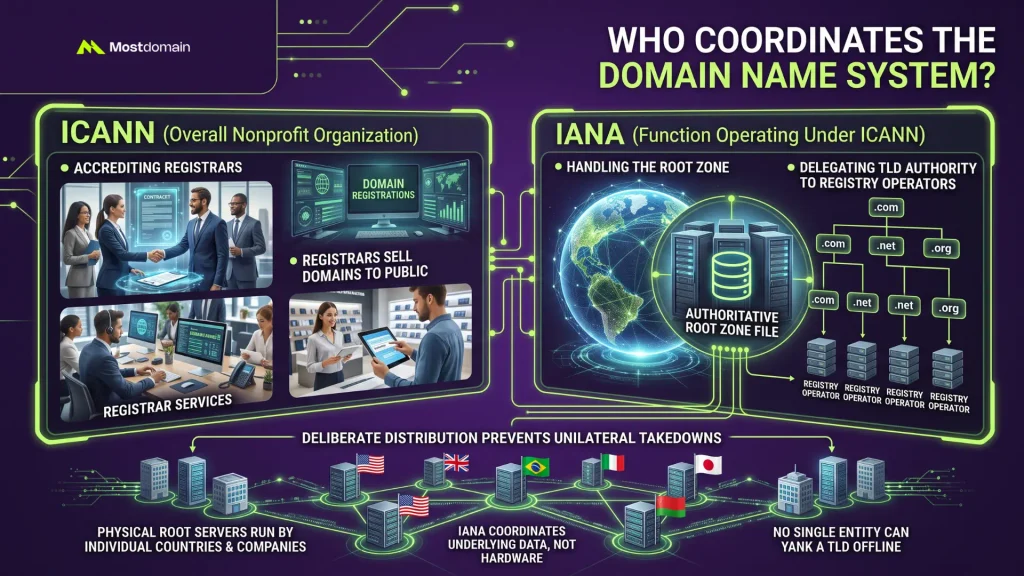
Nobody owns DNS outright, yet one nonprofit coordinates the root zone sitting at the very top of the hierarchy, and that single point of coordination is exactly what keeps the whole system from splintering apart.
Where ICANN and IANA Actually Fit In
A function operating under ICANN, IANA, maintains the authoritative root zone file, the master record telling root servers which organization runs each TLD.
- Accrediting the registrars who sell domain registrations to the public falls under ICANN
- Handling the root zone specifically, and delegating authority for each TLD to a designated registry operator, falls under IANA
- The actual physical root server infrastructure gets run by individual countries and companies, even while IANA coordinates the underlying data
- Distribution here is deliberate by design; no single government or company gets to unilaterally yank a TLD offline through DNS governance alone
Common DNS Problems and How to Actually Fix Them
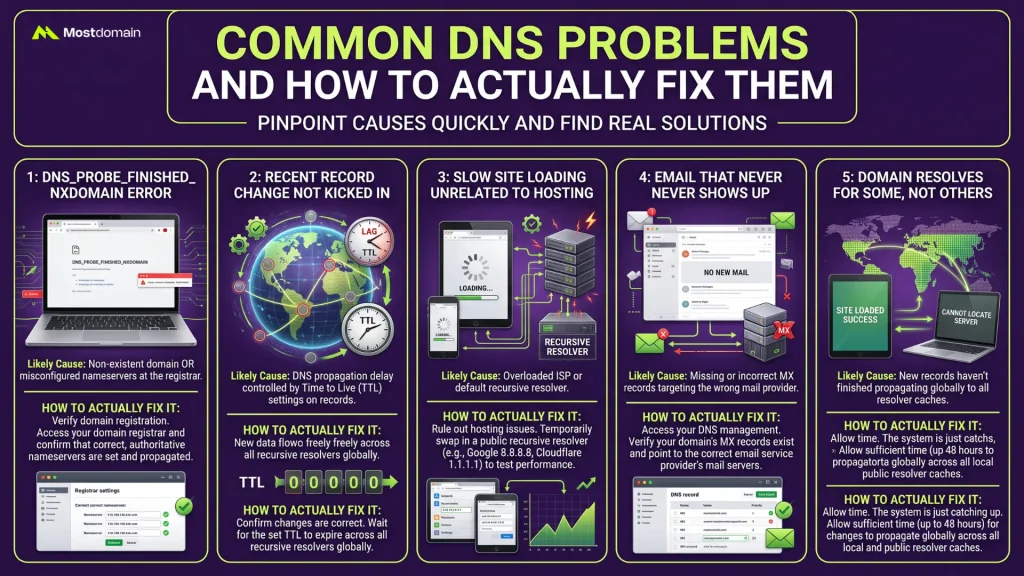
A small handful of causes accounts for most DNS problems, and pinpointing which one is at play usually takes less time than people assume going in.
- A DNS_PROBE_FINISHED_NXDOMAIN error, or something similar, generally points to a domain that doesn’t exist or nameservers misconfigured at the registrar level
- A record changed recently that hasn’t kicked in yet is almost always TTL and propagation catching up, not an actually broken setup
- Site loading slowly for reasons that have nothing to do with hosting sometimes traces back to an overloaded recursive resolver; swapping in a public one rules that out fast
- Email that never shows up anywhere points first toward MX records, so confirm they exist and target the right mail provider before chasing other explanations
- A domain resolving fine for some visitors but not others usually just means propagation hasn’t finished reaching every resolver’s cache yet
FAQ
What’s the difference between DNS and a domain registrar?
A registrar sells and manages the domain registration itself. DNS is the separate system that makes a registered domain actually resolve to something. Registering a domain at one company while hosting its DNS somewhere else entirely is completely normal.
Why does a DNS change take time to work?
Propagation delay, mostly caused by TTL values telling caches around the world to hold onto the old answer until that timer runs out. Lowering TTL in advance speeds this whole process up considerably.
Can a domain work without DNS?
Not in any practical sense. Without DNS records pointing somewhere, a registered domain has no way to connect visitors to a website, an email server, or anything else attached to it.
Is DNS the same everywhere in the world?
The core system stays global and consistent, but resolvers vary, and some countries filter or restrict DNS responses at a national level, which changes what specific domains resolve to depending on where the query originates.
How is DNS different from a CDN?
DNS resolves a name to an address. A CDN decides which of several servers should receive that traffic, based on geographic location and current load. Some CDNs actually rely on DNS-level routing to make that exact decision.
Does changing DNS providers affect SEO?
Not directly. Search engines care about uptime and page speed, both of which a faster or more reliable DNS provider can indirectly improve, but the DNS provider itself isn’t treated as a ranking factor on its own.
References
- Cloudflare, What Is DNS? | How DNS Works
- Network Solutions, Domain name system: What DNS is and how it works
- Fortinet, What Is Domain Name System (DNS)?
- Hostinger, What is DNS: A comprehensive guide to how it works