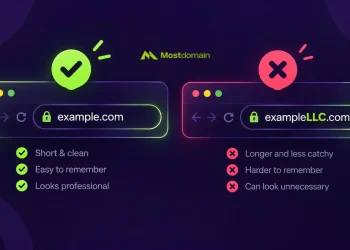

An AI domain finder does one thing manual searching can’t: it generates dozens of viable, available options in the time it takes you to realize your first choice is already gone. Spent 45 minutes hunting for a domain last week only to settle for something with a hyphen and a number? That’s not bad luck. That’s the wrong tool.
The domain availability problem has quietly gotten worse over the past decade. By the time most founders start looking, the clean .com options for their niche are registered. Second-tier fallbacks? Taken too, mostly. What hasn’t evolved is the interface itself: type a name, receive a verdict, start over. Registrar search boxes in 2025 work exactly the same as they did two decades ago.
What an AI Domain Finder Actually Does
The label gets used loosely, so it’s worth being precise. A genuine AI domain finder combines Natural Language Processing with real-time availability queries across multiple TLD registries. You give it context, not just a keyword, and it returns names you’d realistically use, not just permutations of whatever you typed.
That context-processing detail matters more than it sounds. Describe “a productivity app for remote teams,” and a capable system surfaces names from adjacent semantic territory: workflow, async, distributed, and focus. A basic word combiner just appends “-app” or “-io” to your input and calls it a day. Thirty seconds in, it shows.
Brand heuristics get layered in too. Pronounceability, recall rate, and character count: the research behind domain authority signals has matured enough to feed usefully into modern scoring models. Leaning on those scores heavily, or barely at all, that’s a judgment call. What’s less debatable is that having them surface names you wouldn’t have considered manually covers real ground.
The Speed Gap Nobody Talks About
Speed comparisons between AI and manual domain searching look dramatic on paper. Three minutes versus 47. The more interesting gap is cognitive load (that part rarely makes it into the marketing).

Manual searching means carrying a running mental list. You try a name, it’s taken, you branch to variations, one variation is available but phonetically awkward, so you backtrack to an earlier idea. After 20 minutes, you can’t fully remember why you liked the original direction. The session ends not because you found something good, but because you ran out of momentum.
An AI domain finder externalizes that branching entirely. The system holds the variations; your job becomes evaluation, not generation. Faster, yes. The real gain, though, is staying in decision mode rather than cycling in and out of brainstorm mode every two minutes.
Parallel checking across hundreds of TLDs is where the speed difference becomes concrete. Extensions you’d never think to type manually show up anyway: .studio, .academy, .co. The name you actually want might live in one of those, not .com.



From AI Suggestion to Registered Domain
Running an AI domain finder handles the discovery side (the part that used to eat an hour of your evening). What comes after is simpler but worth getting right. Once you’ve landed on a shortlist, you need a registrar that actually supports the extensions the AI surfaced.
That’s where TLD coverage matters practically. Many AI finders recommend newer generics like .design, .studio, or .academy because those are genuinely available and often a better brand fit than yet another hyphened .com. Registering through MostDomain covers that range, over a thousand TLD options, so whatever the AI finder surfaces, you can actually register in one place without hunting for a second registrar.
The full process ends up being tighter than it sounds. Use an AI tool to generate and evaluate name options, narrow them to two or three candidates, and then complete registration at MostDomain. Two steps, both faster than the old way of doing either.
What to Look for in a Good AI Domain Tool
Not every tool marketed as an AI domain finder operates the same way. Four things separate tools that actually help from tools that repackage the same frustration:
| What Separates Good Tools | Why the Gap Matters | Signal Something Is Off |
| Where availability data comes from | A tool querying live registries gives you accurate, current results; cached data can lag by hours or days and produce false positives at checkout | You add a name to your cart and it fails: the domain was registered while you were browsing |
| How far the naming logic actually reaches | Word permutations are fast to generate but narrow; real semantic generation pulls in adjacent concepts you wouldn’t have typed yourself | Every result is just your input with a different extension or suffix bolted on |
| How many extensions get surfaced in one search | Stopping at .com, .net, .org means missing options with real brand utility, especially newer generics gaining traction in specific industries | The results page hard-caps at three or four TLDs with no way to expand |
| Whether renewal pricing is visible upfront | Some extensions use low first-year rates as acquisition hooks; year two is where the actual cost structure lives | Pricing only appears at checkout, not in the search or suggestion interface |
Real-Time Availability
Some generators produce name ideas without checking whether those names are actually available. Evaluating a list of suggestions only to find every option is already registered wastes the time you were trying to recover. Confirm the tool queries live registry data, not cached results.
Semantic Range
If every suggestion looks like a minor variation of your input (“yourword.com,” “yourwords.net,” “yourwordapp.io”), the AI component is doing minimal work. Better tools surface concepts adjacent to your description, not just morphological derivatives of your keyword.
Extension Diversity
Defaulting results to .com-only makes sense for certain markets and audiences. For others, extensions like .io or .AI carry legitimate brand signal. A tool that buries non-.com results without explanation might be leaving better options out of your view.
Renewal Pricing Clarity
Intro pricing on certain extensions looks reasonable until year two, when rates sometimes jump by a factor of three. Nothing to do with AI quality; registrar pricing structures vary enough that reading the renewal line before committing is just practical.
How to Get More Out of Every Search Session
Prompting matters, and generic input produces generic output, at least in most contexts. “Online store” is harder to work with than “curated secondhand electronics resale, targeting buyers in their 30s who prioritize reliability over price.”
Three habits that shift outcomes:
- Lead with positioning, not product type. “Trustworthy” and “approachable” give an AI different signal than “accounting software.”
- Filters exist for a reason. Several tools let you exclude character counts, hyphens, or specific extensions. Use those settings rather than scrolling past them.
- One pass is rarely enough. Running the same concept through two or three different framings often surfaces options the first query missed entirely, sometimes by a significant margin.
The best outcome from an AI domain finder session isn’t necessarily a registered domain that same day. A shortlist of four held overnight beats a snap decision mid-session. Running names past someone outside your own head before registering catches the problems your brain has already filtered out.
FAQ
What is an AI domain finder?
A tool that uses machine learning and Natural Language Processing to generate available domain name suggestions based on described context, not just a single keyword. It evaluates brand signals and checks live availability across multiple TLDs simultaneously.
How is an AI domain finder different from a standard domain search?
One name, one answer: that’s the ceiling on what standard search was built to do. An AI domain finder runs in the other direction: multiple candidates generated in parallel, brand scoring applied, availability confirmed across potentially hundreds of extensions before you see a single result.
Can I trust the availability results from AI domain tools?
Live registry queries are what produce results you can trust. Tools that pull from cached data can lag by hours, which means a name showing as available might already be gone. One thing worth knowing regardless of which tool you use: adding to cart reserves nothing. Found a name worth having; get to checkout without detours.
Does the TLD extension affect SEO?
Ranking signals tied to TLD extension are minimal, at least for mainstream choices. Memorability does more practical work: a name someone can spell after hearing it once will outperform a technically optimized domain that nobody retypes correctly.
Does MostDomain support the TLD extensions AI finders recommend?
MostDomain covers a wide range of TLDs, including many of the newer generics that AI finders commonly surface as alternatives to .com. Extensions like .design, .studio, .academy, and various country codes are all registrable there. Once you’ve picked a name through an AI domain finder, you’re unlikely to hit a wall trying to register the extension it recommended.
References
- Mostdomain AI Domain Search: https://www.mostdomain.com
- Moz: Domain Overview: https://moz.com/learn/seo/domain
- Google Search Central: https://developers.google.com/search