How to buy expired domains takes seven steps, in a fixed order. Read the status. Set a price ceiling. Vet the name. Pick a route. Bid or order. Transfer. Then lock it down. Skip one and you inherit the risk.
This guide covers the mechanics, from first bid to final transfer. Most guides skip four things:
- Registry status codes that show what is possible today.
- Reversed wins, when an owner renews mid-auction.
- Transfer locks that can freeze a name for 60 days.
- An evidence file that backs up any refund claim.
Want route comparisons? Read our complete expired domain buying framework. Curious about rankings? See the SEO value of an expired domain first.
Full disclosure: MostDomain runs its own expired domain marketplace. Every route below gets the same scrutiny, ours included.
How to Buy Expired Domains in Seven Steps
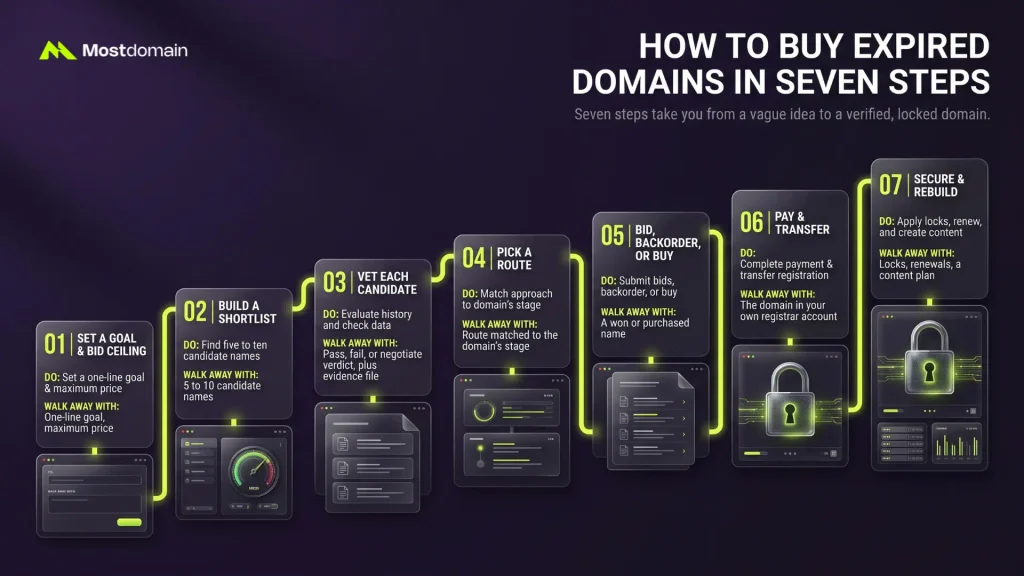
Seven steps take you from a vague idea to a verified, locked domain. Each one leaves you with something concrete.
| Step | What you do | What you walk away with |
| 1 | Set a goal and a bid ceiling | One-line goal, maximum price |
| 2 | Build a shortlist | Five to ten candidate names |
| 3 | Vet each candidate | A pass, fail, or negotiate verdict, plus an evidence file |
| 4 | Pick a route | A route matched to the domain’s stage |
| 5 | Bid, backorder, or buy | A won or purchased name |
| 6 | Pay and transfer | The domain in your own registrar account |
| 7 | Secure and rebuild | Locks, renewals, a content plan |
Can You Buy an Expired Domain Right Now?
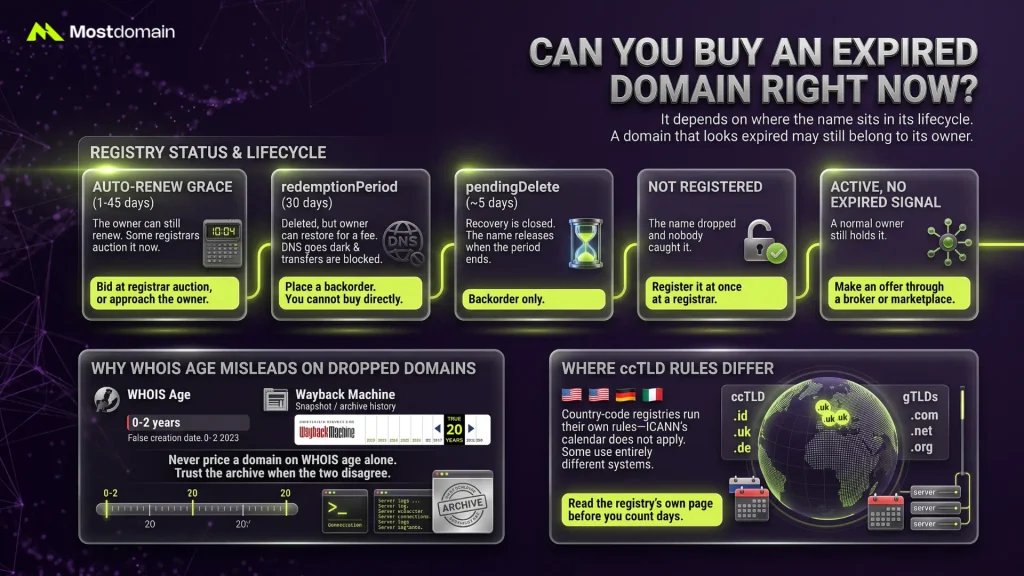
Sometimes. It depends on where the name sits in its lifecycle. A domain that looks expired in WHOIS may still belong to its owner.

Read the Registry Status Before You Plan
Status codes tell you what is possible today. For gTLDs such as .com, ICANN’s recovery policy shapes the middle stages. Unsure about a term? The domain marketplace glossary defines 40 of them.
| Status or stage | What it means | What you can do |
| Auto-renew grace (1 to 45 days, set by the registrar) | The owner can still renew. Some registrars auction the name now. | Bid at the registrar auction, or approach the owner |
| redemptionPeriod (30 days) | Deleted, but the owner can restore it for a fee. DNS goes dark and transfers are blocked. | Place a backorder. You cannot buy it directly |
| pendingDelete (about 5 days) | Recovery is closed. The name releases when the period ends. | Backorder only |
| Not registered | The name dropped and nobody caught it. | Register it at once at a registrar |
| Active, no expiry signal | A normal owner still holds it. | Make an offer through a broker or marketplace |
Why WHOIS Age Misleads on Dropped Domains
A dropped domain gets a fresh creation date, so WHOIS age misleads.
- Age tools may show zero to two years. The real history can span twenty.
- MostDomain’s own listing FAQ notes the same gap.
- Compare the creation date with Wayback snapshots.
- When the two disagree, trust the archive.
- Never price a domain on WHOIS age alone.
Where ccTLD Rules Differ
Country-code registries run their own rules, so the ICANN calendar may not apply.




- ICANN’s policy covers gTLDs such as .com, .net, and .org.
- A .id, .uk, or .de name may follow a different schedule.
- Some ccTLDs use a different transfer system altogether.
- Read the registry’s own page before you count days.
Step 1: Set a Goal and a Bid Ceiling
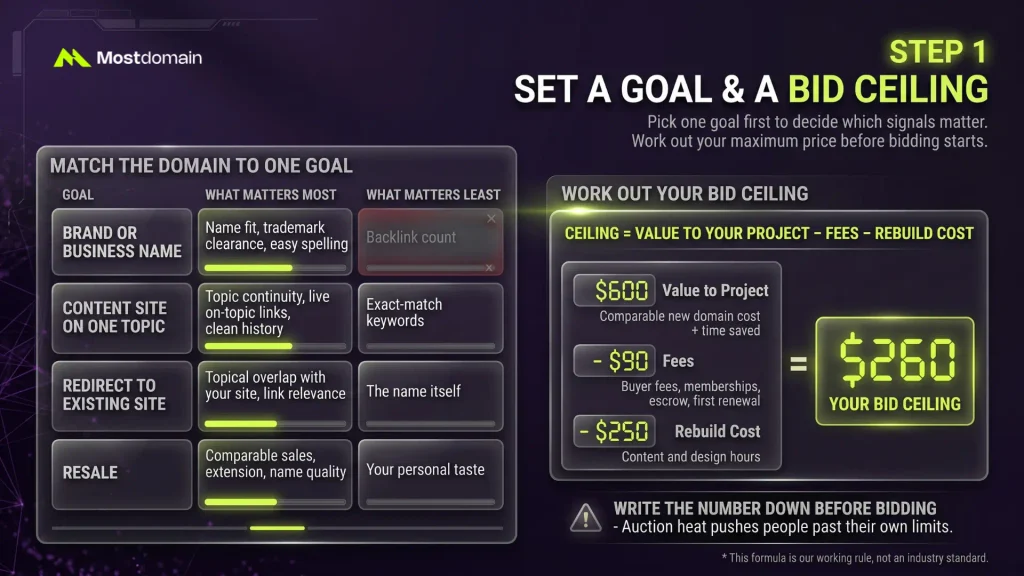
Pick one goal first. It decides which signals matter and which you can ignore.
Match the Domain to One Goal
A bakery name needs a clean brand fit. A content site needs topic continuity. Different goals, different scorecards.
| Goal | What matters most | What matters least |
| Brand or business name | Name fit, trademark clearance, easy spelling | Backlink count |
| Content site on one topic | Topic continuity, live on-topic links, clean history | Exact-match keywords |
| Redirect to an existing site | Topical overlap with your site, link relevance | The name itself |
| Resale | Comparable sales, extension, name quality | Your personal taste |
Work Out Your Bid Ceiling
Your ceiling is the most you can pay and still come out ahead.
- Ceiling = value to your project, minus fees, minus rebuild cost.
- Value means a comparable new domain’s cost, plus the time saved.
- Fees cover buyer fees, memberships, escrow, and the first renewal.
- Rebuild cost means content and design hours.
- Hypothetical case: $600 value, $90 fees, $250 rebuild. Your ceiling is $260.
- Write the number down before bidding opens. Auction heat pushes people past their own limits.
- This formula is our working rule, not an industry standard.
Step 2: How to Get an Expired Domain Shortlist
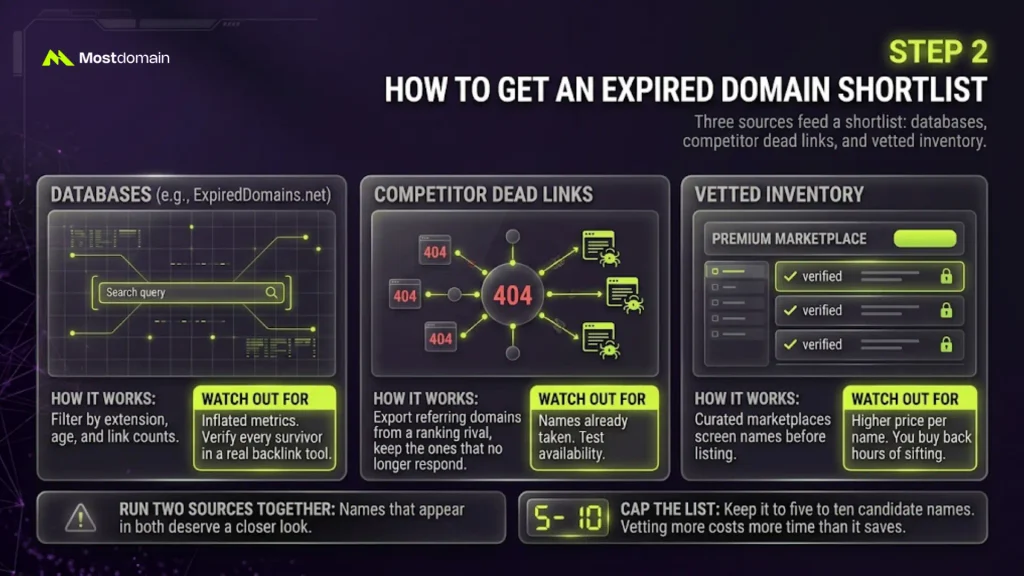
Three sources feed a shortlist: databases, competitor dead links, and vetted inventory.
| Source | How it works | Watch out for |
| Databases such as ExpiredDomains.net | Filter by extension, age, and link counts | Inflated metrics. Verify every survivor in a real backlink tool |
| Competitor dead links | Export referring domains from a ranking rival, keep the ones that no longer respond | Names already taken. Test availability |
| Vetted inventory | Curated marketplaces screen names before listing | Higher price per name. You buy back hours of sifting |
- Run two sources together. Names that appear in both deserve a closer look.
- Cap the list at five to ten names. Vetting more costs more time than it saves.
- Our guide to finding expired domains with backlinks covers filters and the live-link test.
- Want screened names? Browse the MostDomain marketplace, then vet them like any other.
Step 3: Check an Expired Domain Before Buying
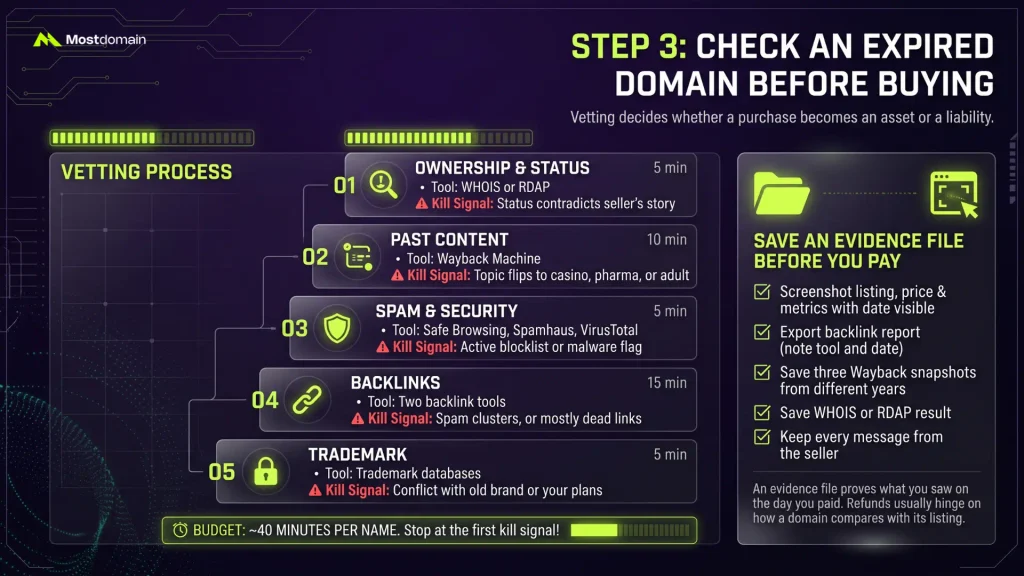
Vetting decides whether a purchase becomes an asset or a liability. Run five checks in this order and stop at the first kill signal.
| Check | Tool | Time | Kill signal |
| 1. Ownership and status | WHOIS or RDAP | 5 min | The status contradicts the seller’s story |
| 2. Past content | Wayback Machine | 10 min | The topic flips to casino, pharma, or adult |
| 3. Spam and security | Google Safe Browsing, Spamhaus, VirusTotal | 5 min | An active blocklist or malware flag |
| 4. Backlinks | Two backlink tools | 15 min | Spam clusters, or mostly dead links |
| 5. Trademark | Trademark databases | 5 min | A conflict with the old brand or your plans |
- Budget about 40 minutes per name. That is a planning estimate, not a benchmark.
- Read our guide to checking domain history before buying for the deeper version.
- Our domain buying checklist goes further on every row.
- Hidden junk is the usual trap. See how to spot and avoid spam domains before you pay.
Save an Evidence File Before You Pay
An evidence file proves what you saw on the day you paid. Listings change. Metrics get edited.
- Screenshot the listing, price, and metrics with the date visible.
- Export the backlink report and note the tool and date.
- Save three Wayback snapshots from different years.
- Save the WHOIS or RDAP result.
- Keep every message from the seller.
Why bother? Refund terms usually hinge on how a domain compares with its listing.
- MostDomain’s marketplace terms consider refunds when a domain materially differs from its description.
- They also cover transfers that fail because of the marketplace’s own error.
- Refunds generally do not cover ranking or traffic changes.
Are There Risks With Buying Expired Domains?
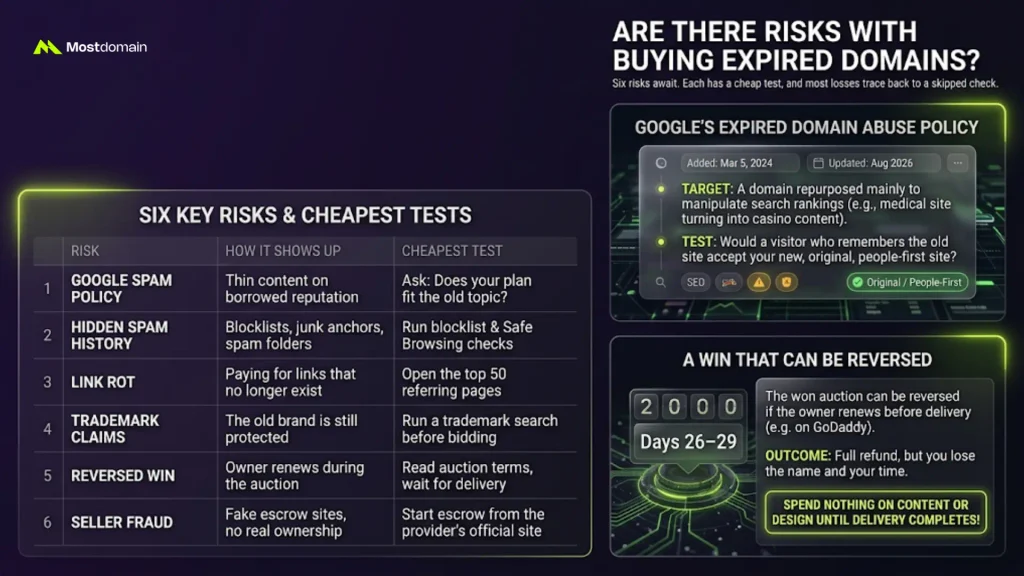
Yes, six of them. Each has a cheap test, and most losses trace back to a skipped check.
| Risk | How it shows up | Cheapest test |
| Google spam policy | Thin content on a borrowed reputation | Ask whether your plan fits the old topic |
| Hidden spam history | Blocklist flags, junk anchors, email landing in junk folders | Blocklist and Safe Browsing checks |
| Link rot | You pay for links that no longer exist | Open the top 50 referring pages |
| Trademark claims | The old brand is still protected | A trademark search before bidding |
| Reversed win | The owner renews during the auction | Read the auction terms, then wait for delivery |
| Seller fraud | Fake escrow sites, sellers without real control | Start escrow from the provider’s own site |
Google’s Expired Domain Abuse Policy
Google treats expired domain abuse as spam, but buying a domain is not banned.
- Google added the policy to its spam rules on March 5, 2024.
- The target is a purchased domain repurposed mainly to manipulate rankings.
- Its own example: a former medical site turned into casino content.
- A new, original, people-first site on an old name is fine, per Google.
- Your test: would a visitor who remembers the old site accept the new one?
- Our guide to Google’s expired domain policy covers enforcement in detail.
- Our breakdown of the August 2026 spam update covers the latest rollout.
A Win That Can Be Reversed
A won auction can be reversed if the owner renews before delivery.
- GoDaddy lets the owner renew on days 26 to 29. An active bid does not stop that.
- Renewal stays possible during final closeout until someone else buys the name.
- If the owner reclaims it, GoDaddy’s terms refund the full price, as DomainInvesting quotes.
- You get your money back. You lose the name and your time.
- Spend nothing on content or design until delivery completes.
- GoDaddy’s terms change, so read the current version.
Step 4: Pick the Route That Matches the Stage
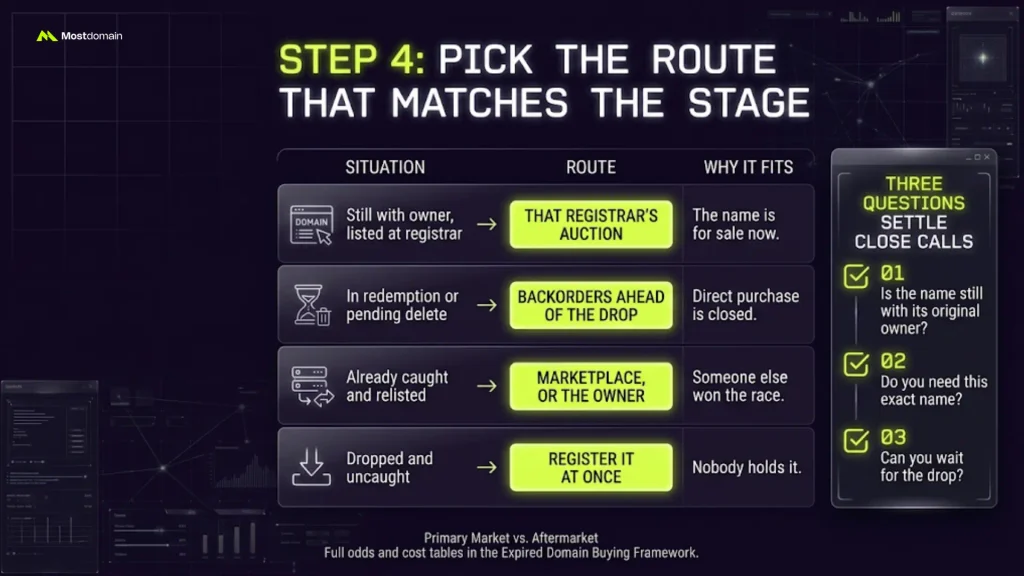
Match the route to the status you found. The stage decides, and your preference comes second.
| Situation | Route | Why it fits |
| Still with the owner, listed at a registrar | That registrar’s auction | The name is for sale now |
| In redemption or pending delete | Backorders ahead of the drop | Direct purchase is closed |
| Already caught and relisted | Marketplace, or the owner | Someone else won the race |
| Dropped and uncaught | Register it at once | Nobody holds it |
Three questions settle close calls:
- Is the name still with its original owner?
- Do you need this exact name?
- Can you wait for the drop?
- Not sure which market you are in? Read primary market vs aftermarket domains.
- Our complete expired domain buying framework holds cost and odds tables for every route.
Step 5: How to Buy an Expired Domain on GoDaddy
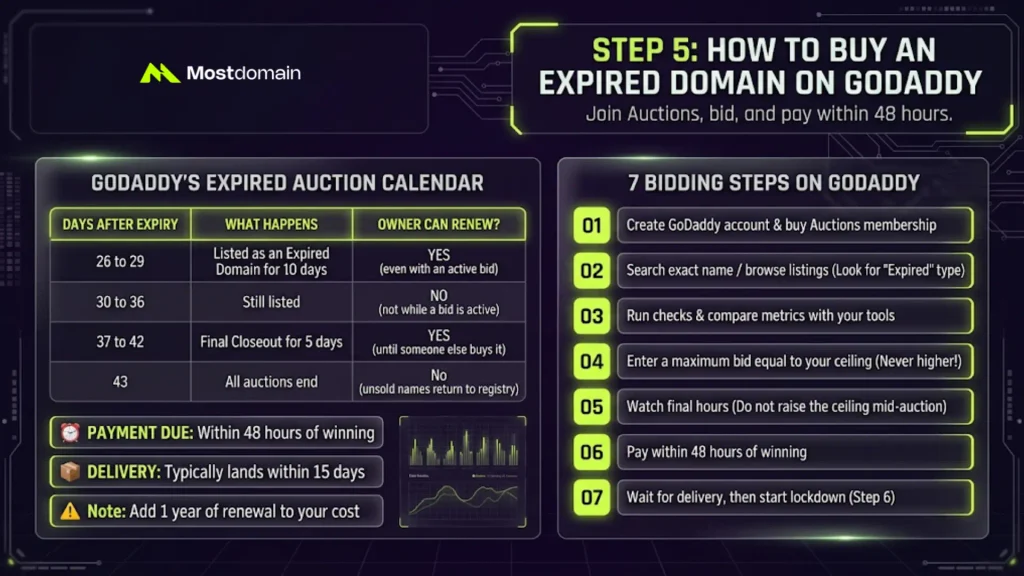
Buying on GoDaddy takes three moves. Join Auctions, bid, then pay within 48 hours.
GoDaddy’s Expired Auction Calendar
GoDaddy runs expired sales on a fixed calendar, counted from the expiry date.
| Days after expiry | What happens | Can the owner still renew? |
| 26 to 29 | Listed as an Expired Domain for 10 days | Yes, even with an active bid |
| 30 to 36 | Still listed | Not while a bid is active |
| 37 to 42 | Final Closeout for 5 days | Yes, until someone else buys it |
| 43 | All auctions end | Unsold names return to the registry |
- GoDaddy says payment is due within 48 hours of winning.
- Delivery typically lands within 15 days of payment.
- GoDaddy’s terms, as DomainInvesting quotes them, require renewal on purchase.
- So add one year of renewal to your cost.
Bidding Steps on GoDaddy
Seven steps cover a GoDaddy bid from account to delivery.
- Create a GoDaddy account and buy an Auctions membership.
- Search the exact name or browse listings. Look for the Expired sale type.
- Run your Step 3 checks on the listing. Compare its metrics with your own tools.
- Enter a maximum bid equal to your ceiling. Never higher.
- Watch the final hours. Do not raise the ceiling mid-auction.
- Pay within 48 hours of winning.
- Wait for delivery, then start the lock-down steps in Step 6.
How to Backorder an Expired Domain
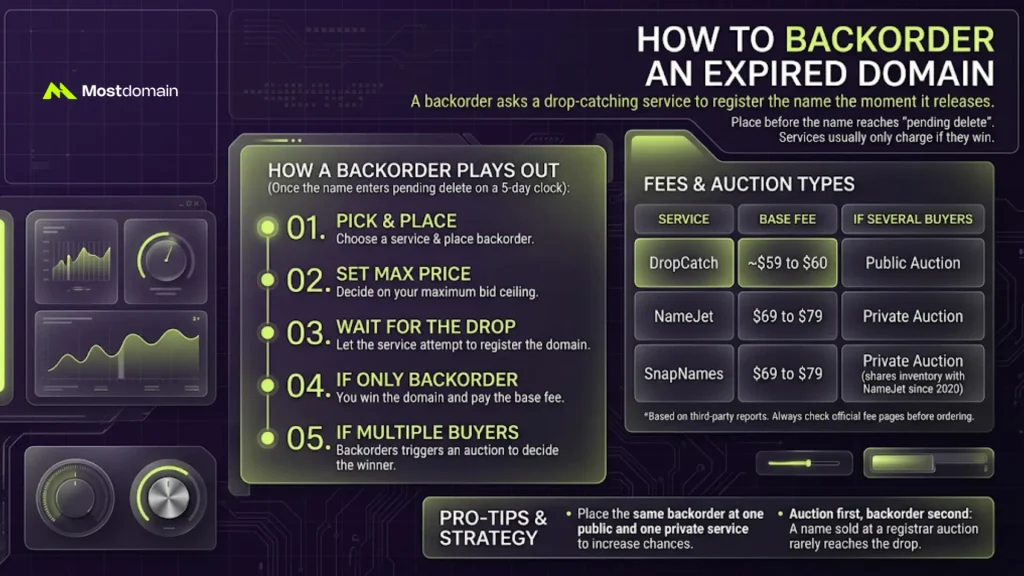
A backorder asks a drop-catching service to register the name the moment it releases.
- Place it before the name reaches pending delete.
- DropCatch, NameJet, and SnapNames report charging only when they win.
- Auction first, backorder second. Usually a name sold at a registrar auction never reaches the drop.
How a Backorder Plays Out
A backorder runs on a five-day clock once the name enters pending delete.
- Pick a service and place the backorder.
- Set your maximum price.
- Wait for the drop.
- If yours is the only backorder, you pay the base fee.
- If several buyers backordered, an auction decides.
Fees and Auction Types
Base fees run roughly $59 to $79 per win. Auction type depends on the service.
| Service | Reported base fee | If several buyers backordered |
| DropCatch | About $59 to $60 | Public auction |
| NameJet | $69 to $79 | Private auction |
| SnapNames | $69 to $79 | Private auction, with inventory shared with NameJet since 2020 |
- These figures come from third-party reports. Check each fee page before you order.
- Place the same backorder at one public and one private service.
- Some services charge per attempt instead, which changes the math.
- Our framework shows how those fees multiply.
How to Buy an Expired Domain From a Marketplace or Owner
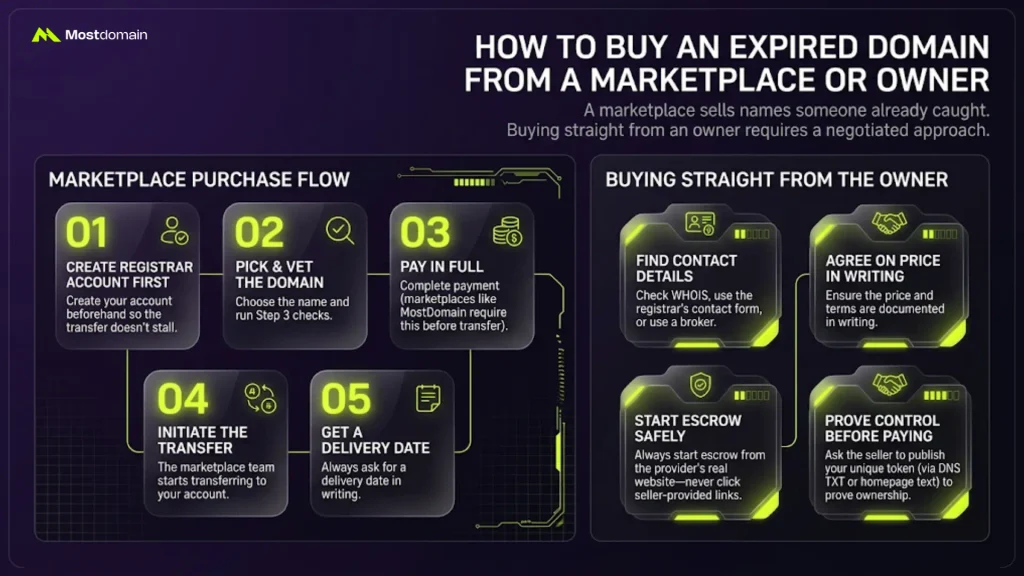
A marketplace sells names someone already caught. You skip the race and pay for screening.
Marketplace Purchase Flow
The flow is short, but the order matters.
- Create a registrar account first, so the transfer does not stall.
- Pick the domain and run your checks.
- Pay in full. MostDomain’s terms, for example, require full payment before transfer.
- After confirmation, the team starts the transfer to the registrar account you designate.
- Ask for a delivery date in writing.
Not sure how a registrar differs from a marketplace? Read registrar vs domain marketplace. For the bigger picture, see what a domain aftermarket is.
Buying Straight From the Owner
A name still held by its owner needs a negotiated approach.
- WHOIS may list contact details. Privacy services often hide them.
- Use the registrar’s contact form or a broker.
- Agree the price in writing.
- Start escrow from the provider’s real site, never a link the seller sends.
- Prove control before you pay. Ask the seller to publish a token you supply.
- A DNS TXT record works. So does a homepage line. Only the real controller can do either.
Step 6: How to Transfer an Expired Domain After You Win
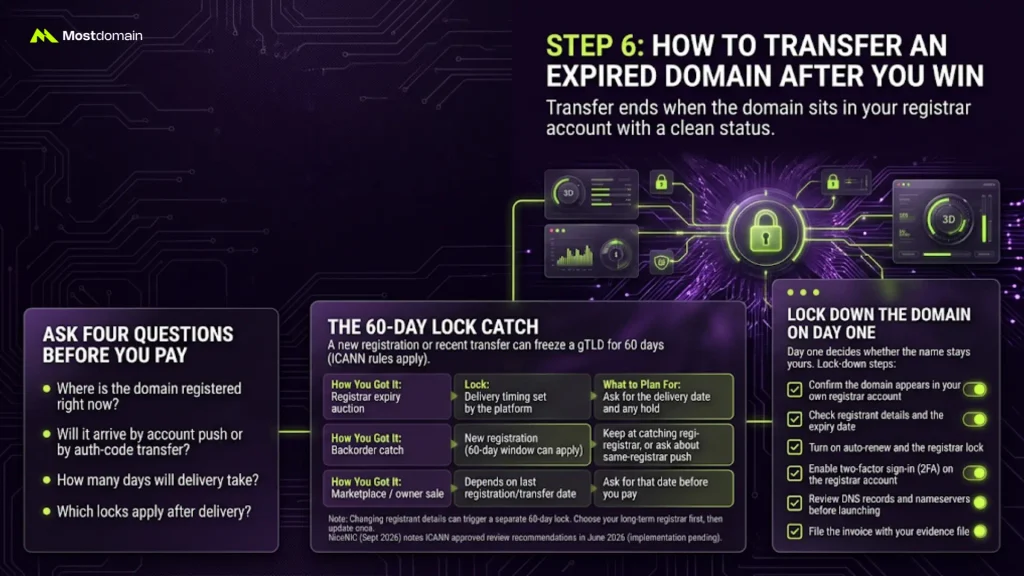
Transfer ends when the domain sits in your registrar account with a clean status. Everything before that is a promise.
Ask Four Questions Before You Pay
Four answers prevent most transfer surprises.
- Where is the domain registered right now?
- Will it arrive by account push or by auth-code transfer?
- How many days will delivery take?
- Which locks apply after delivery?
The 60-Day Lock Catch
A new registration or a recent transfer can freeze a gTLD for 60 days.
- ICANN’s current policy lets registrars deny a transfer within 60 days of initial registration.
- It also covers 60 days after a previous inter-registrar transfer.
- NiceNIC’s September 2026 summary notes ICANN approved review recommendations in June 2026.
- Implementation is still pending, so check current rules.
- A caught name is registered anew, so the first lock can apply.
| How you got it | Lock that can apply | What to plan for |
| Registrar expiry auction | Delivery timing set by the platform | Ask for the delivery date and any hold |
| Backorder catch | New registration, so the 60-day window can apply | Keep the name at the catching registrar, or ask about a same-registrar push |
| Marketplace or owner sale | Depends on the last registration or transfer date | Ask for that date before you pay |
- Account pushes are registrar-specific. Each registrar sets its own rules.
- Changing registrant details can trigger a separate 60-day lock.
- Some registrars offer an opt-out before you make the change.
- Choose your long-term registrar first. Then update the details once.
Lock Down the Domain on Day One
Day one decides whether the name stays yours.
- Confirm the domain appears in your own registrar account.
- Check the registrant details and the expiry date.
- Turn on auto-renew and the registrar lock.
- Enable two-factor sign-in on the registrar account.
- Review DNS records and nameservers before launching anything.
- File the invoice with your evidence file.
Renewal timing is easy to get wrong. These domain renewal best practices help.
How Long Does It Take to Buy an Expired Domain?
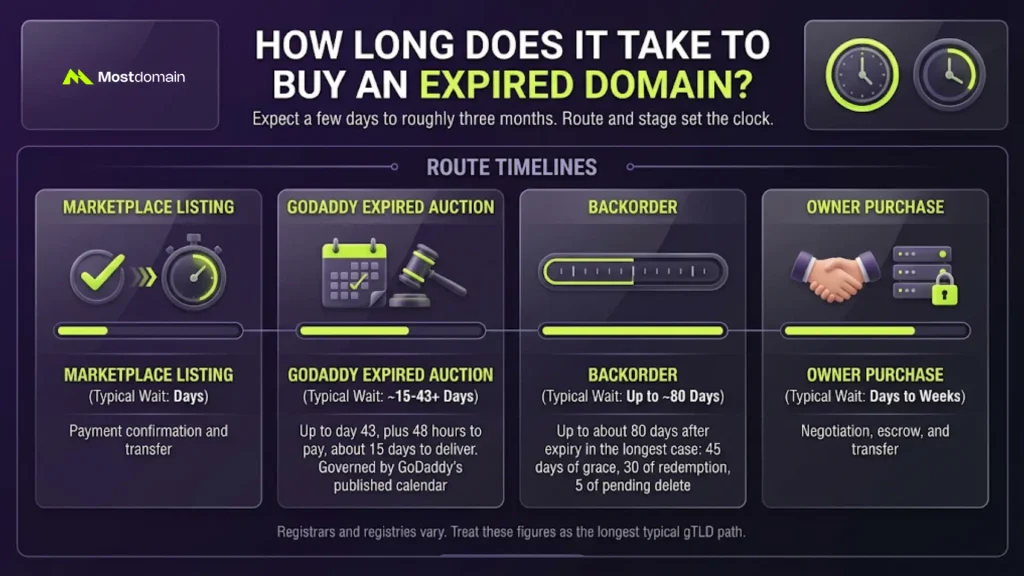
Expect a few days to roughly three months. Route and stage set the clock.
| Route | Typical wait | What sets the clock |
| Marketplace listing | Days | Payment confirmation and transfer |
| GoDaddy expired auction | Up to day 43, plus 48 hours to pay, about 15 days to deliver | GoDaddy’s published calendar |
| Backorder | Up to about 80 days after expiry in the longest case | 45 days of grace, 30 of redemption, 5 of pending delete |
| Owner purchase | Days to weeks | Negotiation, escrow, and transfer |
- Registrars and registries vary.
- Treat these figures as the longest typical gTLD path.
Step 7: Rebuild Before You Redirect
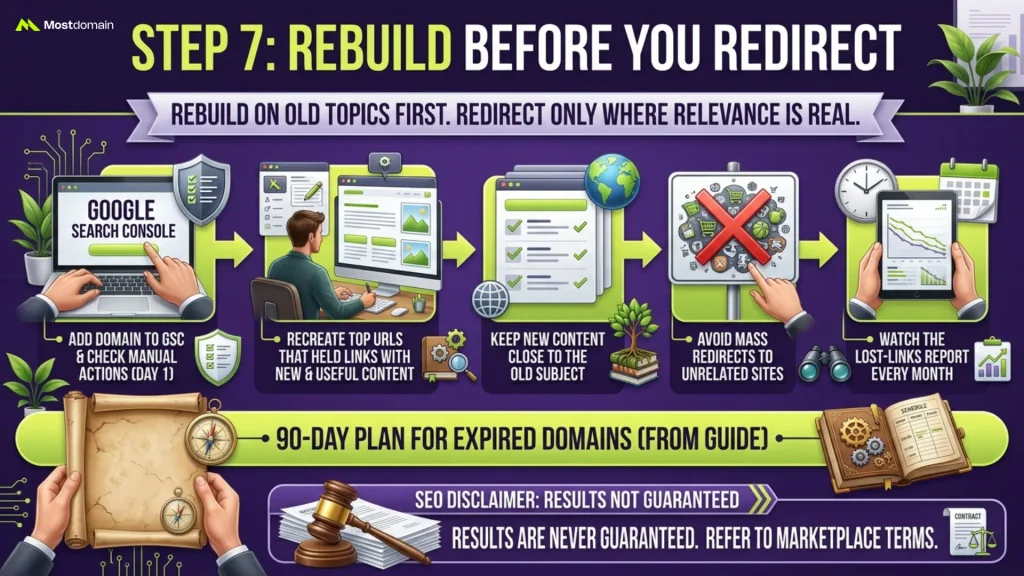
Rebuild on the old topic first. Redirect only where the relevance is real.
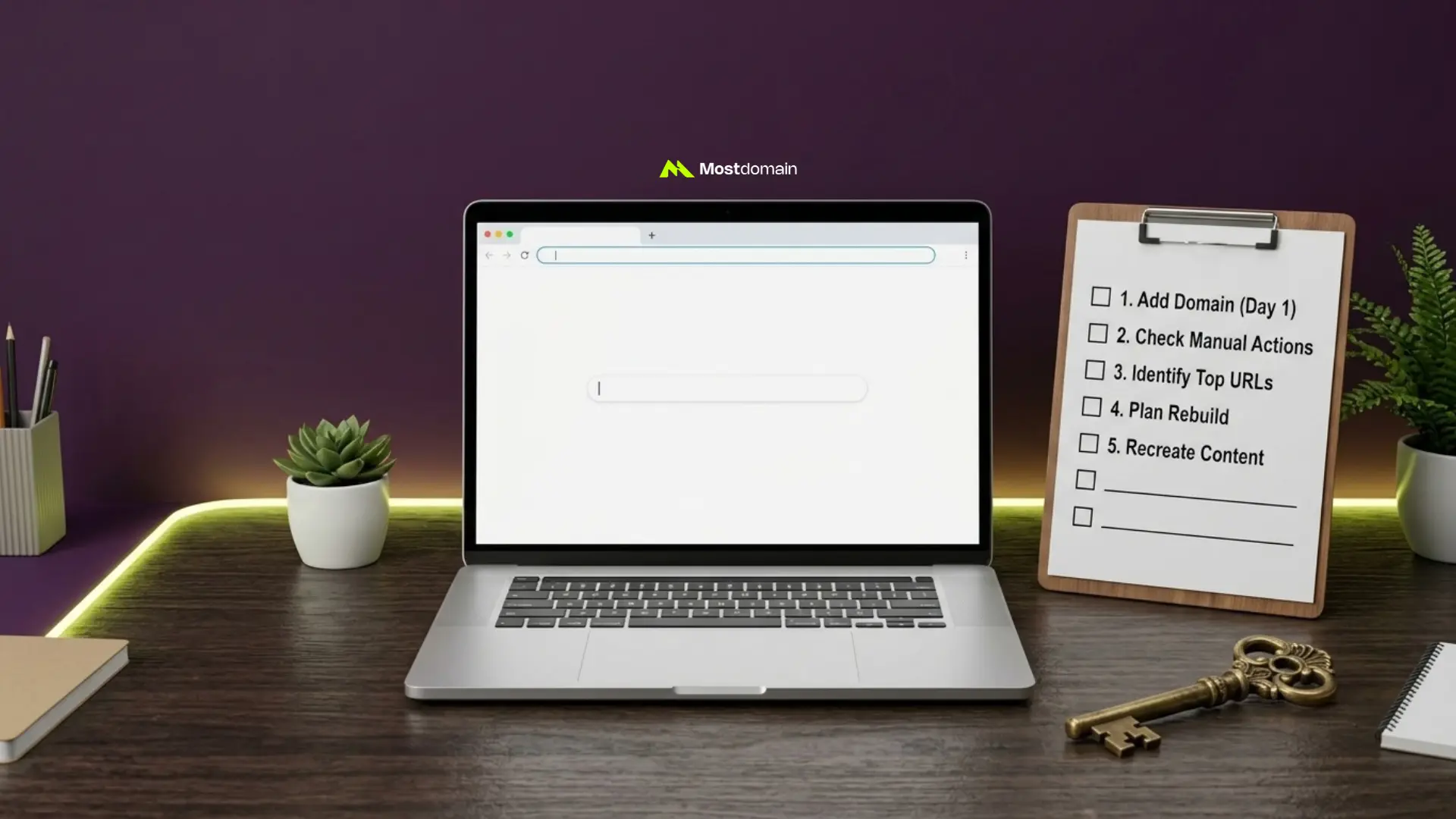
- Add the domain to Google Search Console and check manual actions on day one.
- Recreate the top URLs that held links, with new and useful content.
- Keep new content close to the old subject.
- Avoid mass redirects to unrelated sites.
- Watch the lost-links report every month.
- Our guide to finding expired domains with backlinks lays out a 90-day plan.
- SEO results are never guaranteed, and marketplace terms say so.
FAQ
How much does it cost to buy an expired domain?
Cost runs from a registration fee to several thousand dollars.
- An uncaught .com may cost about $10 to $20.
- Backorders add service fees, reported at roughly $59 to $79 per win.
- Auction prices follow demand.
- Add one year of renewal on top.
Can I buy an expired domain for free?
No. The cheapest route is registering a dropped name at the standard fee.
- Valuable names rarely survive the drop uncaught.
- Expect to compete with professional catchers.
Is it legal to buy an expired domain?
Generally, yes. The risk sits in how you use the name.
- A trademark can outlive a dead brand.
- Search trademark databases first.
- This guide is not legal advice.
Can the previous owner get the domain back?
Up to a point, yes.
- The owner can renew during grace.
- Redemption allows restoring the name for a fee.
- Once pending delete begins, recovery closes.
- A won auction can still be reversed if the owner reclaims it before delivery.
Does buying an expired domain help SEO?
It can give a head start, but it guarantees nothing.
- Links may be stale, and the history may carry problems.
- Google targets low-value reuse.
- Read the SEO value of an expired domain before you count on a boost.
What is the safest way to buy an expired domain?
Vet first, pay through a protected channel, and wait for delivery.
- Match the route to the status.
- Keep an evidence file.
- Build nothing until the name is in your account.
Can I buy an expired domain before it drops?
Yes. Registrar auctions and owner offers work before the drop.
- Backorders cover the drop itself.
- Marketplaces sell names after someone has caught them.
Spend More Time on Step Three Than on the Bid
Most buyers rush the bid and skim the vetting. Flip that. A name worth buying survives forty minutes of scrutiny.
- Write your walk-away price and your walk-away signal on one sheet.
- Bid only when both sit in front of you.
- Log every name you walked away from. That log sharpens your next ceiling.
Prefer screened names? Browse the expired domain marketplace and run the same seven steps. Check the marketplace terms before you pay.
References
- ICANN, 5 Things Every Domain Name Registrant Should Know About ICANN’s Expired Registration Recovery Policy
- ICANN, Transfer Policy
- GoDaddy, Timeline for GoDaddy Auctions Expired Domains
- GoDaddy, How to Secure Expired Domains via Auctions, Backorders and More
- Google Search Central Blog, What Web Creators Should Know About Our March 2024 Core Update and New Spam Policies