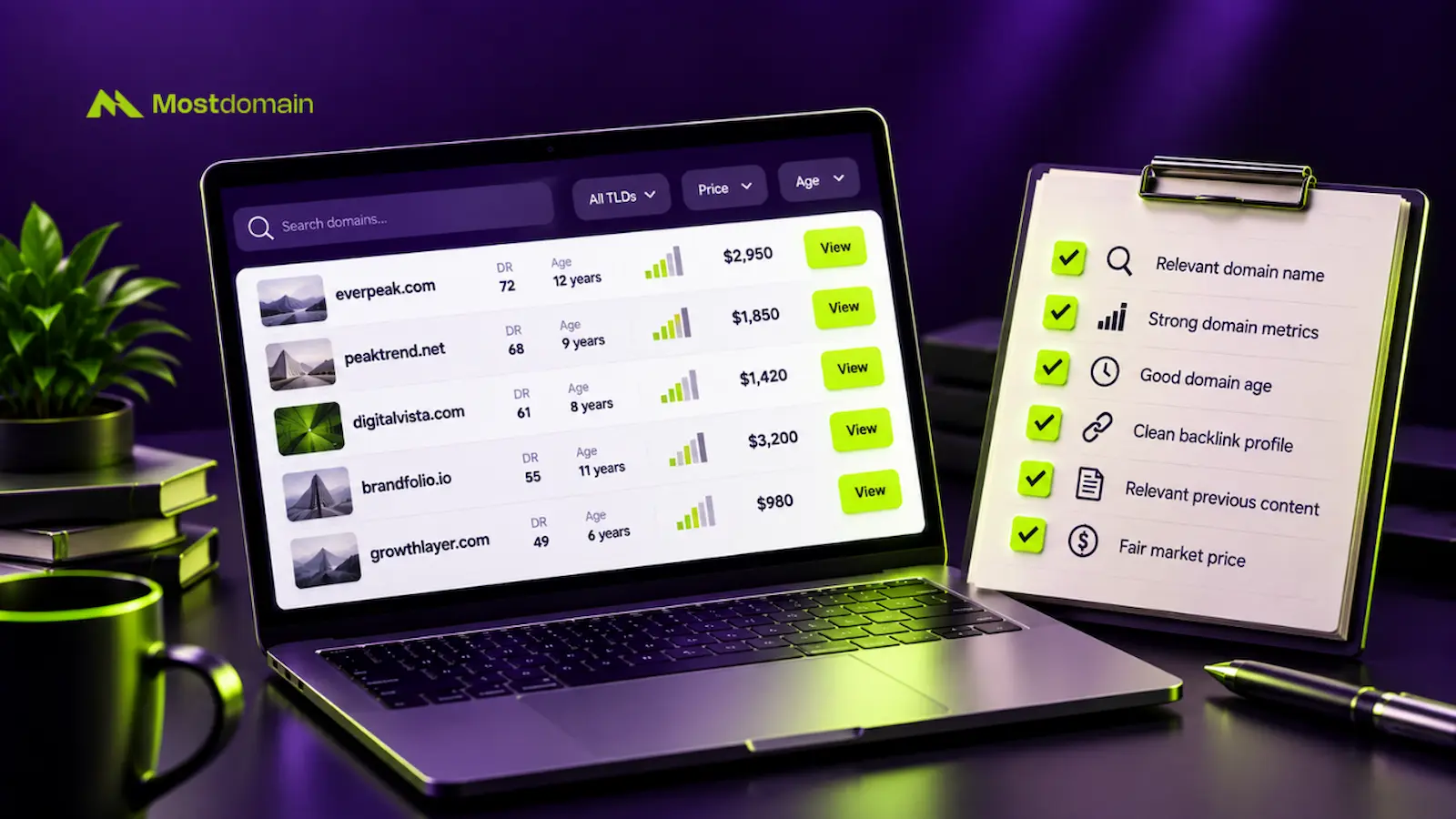
Three habits make buying expired domains safe. Pay through a protected channel. Pick a name whose old topic fits your project. Check its history before any money moves.
Below, you’ll find every route compared, with real costs attached. You’ll also learn how to pick the marketplace and the domain.
Full disclosure: Mostdomain sells expired domains through its own curated marketplace. That’s our stake here. The comparison below treats every route on its merits.
The Quick Answer Of Buying Expired Domain
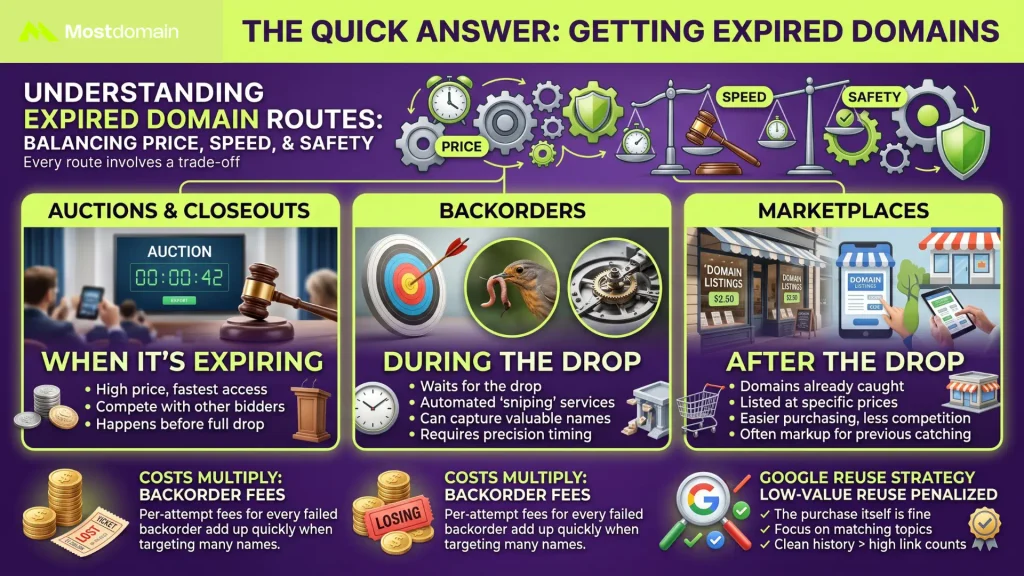
Every route to an expired domain trades price for speed or safety.
- Auctions and closeouts come first, while the name is still expiring. Backorders wait for the drop itself.
- Marketplaces sell names someone already caught, usually at a listed price.
- A per-attempt backorder fee can multiply once you count the names you lose.
- Google goes after low-value reuse of old domains. The purchase itself is fine.
- A matching topic and a clean history beat a big link count.
How to Get Expired Domains: Six Ways In
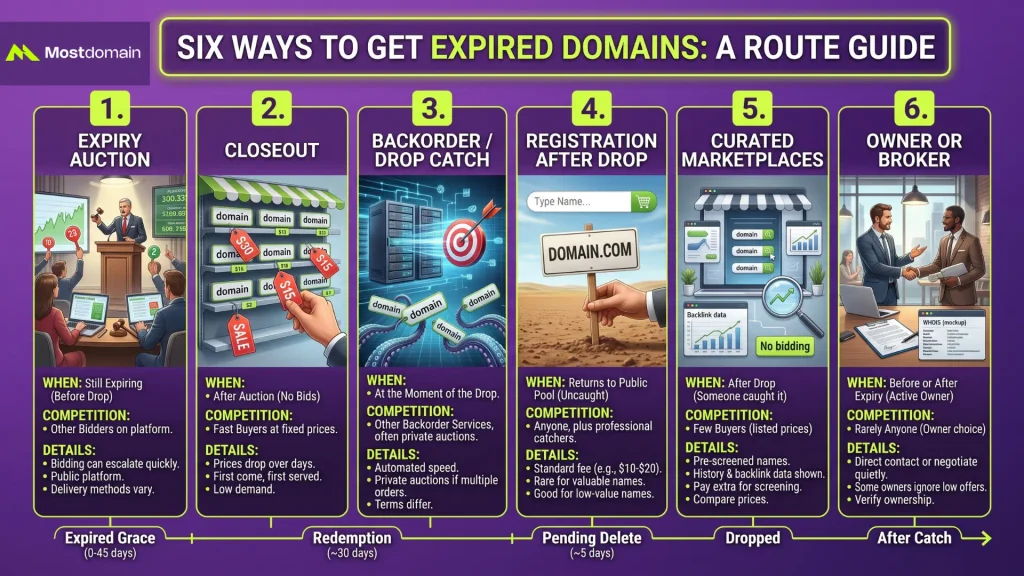
You can get an expired domain through six routes. Budget and risk tolerance decide which one fits.
| Route | Happens when | Who competes with you |
| Expiry auction | While the name is still expiring | Other bidders on the platform |
| Closeout | After an auction draws no bids | Fast buyers at a fixed price |
| Backorder or drop catch | At the moment of the drop | Other backorders, often via private auction |
| Registration after the drop | After the name returns to the public pool | Anyone, plus professional catchers |
| Curated marketplace | After someone already caught the name | Few buyers, since prices are listed |
| Owner or broker | Before or after expiry | Rarely anyone, but the owner may refuse |
Expiry Auctions
An expiry auction sells a domain through a registrar’s partner platform before it drops.

- Expiring names often land at a registrar’s partner auction first.
- Bids are public, and good names climb quickly.
- Check the delivery method before bidding. Platforms handle it differently.
- Bidding tactics get a full breakdown in our guide to expired domain auctions.
Closeouts
A closeout is a fixed price offered after an auction draws no bids.
- Prices often step down over several days until someone buys.
- Dynadot has run closeouts stepping from $30 down to $5.
- Low prices usually mean low demand, so find out why nobody bid.
- First come, first served. Speed matters here.
Backorders and Drop Catching
With a backorder, a service claims the domain the moment it drops.
- Drop-catch services use direct registry connections to win the race.
- If several buyers backorder one name, many services run a private auction.
- Some services charge only when they win. Others charge per attempt, so read the terms.
- Detailed comparisons will follow in our guides to backorder services and drop catching.
Registering After the Drop
If nobody catches a dropped domain, you register it like any new name.




- The price is the standard fee, often $10 to $20 for a .com.
- Valuable names rarely survive the drop uncaught.
- Low-competition names with modest value fit this route best.
- Registering works the usual way. Our steps for registering a domain name apply.
Curated Marketplaces for Caught Names
Someone already caught and screened these names. That’s what a curated marketplace sells.
- Listed prices mean no bidding race.
- The better ones put history and backlink data right on the listing.
- Expect to pay extra for the screening someone already did.
- Relisting often happens at market prices. Compare similar sales first.
Going Straight to the Owner or a Broker
A domain that hasn’t expired yet still has an owner you can approach.
- WHOIS may list contact details. Privacy services often hide them.
- Brokers negotiate quietly, so the owner never sees your budget.
- Some owners ignore low offers completely.
- Ownership checks before payment are covered in our domain buying checklist.
Which Route Fits Which Lifecycle Stage
Lifecycle stage decides your route. Find where the domain sits today.
| Stage | Roughly when | What is happening | Route to use |
| Expired grace | Day 0 to about day 45 | The owner can often still renew at the normal price | Expiry auction, or contact the owner |
| Redemption | About 30 days after grace | The owner can still redeem, usually at a higher fee | Monitor the name and prepare a backorder |
| Pending delete | About 5 days | The owner can no longer redeem the name | Backorder or drop catch |
| Dropped | After release | The name returns to the public pool | Register at once, or lose it to catchers |
| After a catch | Any time later | A buyer caught the name and relisted it | Marketplace or direct offer |
- Timings vary by registrar and extension, so treat these stages as a rough guide.
- Dynadot puts the registry release at roughly 75 days after expiration.
- Each stage gets a closer look in the domain expiration process.
Purchase Expired Domains: Cost, Odds, and Risk by Route
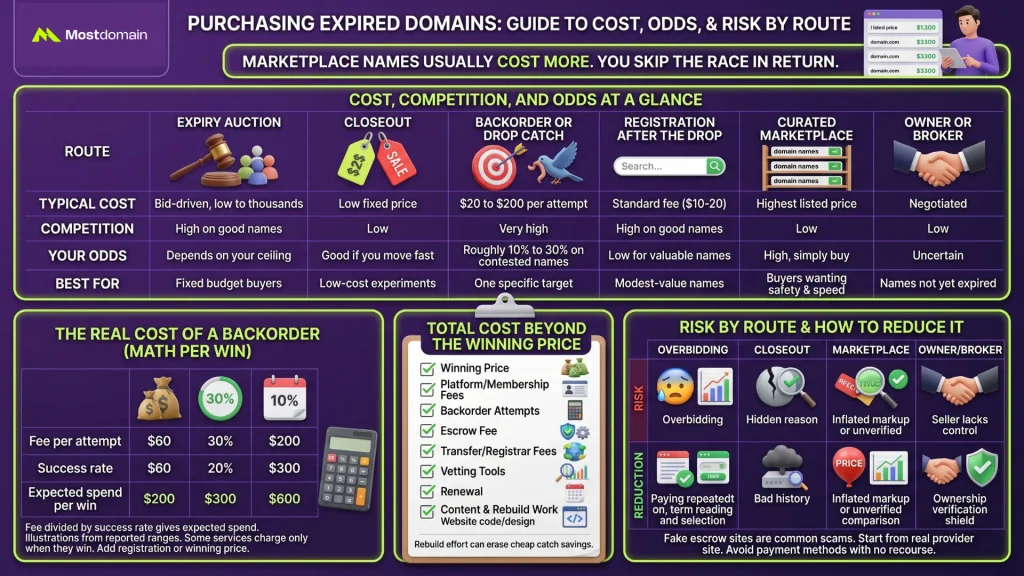
Marketplace names usually cost more. You skip the race in return.
Cost, Competition, and Odds at a Glance
Cost and competition rise together, while visibility into history varies by route.
| Route | Typical cost | Competition | Your odds | Best for |
| Expiry auction | Bid-driven, from low to thousands | High on good names | Depends on your ceiling | Buyers with a fixed budget |
| Closeout | Low fixed price | Low | Good if you move fast | Low-cost experiments |
| Backorder or drop catch | $20 to $200 per attempt, per one source | Very high | Roughly 10% to 30% on contested names | One specific target |
| Registration after the drop | Standard fee, often $10 to $20 for a .com | High on good names | Low for valuable names | Modest-value names |
| Curated marketplace | The listed price, often the highest | Low | High, since you simply buy | Buyers who want safety and speed |
| Owner or broker | Negotiated | Low | Uncertain | Names not yet expired |
- These ranges come from industry guides. Services and extensions vary, so plan loosely.
The Real Cost of a Backorder
A backorder that charges per attempt costs far more than its sticker price.
| Fee per attempt | Success rate | Expected spend per win |
| $60 | 30% | $200 |
| $60 | 20% | $300 |
| $60 | 10% | $600 |
- Fee divided by success rate gives the expected spend per win.
- Treat these figures as illustrations built from reported ranges.
- Some services charge only when they win. Then this math does not apply.
- Add the registration or winning price on top of any of these totals.
Total Cost Beyond the Winning Price
The winning price is only one line in the total cost.
| Cost item | When it applies | What to watch |
| Winning or listed price | Every purchase | Compare against similar sales |
| Platform or membership fees | Some auction platforms | Check fee pages before you bid |
| Backorder attempts | Per-attempt services only | Multiply by realistic odds |
| Escrow fee | Marketplace and direct deals | Confirm who pays it |
| Transfer or registrar fees | After the win, on some routes | Ask before you commit |
| Vetting tools | Backlink and history checks | Free tools cover many basics |
| Renewal | Every year after purchase | Check the renewal price upfront |
| Content and rebuild work | After the transfer | Budget time, not just money |
- Add these up before you compare routes on price alone.
- Rebuild effort can erase the savings from a cheap catch.
Risk by Route
Each route has its own main risk. Price rarely predicts it.
| Route | Main risk | How to reduce it |
| Expiry auction | Overbidding when emotions run high | Fix your ceiling before bidding opens |
| Closeout | A hidden reason nobody bid | Run history checks first |
| Backorder or drop catch | Paying repeatedly without winning | Read fee terms and pick targets carefully |
| Registration after the drop | A bad history you never checked | Check history before you register |
| Curated marketplace | Inflated markup or an unverified listing | Compare similar sales and use protected payment |
| Owner or broker | A seller who lacks real control | Verify ownership and use escrow |
- Fake escrow sites are a common scam. Start escrow from the provider’s real site.
- Avoid payment methods with no recourse if the deal falls apart.
How to Choose an Expired Domain Marketplace You Can Trust
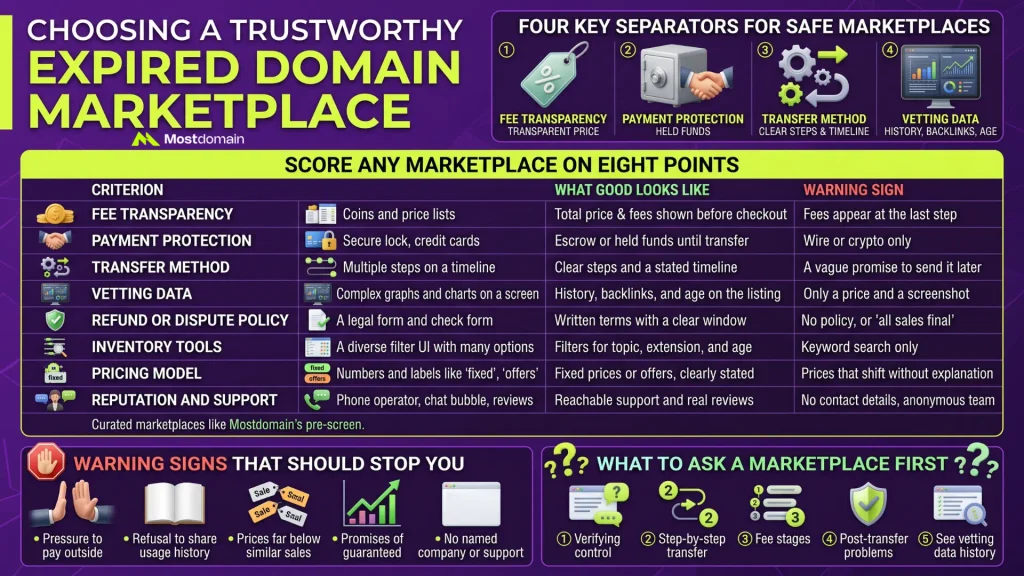
Four things separate safe marketplaces from risky ones. Fees, payment protection, transfer method, and vetting data.
Score Any Marketplace on Eight Points
Run every marketplace through these eight criteria before spending a cent.
| Criterion | What good looks like | Warning sign |
| Fee transparency | Total price and fees shown before checkout | Fees appear at the last step |
| Payment protection | Escrow or held funds until transfer | Wire or crypto only |
| Transfer method | Clear steps and a stated timeline | A vague promise to send it later |
| Vetting data | History, backlinks, and age on the listing | Only a price and a screenshot |
| Refund or dispute policy | Written terms with a clear window | No policy, or “all sales final” |
| Inventory tools | Filters for topic, extension, and age | Keyword search only |
| Pricing model | Fixed prices or offers, clearly stated | Prices that shift without explanation |
| Reputation and support | Reachable support and real reviews | No contact details, anonymous team |
- Curated marketplaces pre-screen what they list.
- Mostdomain’s curated expired domain marketplace is one example. Run this scorecard on it too.
Warning Signs That Should Stop You
Any seller who rushes you past verification deserves suspicion.
- Pressure to pay outside the platform.
- Refusal to share the domain’s past usage.
- Prices far below similar sales.
- Promises of guaranteed rankings.
- No named company, address, or way to reach support.
What to Ask a Marketplace First
Five direct questions surface what most marketplaces won’t volunteer.
- Who verifies seller control of the domain, and how?
- Walk me through the transfer, step by step.
- What fees will I pay, and at which stage?
- What happens if the domain has a problem after transfer?
- Can I see the history and backlink data you used?
How to Choose an Expired Domain for a New Project
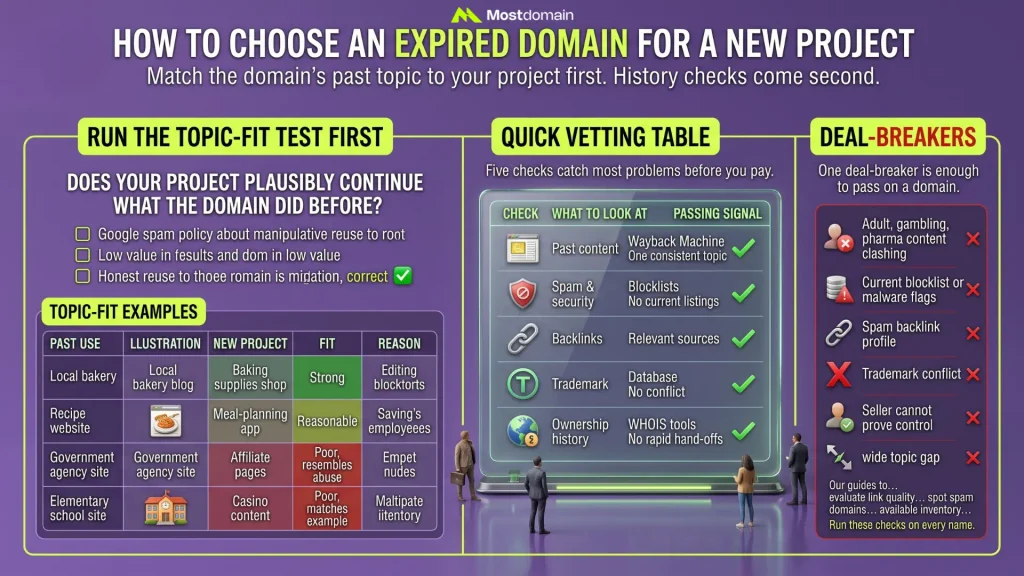
Match the domain’s past topic to your project first. History checks come second.
Run the Topic-Fit Test First
Ask one question: does your project plausibly continue what the domain did before?
- Reuse meant to manipulate rankings is what Google’s spam policy targets.
- The trigger is hosting content that gives users little or no value.
- Google’s own examples include affiliate pages on a former government agency site.
- A close match between old and new topics signals honest reuse.
- Buying is allowed. Purpose and value decide the outcome.
| Past use of the domain | Your new project | Fit |
| Local bakery blog | Baking supplies shop | Strong |
| Recipe website | Meal-planning app | Reasonable |
| Government agency site | Affiliate pages on an unrelated topic | Poor, resembles abuse |
| Elementary school site | Casino content | Poor, matches a Google example |
Read the full breakdown in our guide to Google’s expired domain policy.
Quick Vetting Table
Five checks catch most problems before you pay.
| Check | What to look at | Passing signal |
| Past content | Wayback Machine snapshots across several years | One consistent topic, no spam |
| Spam and security | Blocklists and Google Safe Browsing | No current listings |
| Backlinks | Referring domains and anchor text | Natural, relevant sources |
| Trademark | Trademark databases | No conflict with the name |
| Ownership history | WHOIS history tools | No rapid, repeated hand-offs |
- Our guide to checking domain history before buying walks through each method.
- For link quality, see evaluating an aged domain.
- Our guide to spotting spam domains covers the warning signs in detail.
Deal-Breakers
One deal-breaker is enough to pass on a domain.
- A past in adult, gambling, or pharma content that clashes with your plans.
- Current blocklist or malware flags.
- A backlink profile dominated by spam.
- A trademark conflict with the name.
- A seller who cannot prove control.
- A topic gap so wide that your plan looks like reuse for rankings.
Need candidates? Mostdomain’s available domain inventory is a place to start. Run these checks on every name you shortlist.
Your First Week After Winning the Domain
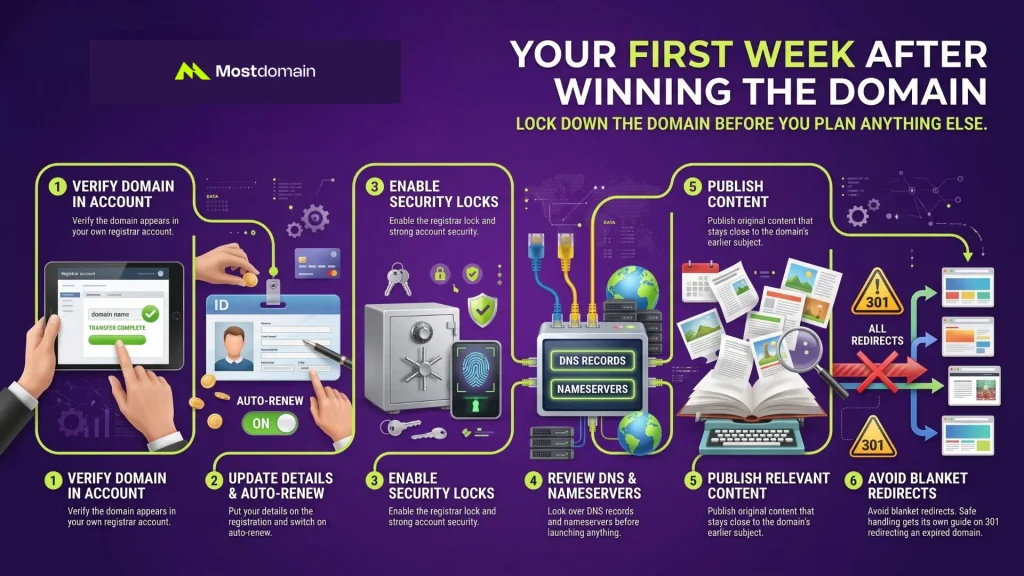
Lock down the domain before you plan anything else.
- Verify the domain appears in your own registrar account.
- Put your details on the registration and switch on auto-renew.
- Enable the registrar lock and strong account security.
- Look over DNS records and nameservers before launching anything.
- Publish original content that stays close to the domain’s earlier subject.
- Avoid blanket redirects. Safe handling gets its own guide on 301 redirecting an expired domain.
The Best Way to Buy Expired Domains, Situation by Situation
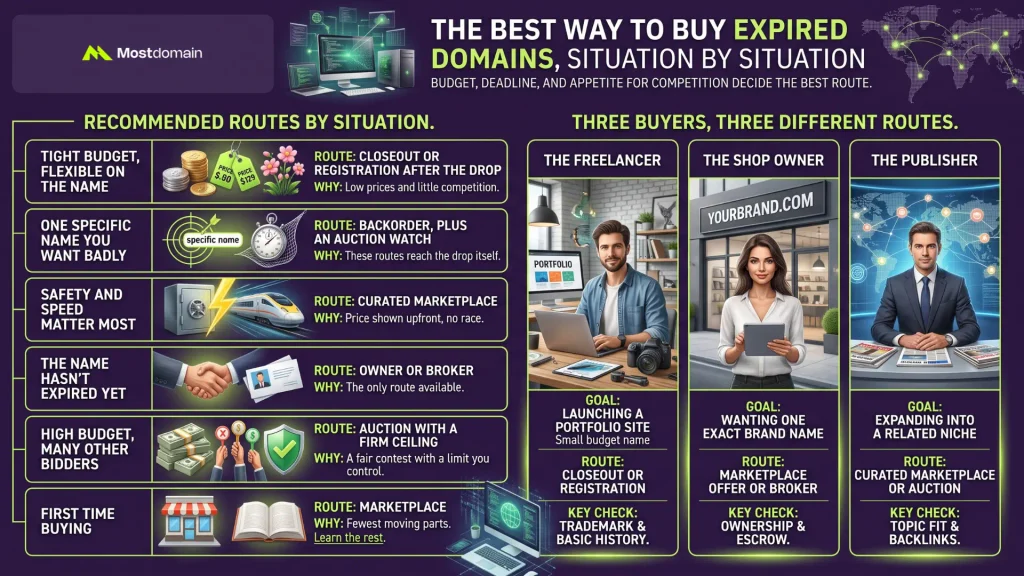
Budget, deadline, and appetite for competition decide the best route.
| Your situation | Best route | Why |
| Tight budget, flexible on the name | Closeout or registration after the drop | Low prices and little competition |
| One specific name you want badly | Backorder, plus an auction watch | These routes reach the drop itself |
| Safety and speed matter most | Curated marketplace | Price shown upfront, no race |
| The name hasn’t expired yet | Owner or broker | The only route available |
| High budget, many other bidders | Auction with a firm ceiling | A fair contest with a limit you control |
| First time buying | Marketplace, then learn the rest | Fewest moving parts |
Three Buyers, Three Different Routes
The same six routes lead to different choices for different buyers.
| Buyer | Goal | Likely route | Key check |
| A freelancer launching a portfolio site | A professional name on a small budget | Closeout or registration after the drop | Trademark and basic history |
| A shop owner wanting one exact brand name | One specific name | Marketplace offer or broker | Ownership and escrow |
| A publisher expanding into a related niche | A domain that matches the topic | Curated marketplace or auction | Topic fit and backlinks |
- All three buyers are hypothetical, and the cases are simplified.
FAQ
Is it safe to buy expired domains?
Generally, yes, provided the payment is protected and the history checked.
- Your route and your checks determine how risky a purchase gets.
- Losses often trace back to fake escrow sites or unverified sellers.
- Skipping history checks is a common and avoidable mistake.
Does an expired domain hurt or help SEO?
It can do either, depending on topic fit and the domain’s history.
- Google’s policy has named expired domain abuse since March 2024.
- Buying a lapsed domain isn’t banned. Low-value reuse is the target.
- Mismatched topics and spammy backlinks both raise the risk.
- A matching topic and clean history lower that risk considerably.
How much does an expired domain cost?
Anywhere from a standard registration fee to several thousand dollars.
- An uncaught .com may cost $10 to $20 at a registrar.
- Backorders add service fees on top of any winning price.
- Demand, length, extension, and history all shape marketplace prices.
How long does it take to get an expired domain?
Days for a marketplace buy, months if you wait for a drop.
- A marketplace purchase plus transfer can finish within days.
- Auctions run for their set windows. Dynadot’s expired auctions have run seven days.
- Backorders wait for the drop, which one source puts near 75 days after expiration.
Is a backorder better than an auction?
Neither wins outright, because each fits a different lifecycle stage.
- Auctions work while a name is still expiring.
- Backorders target the drop for names that reach it.
- Many serious buyers use both, depending on the target.
Can I buy a domain that has just expired?
Sometimes. Often the owner can still renew for a while.
- Expired names usually enter a grace period first.
- Some registrars auction them during that window.
- You can also contact the owner or hire a broker.
What if the domain I bought has a bad history?
Reach out to the seller immediately, then read the refund or dispute policy.
- Document what you found, with dates and screenshots.
- Escrow protection depends on acting before funds are released.
- A written policy gives you far more leverage than a verbal promise.
- Sometimes walking away costs less than cleaning up the damage.
Conclusion
Two choices decide how safely you buy: the route and the domain.
- Match the route to your budget and timeline.
- Choose a domain whose past topic fits the project you actually plan.
- Run history checks before paying. Every time.
- Still unsure? Our domain buying questions page may help.
References
- Google Search Central, Spam Policies for Google Web Search
- Google Search Central Blog, What Web Creators Should Know About Our March 2024 Core Update and New Spam Policies
- Dynadot, How to Buy Expired Domains: Tips for Discovery
- Dynadot, Expired Domains: What Still Works, What’s Spam, and How to Rebuild Safely
- DomainDetails, Expired Domain Auctions Compared: GoDaddy vs NameJet vs DropCatch (2026)
- Name Experts, The Complete Guide to Buying Expiring Domains
- Wix, How to Buy Expired Domains and Gain Instant Traffic
- Instant Domain Search, Expired Domains
- Names.center, How to Buy an Expired Domain: Backorders, Drop-Catching & Auctions
- Notify.domains, How to Buy Expired Domains Without Watching Ten Marketplaces