
Hreflang tags are the reason a French visitor sees a French page instead of your English homepage. And getting them right is rarer than it sounds. Two out of three sites that use them have at least one broken implementation. Ahrefs put a real number on that. They crawling 374,756 domains and finding a 67% error rate. This covers what goes wrong, how to catch it, and one thing almost no other guide mentions. Whether any of this still matters once AI search enters the picture.
Hreflang Tags and Rankings: What They Actually Control
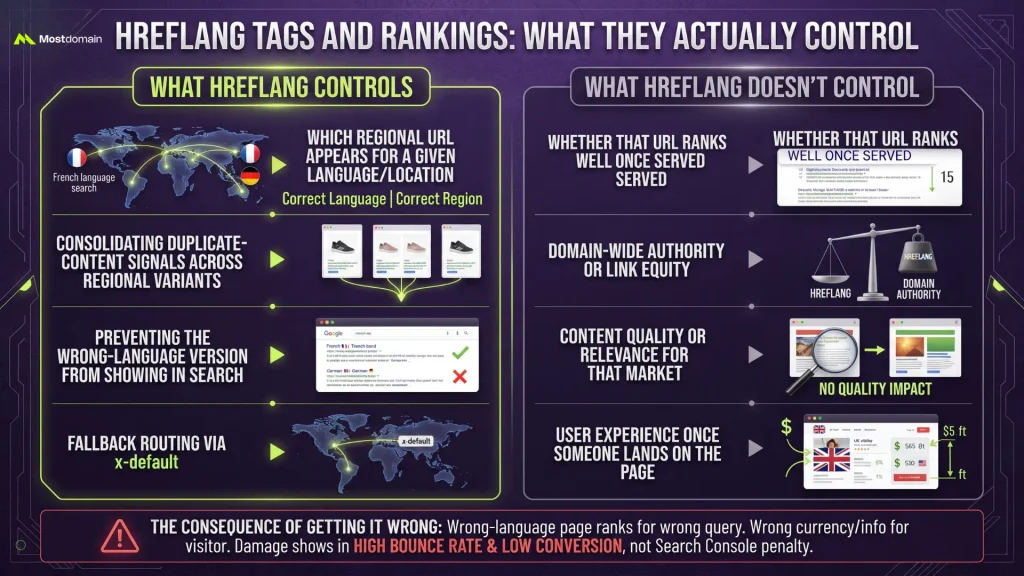
Hreflang tags decide which URL gets served for a given language or region. Rankings sit outside that job entirely. A distinction Google’s John Mueller has made directly by calling hreflang a signal rather than a directive.
| What hreflang controls | What hreflang doesn’t control |
| Which regional URL appears for a given language/location | Whether that URL ranks well once served |
| Consolidating duplicate-content signals across regional variants | Domain-wide authority or link equity |
| Preventing the wrong-language version from showing in search | Content quality or relevance for that market |
| Fallback routing via x-default | User experience once someone lands on the page |
Get it wrong and the failure mode isn’t a ranking drop. It’s a French page ranking for a German query, or a UK visitor landing on a US pricing page that quotes the wrong currency. The damage shows up in bounce rate and conversion, not in a Search Console penalty notice.
Hreflang Tags Syntax: The Codes That Trip People Up
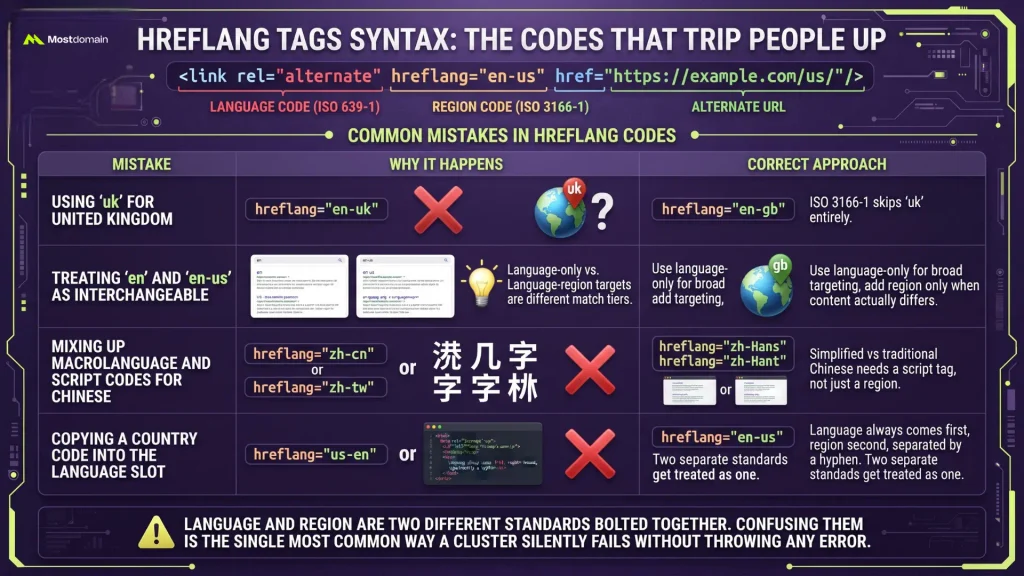
Hreflang tags syntax boils down to three pieces stacked together: a language code, an optional region code, and the alternate URL. Written out, it looks like <link rel=”alternate” hreflang=”en-us” href=”https://example.com/us/” />.
The codes themselves are where most implementations break down.
| Mistake | Why it happens | Correct approach |
| Using “uk” for United Kingdom | Intuitive guess, but ISO 3166-1 skips “uk” entirely | Use “gb” |
| Treating “en” and “en-us” as interchangeable | Language-only and language-region targets are different match tiers | Use language-only for broad targeting, add region only when content actually differs |
| Mixing up macrolanguage and script codes for Chinese | Simplified vs traditional Chinese needs a script tag, not just a region | Use “zh-Hans” or “zh-Hant,” not “zh-cn” alone |
| Copying a country code into the language slot | Two separate standards get treated as one, ISO 639-1 for language, ISO 3166-1 for country | Language always comes first, region second, separated by a hyphen |
Language and region are two different standards bolted together. Confusing them is the single most common way a hreflang cluster silently fails without throwing any visible error.

Choosing the Right Hreflang Tags Implementation Method by Site Size
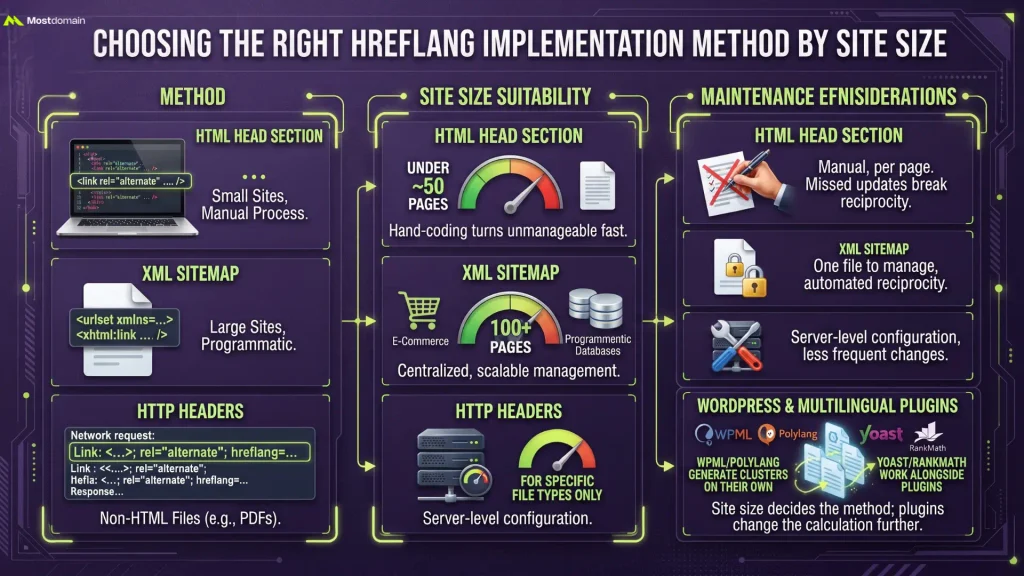
Hreflang tags implementation comes down to three methods, and site size decides which one actually makes sense.
| Method | Best for | Maintenance |
| HTML head section | Under roughly 50 pages | Manual, per page |
| XML sitemap | 100+ pages, especially programmatic or e-commerce sites | Centralized, one file to manage |
| HTTP headers | Non-HTML files like PDFs | Server-level configuration |
Site size decides the method more than personal preference does, and WordPress changes that calculation further. WPML and Polylang generate hreflang clusters on their own as new translations get published. Yoast and RankMath only step in once a multilingual plugin is already running alongside them. Hand-coding hreflang into a theme’s head section is fine for five pages. Past a few dozen URLs it turns unmanageable fast, since one missed update anywhere breaks the reciprocity every other page in the cluster depends on.
Hreflang Tags for JavaScript and Dynamic Websites
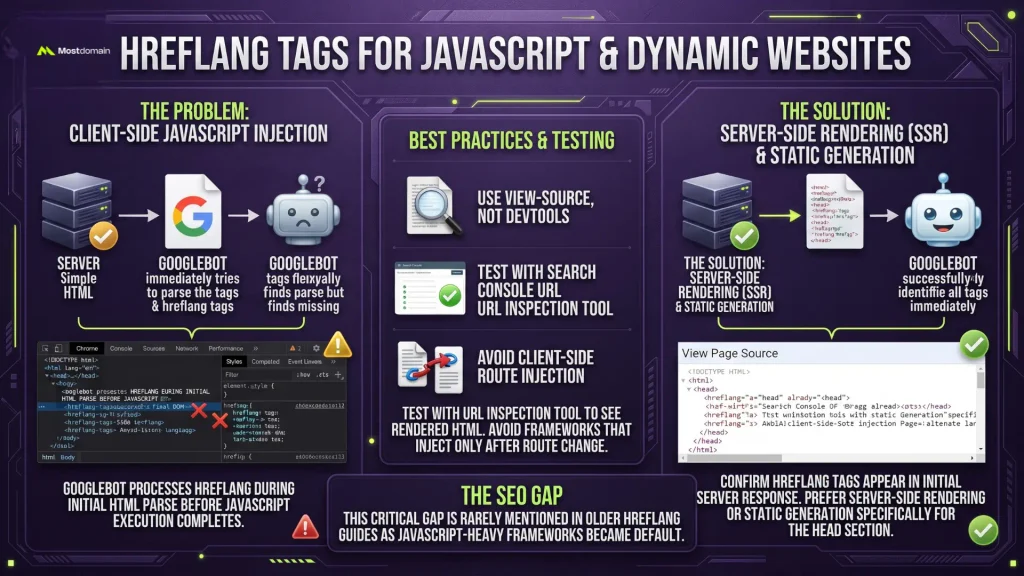
Hreflang tags injected client-side through JavaScript often never reach Google’s indexing pipeline, since Googlebot processes hreflang during the initial HTML parse before JavaScript execution completes in some rendering paths.




- Confirm hreflang tags appear in the page’s initial server response, not just the final rendered DOM, using view-source rather than DevTools’ inspected element
- Prefer server-side rendering or static generation for the head section specifically, even if the rest of the page hydrates client-side
- Test with the URL Inspection tool in Search Console, which shows the rendered HTML Google actually indexed
- Avoid frameworks that inject alternate-language links only after a client-side route change, since that pattern frequently never gets crawled at all
This gap barely gets mentioned in most hreflang guides, largely because most of them were written before JavaScript-heavy frameworks became the default for new builds.
X-Default Hreflang: When You Actually Need It
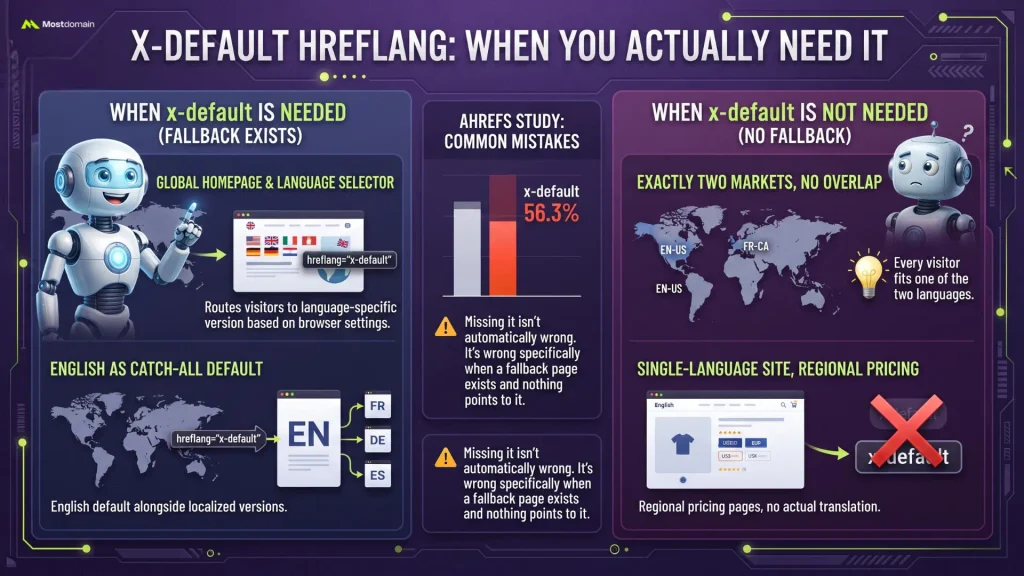
X-default hreflang is only necessary when a genuine fallback page exists, meaning a language selector or a default version for visitors whose language doesn’t match any targeted variant.
- Needed: a global homepage that routes visitors to a language-specific version based on browser settings
- Needed: a site with English as a catch-all default alongside three or four localized versions
- Not needed: a site targeting exactly two markets where every visitor fits one of the two languages cleanly
- Not needed: a single-language site with regional pricing pages but no actual translation
Ahrefs’ study found 56.3% of domains missing x-default entirely, the single most common hreflang error in their dataset. Missing it isn’t automatically wrong. It’s wrong specifically when a fallback page exists and nothing points to it.
Hreflang Tags Audit: Reading the Errors That Matter
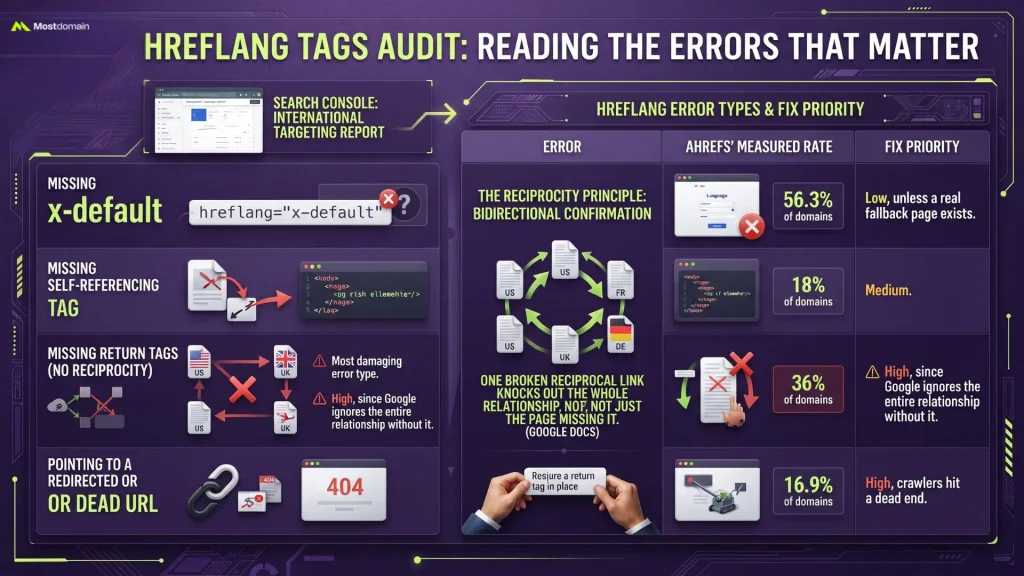
Hreflang tags audit work starts with Search Console’s International Targeting report, and the specific error type it surfaces determines how urgently it needs fixing.
| Error | Ahrefs’ measured rate | Fix priority |
| Missing x-default | 56.3% of domains | Low, unless a real fallback page exists |
| Missing self-referencing tag | 18% of domains | Medium |
| Missing return tags (no reciprocity) | Most damaging error type | High, since Google ignores the entire relationship without it |
| Pointing to a redirected or dead URL | 16.9% of domains | High, crawlers hit a dead end |
One broken reciprocal link rarely stays contained to a single page. Google spells this out in its own documentation on managing multi-regional sites: hreflang needs bidirectional confirmation, so a missing return tag anywhere can knock out the whole relationship, not just the page missing it.
Hreflang Tags Mistakes That Still Break Sites in 2026
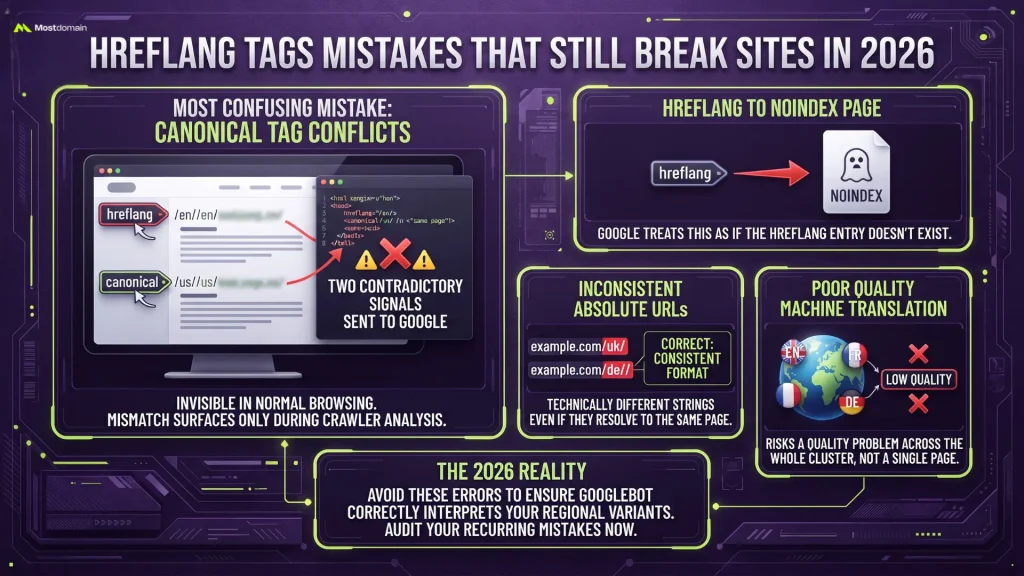
Canonical tag conflicts cause the most confusion among the recurring hreflang tags mistakes, mostly because they trip up teams who are otherwise confident they’ve done everything right.
- Hreflang pointing to one URL while the canonical tag on that same page points somewhere else, sending Google two contradictory signals about which version is authoritative
- Hreflang referencing a noindex page, which Google treats as if the hreflang entry doesn’t exist
- Absolute URLs typed inconsistently (missing https://, trailing slash mismatches) that technically point to different strings even when they resolve to the same page
- Machine-translated content deployed across hreflang variants without editorial review, which risks a quality problem across the whole cluster rather than a single page
The canonical and hreflang conflict specifically deserves attention because it’s invisible in normal browsing. The page renders fine, the URL loads fine, and the mismatch only surfaces once a crawler compares the two signals against each other. For the mechanics of how canonical tags work outside a hreflang context, canonical tags get covered in more depth elsewhere.
Hreflang Tags and AI Search: Do LLMs Even Read Them
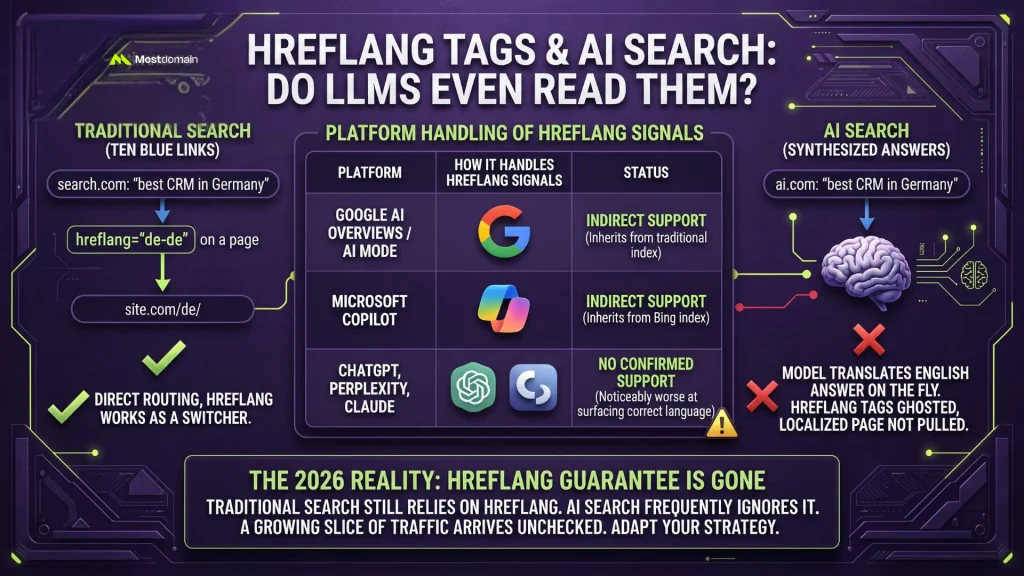
Ten blue links is the world hreflang tags were built for, and AI search engines don’t operate that way anymore, since they synthesize an answer instead of routing a visitor to a single URL.
Search Engine Land covered exactly this in early 2026, and the framing stuck: hreflang has always been a switcher, never a booster. Synthesized answers don’t need instructions on which page to serve, because nothing is being routed anywhere. A brand can tag its German page perfectly and still get ghosted the moment a model just translates its English answer on the fly instead of pulling the localized version at all.
| Platform | How it handles hreflang signals |
| Google AI Overviews / AI Mode | Inherits Google’s traditional index, so hreflang helps here indirectly |
| Microsoft Copilot | Runs on Bing’s index, similarly inheriting whatever hreflang already does for Bing |
| ChatGPT, Perplexity, Claude | No confirmed hreflang support; independent testing found these platforms noticeably worse at surfacing correct-language versions than Google or Bing |
None of this means hreflang is worth abandoning. Most sites still get the bulk of their organic traffic from traditional search, and hreflang genuinely earns its keep there. What’s changed is the guarantee. A growing slice of traffic now arrives through a model that never checked the tag at all, so hreflang alone can’t promise the right regional content reaches every international visitor anymore.
FAQ
Do hreflang tags directly improve search rankings?
No. Hreflang tags decide which regional URL shows up for a given language or location, not how well that URL performs once it’s shown. Google’s own John Mueller has said hreflang works as a targeting signal, not a ranking factor.
How many hreflang tags does a page need?
One entry for every language and region variant, plus a self-referencing tag pointing to the page itself. A site with five language versions needs five hreflang entries on every single page in that cluster, including a tag each page points back at itself.
Can hreflang tags fix duplicate content issues across languages?
Yes, that’s one of the core jobs hreflang does. It tells search engines that similar pages in different languages are intentional regional variants, not duplicates, which heads off the content-quality confusion that could otherwise drag rankings down across the whole set.
Do I need hreflang tags if my site only targets one country?
No. Hreflang tags exist for sites splitting traffic across multiple languages or regions. A single-language, single-region site gains nothing from adding them, just extra technical overhead with no payoff behind it.
How often should hreflang tags be audited?
Every three to six months for stable sites, and immediately after any CMS migration, URL structure change, or new market launch. Ahrefs’ 67% error rate across nearly 375,000 domains reflects sites that mostly implemented hreflang once and never checked it again.
References
- Google Search Central, Managing Multi-Regional and Multilingual Sites
- Ahrefs, The Most Common Hreflang Issues Across 374,756 Domains
- Search Engine Land, How AI Search Defines Market Relevance Beyond Hreflang