A single wrong character in an MX record, and email stops arriving without any warning bell going off. Nobody gets an error message. The messages just disappear, and whoever manages the domain usually finds out weeks later when a client asks why nothing ever came through. That failure point is exactly what DNS management is meant to prevent.
DNS management covers the work of controlling, editing, and monitoring the DNS records. It covers that work that tell the internet where a domain actually lives. Which server hosts the website, which mail server handles email, and which subdomains or outside tools get to connect. It isn’t something configured once and forgotten. If the fundamentals feel shaky, our guide to domain names covers what a domain actually is before this gets into how its DNS gets managed.
Who Actually Handles DNS Management
Three parties typically end up responsible for DNS management. The domain registrar, the web host, or a dedicated third-party DNS provider. Which one applies to a given domain depends entirely on how it was set up in the first place. And plenty of domain owners genuinely don’t know which party they’re dealing with until something breaks.
A quick WHOIS lookup usually clears up who the registrar is. Hosting bundles often auto-configure DNS behind the scenes, convenient until a business outgrows what the bundle can handle. Anyone still comparing options might check our breakdown of the best web hosting for small business, since not every host treats DNS the same way.
| Who Manages It | What They Actually Control |
| Domain Registrar | Default nameservers and basic record edits through a fairly limited dashboard |
| Web Host | DNS bundled into the hosting plan, frequently pre-configured with no manual setup needed |
| Third-Party DNS Provider | Full record control, advanced routing, DNSSEC, and security layers most bundled plans skip |
What Tasks Fall Under DNS Management
Ask five people what daily DNS management looks like, and most will describe the same handful of repeating tasks rather than anything exotic.
- Editing records. Adding, updating, or removing A, CNAME, MX, and TXT entries as infrastructure changes. This is where most hands-on work happens.
- Zone management. All of a domain’s records live inside a DNS zone, and keeping it organized matters once a domain accumulates dozens of entries.
- Nameserver changes. Switching providers means pointing nameservers to the new one, and getting this step wrong is the most common source of downtime.
- TTL adjustments. Lower the time-to-live value before a migration so cached records expire faster, then raise it back once things settle.
- Security monitoring. Watching for unauthorized edits matters more than most beginners assume, until it happens to them once.
Common DNS Record Types You’ll Manage
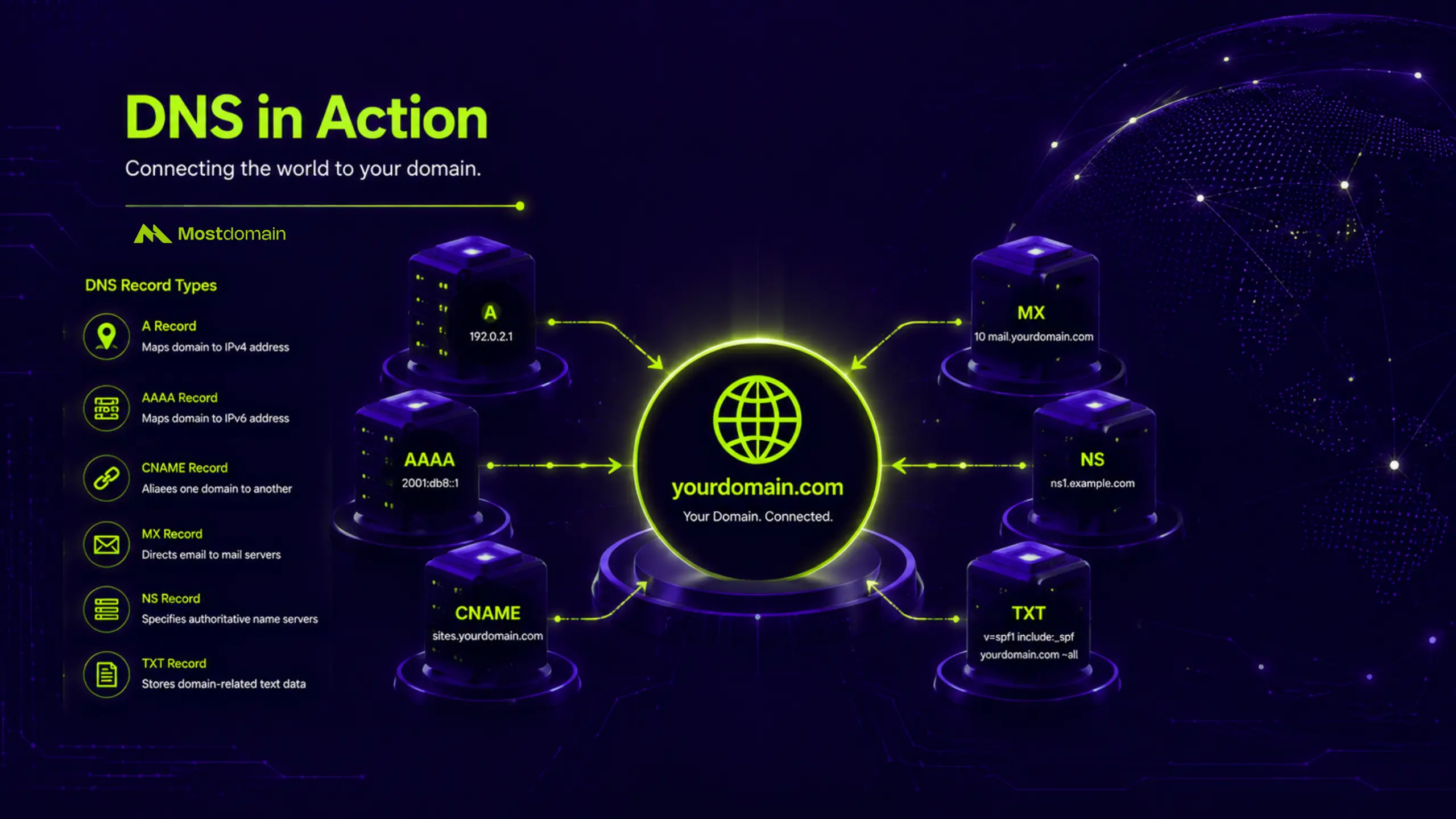
Five record types cover almost everything a typical domain owner will touch, and mixing them up is the fastest way to break something.

| Record Type | What It Actually Does |
| A Record | Points the domain straight to an IPv4 address, usually a web server |
| CNAME | Redirects one hostname to another, handy for pointing a subdomain like blog.yoursite.com to a separate platform without touching the root domain |
| MX | Tells the internet which mail server should receive incoming email for the domain |
| TXT | Stores plain text data, most often used for SPF, DKIM, or proving ownership to a third-party tool |
| NS | Declares which nameservers are authoritative for the domain, essentially handing off control |
DNS Management vs Domain Management vs Managed DNS
These three terms get thrown around interchangeably, and that mix-up causes more confusion than almost anything else in this space. Domain management sits closer to ownership: registration, renewal, transferring a domain between owners. DNS management is the layer underneath, dealing with where records actually point.
Managed DNS is what happens when a business stops handling that manually. Some reach a point where outsourcing DNS management to a third-party provider makes more sense than keeping it in-house, particularly once uptime becomes a revenue issue rather than a technical inconvenience.
| Term | What It Really Covers |
| Domain Management | Registration, renewal, ownership transfers, WHOIS records |
| DNS Management | Records, zones, and nameserver pointing for a domain that’s already registered |
| Managed DNS | A third-party service handling the entire DNS management workload, often with uptime guarantees written into the contract |
When You’ll Actually Need to Touch DNS Management
DNS management isn’t something that only comes up when a website goes down. Most of the time, it gets triggered by a change happening somewhere else in the business.




- Switching hosts. Migrating a website to new infrastructure means updating at least the A record, sometimes the entire nameserver setup.
- Adding email. Connecting Google Workspace or Microsoft 365 requires new MX and TXT records, and skipping even one breaks delivery.
- Verifying ownership. SSL certificates and third-party tools often ask for a TXT record as proof the domain belongs to whoever’s requesting it.
- Launching a subdomain. A blog, store, or app on its own subdomain needs a CNAME or A record pointing it somewhere specific.
- Buying a domain with history. Reconfiguring records right after buying a domain that already carries traffic or backlinks, such as one picked up through MostDomain, keeps its existing SEO signals intact instead of resetting them by accident.
Managing DNS Yourself vs Using a Managed DNS Service
Whether to manage DNS in-house or hand it off comes down to one question: how much does downtime actually cost this particular domain?
| Situation | What Tends to Work Better |
| Personal blog or small hobby site | Handling it yourself through the registrar dashboard, since the stakes of an outage are low |
| Business-critical site with global traffic | A managed DNS provider, mainly for redundancy and faster resolution across regions |
| Handling sensitive data or real attack risk | Prioritizing DNSSEC and DDoS protection over cost savings |
| Managing dozens of domains at once | Managed DNS tends to cut down on manual mistakes simply by reducing how many hands touch each record |
Common DNS Management Mistakes to Avoid
Most DNS management mistakes trace back to one thing: timing, not technical skill.
- Skipping the TTL drop. Forgetting to lower TTL before a migration means old records stay cached longer than expected.
- Ignoring propagation delay. Changes don’t take effect instantly everywhere. Some networks catch up within minutes, others take up to 48 hours.
- Leaving duplicate records behind. Switching providers without cleaning up the old configuration creates conflicting entries that confuse resolvers.
- Skipping backups. Editing records without saving the original setup turns a five-minute fix into a long troubleshooting session.
- Leaving default credentials unchanged. A detail people forget until an account gets compromised, at which point it’s suddenly the only thing that matters.
These are also exactly the kind of gaps covered in our guide on how to secure a domain name for free, worth a look before making any bulk changes.
Keeping DNS From Becoming a Problem
Good DNS management has less to do with memorizing every record type and more to do with knowing when to act. A forgotten TTL setting rarely causes visible damage right away. It just sits there until the one moment things need to work smoothly, and then it doesn’t.
Check DNS lookup results after any infrastructure change. That single habit prevents most of what sends people searching for this topic in the first place, and it costs nothing but a few minutes.
FAQ
How often does DNS need updating?
Only when something changes elsewhere, like a new host, added email, or a fresh subdomain. No fixed maintenance schedule exists beyond that.
Is it risky to switch DNS providers?
Not if every existing record gets copied over before the nameservers change. The risk shows up when someone forgets a single MX or TXT entry mid-move.
What actually breaks when a record is misconfigured?
Depends on the record. A bad A record takes the website down. A bad MX record kills email. Most of it resolves once the fix goes live and propagation finishes.
Does DNS management cost anything?
Basic DNS management is usually free through a registrar or host. Paid managed plans come into play for DNSSEC, global Anycast routing, or traffic analytics, none of which most small sites need.
Can DNS affect search rankings?
Indirectly, yes. Site speed, uptime, and clean redirects all trace back to DNS configuration, and search engines notice when a domain resolves slowly or drops offline.
References
- TechRadar, “What is DNS management?”
- ClouDNS Blog, “What is DNS management? How to use ClouDNS Control Panel?”
- Indusface, “DNS Management: Key Tasks and Best Practices”
- OpenSRS, “What are DNS management services?”
- IBM, “What Is Managed DNS?”
- GoDaddy Help, “What is DNS?”