A Typeform custom domain replaces the default form.typeform.com link with an address you actually own. So form.typeform.com/to/12345 turns into something like surveys.yourbrand.com/to/12345. Getting there takes an Enterprise or Growth Custom plan and one CNAME record pointed at Typeform’s servers. None of it is technically hard. It won’t be hard once you know where people usually trip up, and that’s the gap this guide tries to close.
Most tutorials online stop at “here’s how to add the CNAME record.” Fine as far as it goes, but it skips what happens to your domain’s DNS health afterward, whether the move does anything for search visibility, and what you’re supposed to do if Enterprise pricing simply isn’t in the cards yet. This piece treats the custom domain setup as one part of a bigger picture around domain ownership and management.
How a Typeform Custom Domain Actually Changes Your Form Links
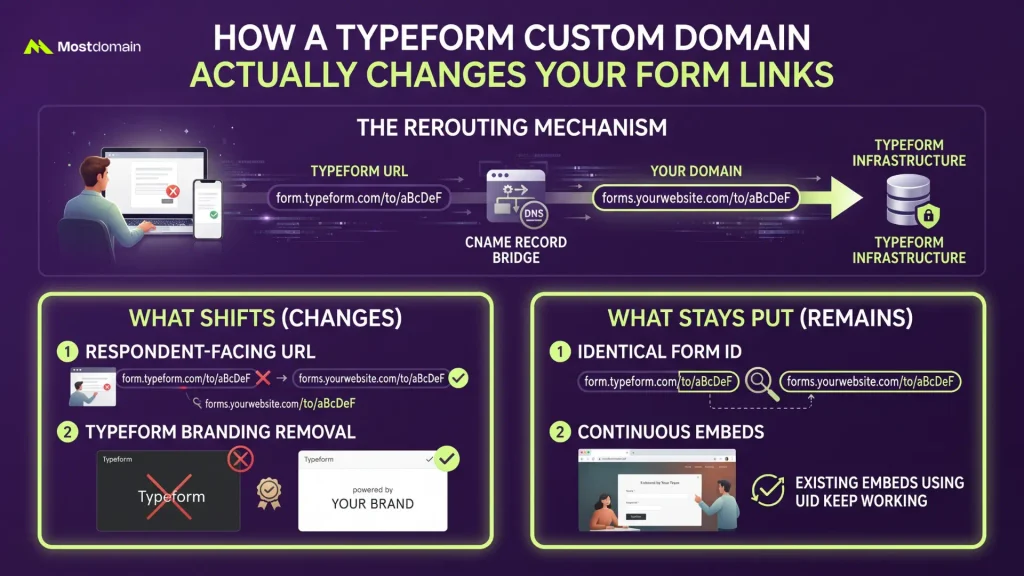
Under the hood, a Typeform custom domain works by rerouting form traffic. It routes through a domain you control, with a CNAME record acting as the bridge between your DNS and Typeform’s infrastructure. Nothing about the form itself changes on the backend.
What shifts, and what stays put:
- The URL your respondents see, no more form.typeform.com
- Removal of Typeform’s own branding on paid tiers that already include that
- Form IDs at the end of the URL, which stay identical
- Existing embeds using the form UID, which keep working without a redirect notice showing up for visitors
Custom Domain vs Custom Subdomain, and Why the Difference Matters
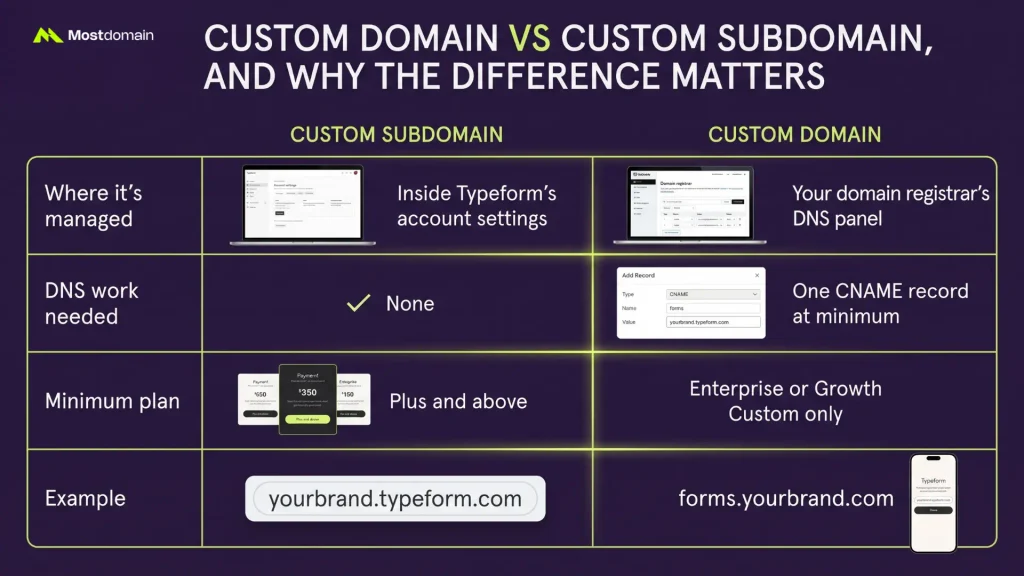
The real difference comes down to who manages the DNS. A custom subdomain lives entirely inside Typeform’s dashboard with zero external setup, while a genuine custom domain points to a domain you registered yourself and requires you to touch DNS records directly.
| Aspect | Custom Subdomain | Custom Domain |
| Where it’s managed | Inside Typeform’s account settings | Your domain registrar’s DNS panel |
| DNS work needed | None | One CNAME record at minimum |
| Minimum plan | Plus and above | Enterprise or Growth Custom only |
| Example | yourbrand.typeform.com | forms.yourbrand.com |
A lot of blog posts blur these two together. They’re really different features, and knowing which one you’re actually paying for saves a wasted upgrade.

Which Plan You Need and What It Really Costs
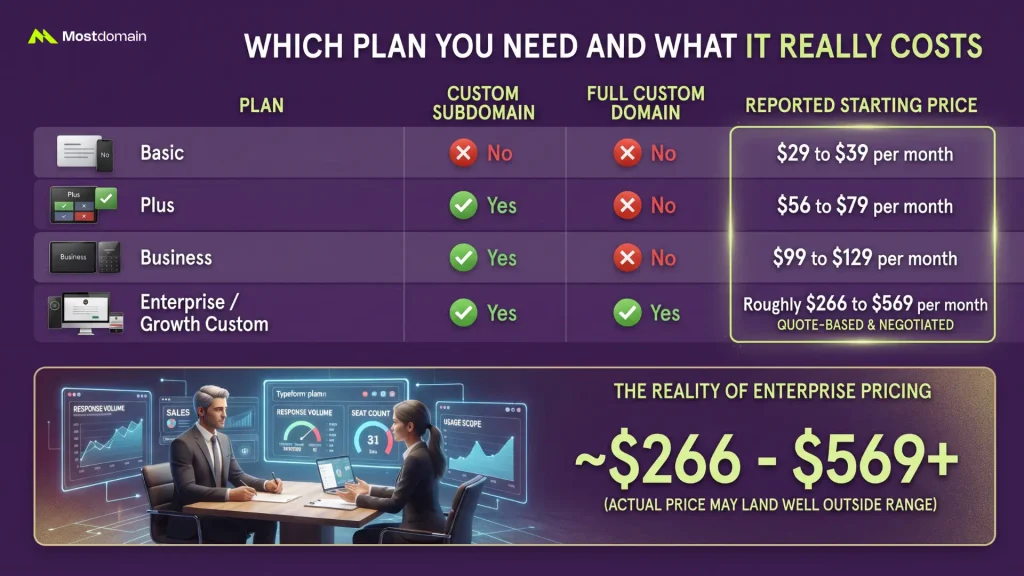
You need Typeform’s Enterprise plan, or the Growth Custom add-on, to unlock a full custom domain. Neither is publicly priced, and third-party trackers don’t fully agree on where Enterprise starts, with figures ranging from roughly $266 to $569 a month depending on which report you check and how usage is scoped.
| Plan | Custom Subdomain | Full Custom Domain | Reported Starting Price |
| Basic | No | No | $29 to $39 per month |
| Plus | Yes | No | $56 to $79 per month |
| Business | Yes | No | $99 to $129 per month |
| Enterprise / Growth Custom | Yes | Yes | Roughly $266 to $569 per month, quote-based |
That Enterprise range is closer to a rough estimate than anything binding, since actual pricing gets negotiated on response volume and seat count. The number you’re quoted might land well outside either end, honestly, and there’s no real way to know until sales gets involved.
Setting Up the CNAME Record Step by Step
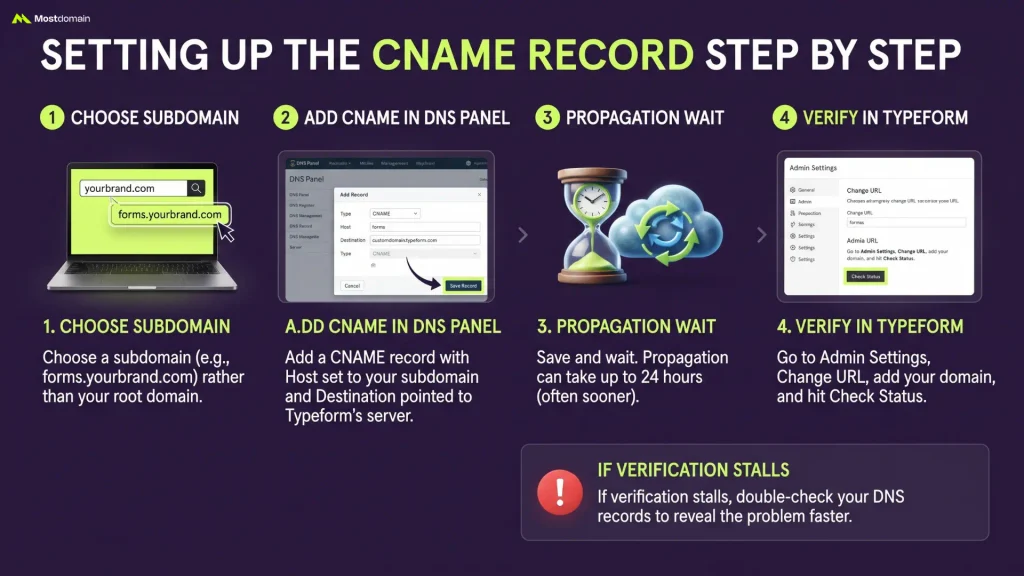
Setting up a Typeform custom domain boils down to one CNAME record pointed at Typeform’s server. Then a verification check inside Typeform’s admin panel. Here’s the actual sequence.




- Choose a subdomain rather than your root domain, something like forms.yourbrand.com
- In your registrar’s DNS panel, add a CNAME record with Host set to your chosen subdomain and Destination pointed to customdomain.typeform.com, or customdomain.eu.typeform.com if your account sits on the EU data center (a distinction tied to data residency rules, a separate rabbit hole we won’t go down here)
- Save the record and wait, propagation can take up to 24 hours even though it often finishes sooner
- Go to Admin Settings, then Change URL inside Typeform, add the domain, and hit Check Status
If verification stalls at step four, reading your DNS records correctly tends to reveal the problem faster than guessing.
Preparing Your Domain Before You Connect It
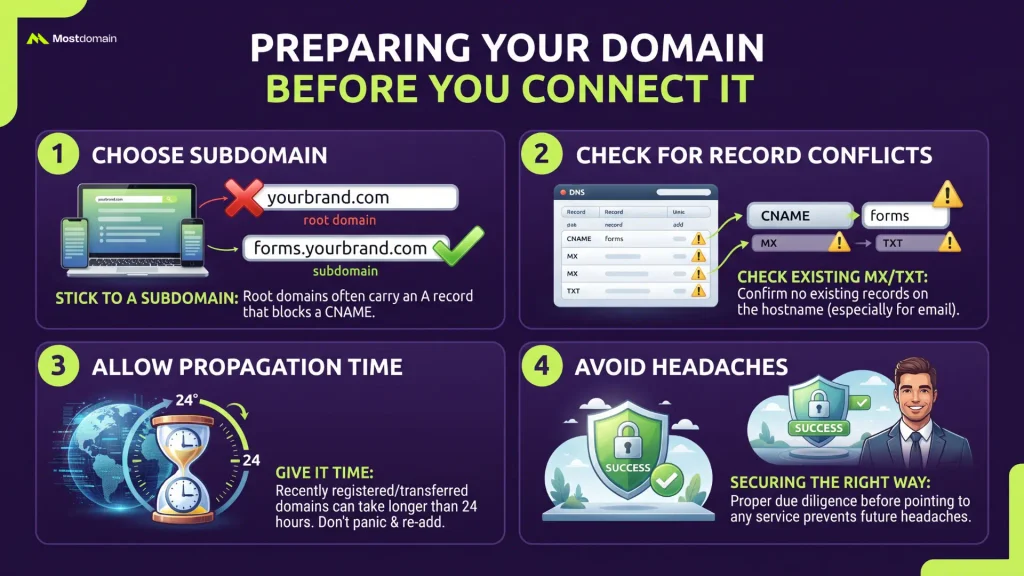
Most setup guides never mention this part. Checking for record conflicts and picking a subdomain over your root domain before you touch anything saves a redo later, sometimes a frustrating one.
A few things worth confirming first:
- Stick to a subdomain, since root domains often already carry an A record that blocks a clean CNAME on the same host
- Check whether that exact hostname already has an MX or TXT record attached, especially if the domain also handles email
- Give it time. Recently registered or transferred domains can take noticeably longer than the usual 24-hour window to fully propagate, so don’t panic and start re-adding the record
None of this is Typeform-specific, honestly. It’s the same due diligence that matters before pointing any domain at a third-party service. And securing a domain the right way from the start avoids most of these headaches entirely.
Does a Typeform Custom Domain Help or Hurt Your SEO
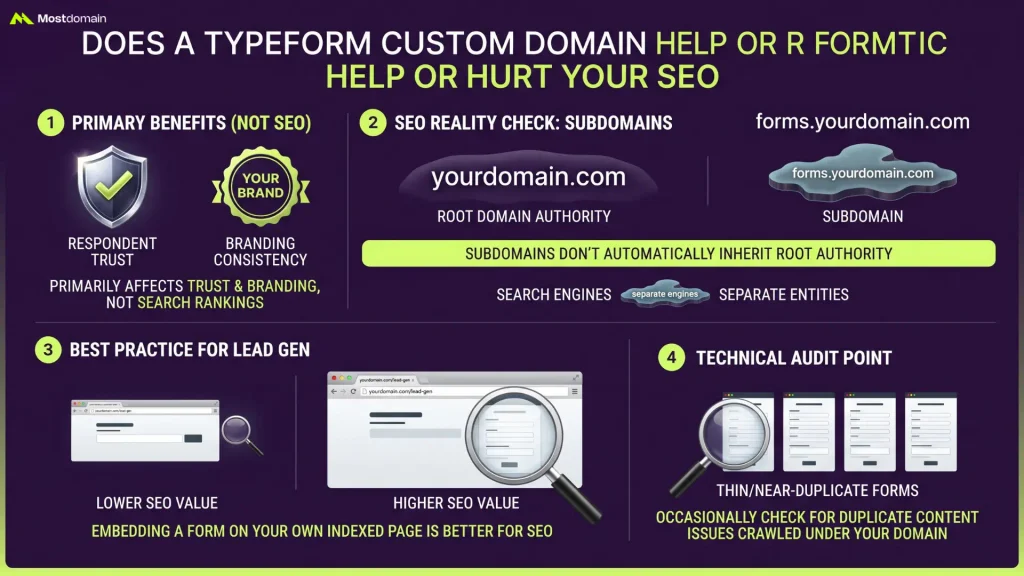
Branding and respondent trust, that’s mainly what a Typeform custom domain changes here, and search rankings barely enter the picture. Typeform forms are served through Typeform’s own infrastructure, and that content rarely gets indexed the way a normal page on your site would.
A subdomain doesn’t automatically inherit your root domain’s authority either, and search engines have gotten noticeably better at treating subdomains as somewhat separate entities worth evaluating on their own. If ranking a lead-gen page is the actual goal, a form embedded on your own indexed page will usually do more for you than a form living on a branded subdomain ever will. Check Google’s own search documentation if you want the underlying mechanics, and keep in mind that the same logic behind how TLDs affect SEO rankings applies here too, just more loosely.
Worth an occasional check: make sure Typeform isn’t letting thin, near-duplicate form pages get crawled under your domain by accident.
Options If You’re Not on an Enterprise Plan
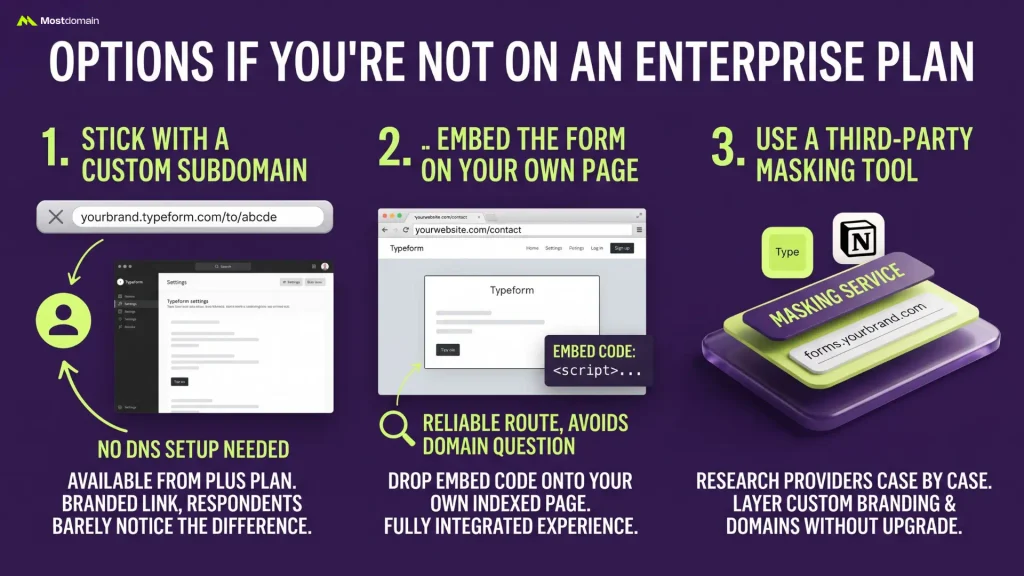
If Enterprise pricing is out of reach right now, the realistic paths are a custom subdomain, a full embed on your own page, or a masking tool built specifically for this gap.
Stick With a Custom Subdomain
Available from the Plus plan, this gets you a branded-looking link without touching DNS at all. It’s not a true custom domain, but for a lot of use cases the difference barely registers to respondents.
Embed the Form on Your Own Page
Dropping the Typeform embed code directly onto an indexed page on your own site sidesteps the domain question entirely. Typeform’s own community has noted that DNS-level forwarding to their servers isn’t officially supported, so a full-page embed or an HTTP redirect is the more reliable route if you’re trying to avoid Enterprise pricing altogether.
Use a Third-Party Masking Tool
A handful of tools exist purely to layer custom branding and domains on top of platforms like Typeform and Notion for accounts that aren’t on the qualifying tier. Worth researching case by case, since capability and reliability vary a fair bit between providers.
Fixing Common DNS Errors by Registrar
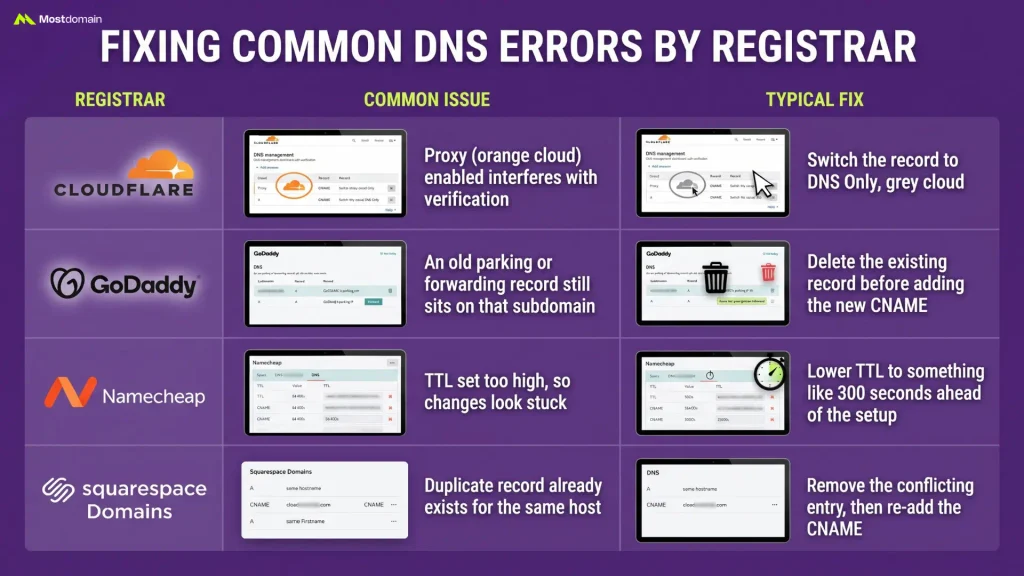
A typo in the CNAME target, a record already parked on the same host, or DNS caching that just hasn’t caught up. Any of those three explains most failed verifications. And the fix looks a little different depending on where the domain is actually registered.
| Registrar | Common Issue | Typical Fix |
| Cloudflare | Proxy (orange cloud) enabled on the CNAME interferes with verification | Switch the record to DNS Only, grey cloud |
| GoDaddy | An old parking or forwarding record still sits on that subdomain | Delete the existing record before adding the new CNAME |
| Namecheap | TTL set too high, so changes look stuck | Lower TTL to something like 300 seconds ahead of the setup |
| Squarespace Domains | Duplicate record already exists for the same host | Remove the conflicting entry, then re-add the CNAME |
These patterns show up across custom domain setups in general, and they’re worth checking before assuming something’s uniquely broken with your account.
FAQ
Can I use a Typeform custom domain on the free plan?
No. A custom domain requires either an Enterprise plan or the Growth Custom add-on. Both of which sit well above the free tier.
What happens to my old form links once I switch?
They keep working. Respondents don’t see a redirect notice. And the original standard URL, any custom subdomain, and the new custom domain all continue to function side by side.
How long does DNS propagation actually take?
Typeform states up to 24 hours. Though in practice it often resolves within a few hours depending on the registrar and how aggressively local DNS caches refresh.
Will a custom domain improve my form’s SEO?
Not meaningfully. It’s a branding and trust upgrade for respondents, not a ranking mechanism, since form pages served through Typeform’s infrastructure aren’t typically indexed as standalone content.
Can I connect more than one custom domain to my account?
Yes, Typeform allows up to 10 custom domains per account. And you can assign a specific one to each form individually when sharing it.
What if I can’t justify Enterprise pricing right now?
A custom subdomain from the Plus plan, a direct embed on your own indexed page, or a masking tool built specifically for this gap are the three realistic workarounds, each with different tradeoffs worth weighing against your budget.
References
- Typeform Help Center, “Custom domains (for Enterprise plus and Growth Custom accounts)”
- forms.app Blog, “How to set up a custom domain in Typeform”
- Typeform Community, “Typeform Custom Domains Still Possible?”
- Typeform Community, “Forwarding a subdomain to a published Typeform”
- FormNX, “Typeform Pricing 2026: Plans, Limits & Real Cost”
- Typeform Help Center, “How to customize your form URL”