
Issues with domain marketplace purchases are more frequent than buyers anticipate and the cause is rarely the price. It is the past.
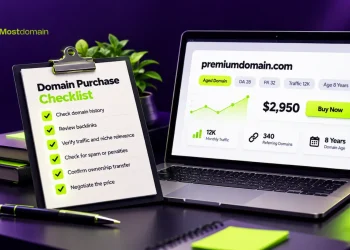
Buying a domain from a reseller or auction site is not starting with a blank slate. You are inheriting whatever the previous owner exercised domain, whether it be spam, black-hat link building, or phishing pages that run for years before the domain is listed for sale. This is a practical guide to the hidden problems to uncover before your transfer is complete.
What Makes a Domain “Spammy” in the First Place
Time contributes to spam label signals instead of a domain arriving pre-labeled spam.
A domain’s previous owners may have abused the domain to send out unsolicited emails at scale, host thin affiliate content to manipulate rankings via predatory links, or run link schemes to hundreds of unrelated sites with low-quality backlinks. All of this is not reflected in any listings. You have to look for it.
The most obvious impact of purchasing a poisoned domain is the search engines’ perception before your first page is even live. Inherited penalties are time-consuming to recover from, and there are no guarantees that you even get to where you want to go.
Check the Domain’s Browsing History First
The starting point has to be the Wayback Machine at archive.org.

You can search for a domain and see archived snapshots for a period of time and across different years. Not a domain to be picked if it’s a travel blog that’s a genuine domain registered in 2020 and then became a pharmaceutical doorway page, then sat listed and dormant. We’re looking for the content shifts. Look for the big layout changes, too, and in the content domain, big ad placements and a lot of parked pages.
Increasing and decreasing content in archive snapshots is important info. It’s a domain registered for seven years and has no crawl history, so no crawls and that domain probably has a lot of suppression and manipulation, so look for that absence of presence because that’s a flag.
Run a Spam Score Check Before You Contact the Seller
In the case of each of these platforms, one of the things that they will tell you is whether they assign a score (in the case of Moz, they call it a Spam Score) to measure whether a domain is spammy or toxic. So, it is best to run all three tools, rather than one.


With Moz, scores under 10% are deemed acceptable (upper thresholds of 30% or greater typically mean that you need to assess the backlinks one by one, and not just the collective backlinks). Similar is the case with SEMrush’s Toxicity Score, which aims to aggregate the quality signals for the referring domains and tries to come up with an aggregate single risk score.
Before diving into anchor text, it helps to know which tool is doing what. Each service in the table below covers a different layer of risk, and none of them overlap enough to make the others redundant.
Tools Table
| Tool | What It Checks | Risk Threshold to Watch |
| Moz Link Explorer | Spam Score based on backlink quality signals | Above 30% warrants a closer look at individual referring domains |
| Ahrefs / SEMrush | Backlink toxicity, anchor text distribution, link velocity spikes | Exact-match commercial anchors exceeding 25% of total profile |
| Wayback Machine | Historical website content across archived snapshots | Abrupt topic shifts or gaps of several years with no crawl activity |
| MXToolbox | Email blacklists and IP-based sender reputation databases | Any active listing across 100+ blacklist sources |
| Google Transparency Report | Malware, phishing flags, and deceptive content history | Any flag, regardless of how old, warrants a direct follow-up |
| Sucuri SiteCheck | Active infections, threat signatures, and security scanner feeds | Known threat signatures or recent malware detections |
No single tool in this list tells the full story on its own. Running Moz alone tells you about link quality. Running MXToolbox alone tells you about email reputation. The picture only becomes reliable when the results from all six point in the same direction.
Dig Into the Backlink Anchor Text
Distributing anchor text looks poor from a spam perspective.
An untainted domain possesses a backlink structure that mirrors the way people normally cite sources: brand mentions, plain URLs, some funneling phrases, and here and there, a topic-related descriptor. A domain suspected of having a spam backlink profile will be noticeably different. Anchors texted commercial keywords that match exactly and are in a quantity no rational backlinking activity would account for.
If a domain’s anchor text surpasses widely accepted limits of spam, in the odd case that domain is reputable, and targets exact match keywords of a transactional nature that bear no relation to what the domain represents, that is not ambiguous. It is a documented example of malfeasance. It doesn’t matter whether it was done by the current owner, the previous one, or if they monetarily lost access.
Cross-Check Against Blacklists and Security Databases
Spam score tools consider SEO risk. Blacklist tools consider something entirely different.
The three services we’re focusing on are Google’s Transparency Report, Sucuri SiteCheck, and MXToolbox; all three have completely different purposes. Google’s report identifies domains associated with malware or deceptive practices. Sucuri reports whether an active infection is present, as well as whether there are known threat signatures. MXToolbox combines more than a hundred different email and IP blacklists to determine if the domain’s reputation as the sender (due to bulk emails) has been compromised.
Use all three. While a domain may be clean from an SEO perspective, it may still be on a spam blacklist due to a campaign that ended three years ago. This scenario is more likely than most potential buyers think, especially for domain marketplace listings, and is particularly important for any company that relies on transactional email.
Red Flags That Should Stop the Purchase Entirely
Some concerns warrant further investigation. Some justify avoidance without further negotiations. Understanding the distinction is critical.
- Historical archives showing abrupt changes in content direction. A domain that suddenly transitioned from a legitimate niche to gambling, pharmaceuticals, or adult content earns a negative prejudice that even the most extreme SEO remediation may not be able to fix. In this case, the pivot is the signal.
- Any active entry in MXToolbox blacklist. Not historical and resolved, but an active flag. If the domain is still registered in your email or IP blacklists at the time of your review, that damage to the sending reputation is a reality, not a conjecture.
- Multi-year gaps in a domain’s archive. An aged domain registered in 2016 with no archived content from 2018 to 2023, was either intentionally suppressed or significantly manipulated in that time frame.
- No viable explanation for a 50+% spam score. There may be an isolated bad cluster of links for some that can be disavowed. A score at this level for a domain coming from many URLs is part of a broad and deep structural issue rather than an isolated one.
Marketplace Considerations
How domains are sold through marketplace platforms varies wildly. Of primary concern are two elements:
- Payment held in escrow. Some platforms hold payment from the buyer until the seller submits proof of completion for the domain transfer. This removes the most common instance of fraud where the seller collects payment and does not perform a domain transfer. Without this feature, the marketplace is not worth considering.
- Domain seller verification and listing criteria. Not every site has a good domain seller vetting process. Some may simply list a domain with no seller disputes. Others conduct a reputation check on the seller before the domain is ready for search. Some may not appear much different on the main page, but you may notice this in the site policies or the speed of customer support in responding to queries regarding seller responsibility.
When a Deal Looks Right but the History Looks Questionable
This occurs more often than clean cases do.
You come across a domain that fits, dare I say perfectly in length, extension, name, all in context for when you are building. The spam score is on the verge of being acceptable, but the grace is there. The wayback shows one random chapter from like four years ago, and that’s it. There’s not a single spam domain. It entirely depends on what you’re willing to do for the domain in terms of rehabilitation and how sensitive the domain’s intended purpose is for email deliverability. For web projects where email is more of a secondary thing, a spam history is still a factor. For projects where email is the primary purpose, then a domain with a spam history is still an avoidable risk regardless of the name of the domain.
The tools must be trusted. The name can wait.
Frequently Asked Questions
What could lead to a domain developing a spam history before it gets put on the market?
The greatest portion of a spam history develops over time rather than getting spammed out in one major event. A domain could have one of its previous owners operating a link selling business for 2-3 years. Once the domain expires it goes to the secondary market with a backlink profile. Listings look normal. Histories do not.
What do I do to determine whether a domain is blacklisted?
MXToolbox’s blacklist checker combined with Google Transparency Report with Sucuri SiteCheck is the ideal solution. Between these three methods, you will be able to manage email blacklists, web threat databases, and security scanner feeds. You can’t do these checks individually, and the coverage of each is not comprehensive so some overlap is likely.
Should I avoid a domain with a high Moz Spam Score?
Not with a high degree of certainty. A score above 30% is reason to do some more analysis, and not a reason to automatically exclude that score. Some reasons for concern are in a domain’s profile; for example, spam anchor text, links to blacklisted ref domains, or links acquired in large quantities over a short period of time.
Once a domain is bought, can you recover the spam domain?
This can happen, but the time it will take is a large unpredictive portion. Toxicity on backlinks can be addressed using Google’s Disavow Tool, and most registries permit requests to remove domains from blacklists. The hardest task is rebuilding trust with the search engine which will happen faster than most buyers are expecting, but will take a lot longer than most buyers. It is not guaranteed to happen.
Is it safe to buy from a domain marketplace if I perform certain checks?
Yes, as long as you conduct checks that include an escrow service and some basic listing criteria that the marketplace itself defines. The marketplace itself is safe and neutral. The largest risk is posed by the domain’s past owners, which is where thorough checks will help mitigate the risk.
What do domain professionals use to check domains?
Most professionals check a combination of various sources, such as backlink checkers Ahrefs or SEMrush, a Malware check by Moz (Spam Score), the Wayback Machine (for viewing the content history and previous owners of a site), and WHOIS (for finding the ownership records), and MXToolbox to check if a domain has been blacklisted. Using all five checks is the main differentiator between being cautious about a domain purchase and leaving it all to guesswork.
References
- Google Transparency Report, Google Safety Center
- Moz, Spam Score: Moz’s Link-Based Spam Detection Metric
- Ahrefs, Backlink Analysis Documentation
- MXToolbox, Email Blacklist Check
- Internet Archive, Wayback Machine (archive.org)
- Domcop, How To Check Domain History (2026 Guide)
- BoldDomains, How to Check Domain History Before Buying (2026)