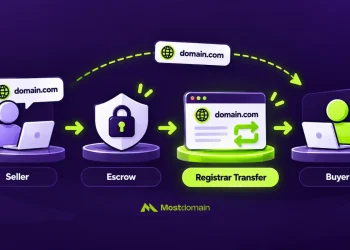

Domain Migration Checklist: What to Do After Buying an Aged Domain – Domain migration checklist is essential when you purchase an aged domain to preserve its SEO value and ensure a smooth transition.
Buying an aged domain offers advantages like established backlinks and domain authority, but without proper website transfer planning, you risk losing everything. This guide walks you through every critical step.
Understanding Domain Migration
Domain migration is the process of moving a website from one domain to another while preserving SEO equity, traffic, and functionality. When you buy an aged domain, this process requires extra attention because you are inheriting the domain’s history, backlinks, and potential issues. The migration involves technical steps like DNS update, URL redirection, and SSL certificate migration.
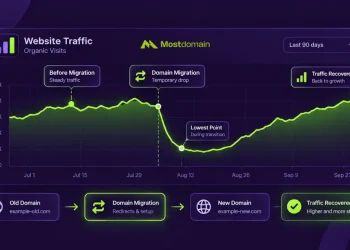
Unlike registering a fresh domain, an aged domain comes with existing search engine indexing status and established authority signals. Proper migration ensures you keep the SEO benefits while avoiding penalties from previous owners. A failed website transfer can result in 30 to 50 percent traffic loss within weeks, making your investment worthless.
Pre-Migration Checklist
1. Conduct Due Diligence on Your Aged Domain
Before any domain migration, verify the domain’s history thoroughly. Check the Wayback Machine for previous content, analyze the backlink profile using tools like Ahrefs or Semrush, and verify there are no Google penalties in Search Console. Look for signs of spam, adult content, or black hat SEO tactics that could hurt your rankings.
| Check Item | Tool to Use | What to Look For |
| Domain History | Wayback Machine | Spam content, adult material |
| Backlink Profile | Ahrefs, Semrush | Toxic links, anchor text |
| Penalty Status | Google Search Console | Manual actions |
| Spam Score | Moz | Score above 30 percent |
2. Backup Data and Document Everything
Create complete backups before starting your domain migration checklist tasks. Export your current website files, databases, and configurations. Document all existing URL redirection rules and current DNS settings for reference. This documentation becomes invaluable if you need to troubleshoot issues later or rollback changes.

3. Set Up Hosting and DNS Configuration
Your DNS update process begins with choosing reliable hosting. Point your nameservers to the new host and allow 24 to 48 hours for propagation. Verify the connection using DNS lookup tools before proceeding with website transfer.
4. Install SSL Certificate
SSL certificate migration protects your site and maintains trust signals. Install SSL on the new hosting before going live. Google considers HTTPS a ranking factor, making this step nonnegotiable for SEO preservation.
5. Plan Your Email Transition
Email transition requires careful MX record configuration. Set up email accounts on the new hosting, configure SPF and DKIM records for deliverability, and test thoroughly. Notify stakeholders about the domain migration timeline to prevent communication gaps.



Migration Day Checklist
6. Implement DNS Update
Execute your DNS update during low traffic hours, typically late night or early morning on weekdays. Update A records point to the new server IP, configure CNAME records for subdomains, and set TTL values to minimum for faster propagation. Monitor the transition using multiple DNS checking tools to confirm global propagation.
7. Configure 301 Redirects Properly
URL redirection using 301 redirects is critical for SEO preservation and maintaining your aged domain authority. Map every old URL to its new equivalent using a comprehensive redirect map spreadsheet. Avoid redirect chains and ensure each redirect resolves in a single hop for maximum link equity transfer.
✓ Redirect homepage to new homepage
✓ Redirect all internal pages with matching URLs
✓ Redirect old images and media files
✓ Handle 404 pages with appropriate redirects
✗ Never use 302 temporary redirects for permanent moves
✗ Avoid redirect loops at all costs
8. Update Internal Links
Internal links update prevents unnecessary redirect hops. Search your database for old domain references and replace them with new URLs. This includes navigation menus, footer links, content links, and hardcoded URLs in templates.
9. Manage External Links and Backlinks
External links update involves reaching out to high-value referring domains. Contact webmasters of sites linking to you and request URL updates. Focus on your top 20 backlinks first, as they carry the most authority for SEO preservation.
10. Execute Technical Testing
Technical testing validates every aspect of your domain migration. Check all pages load correctly, verify forms and functionality work, test on multiple devices and browsers, and confirm analytics tracking fires properly.
Post-Migration Checklist
11. Verify Search Engine Indexing
Submit your new sitemap to Google Search Console for faster search engine indexing of your migrated content. Use the URL Inspection tool to request indexing of priority pages like your homepage and top converting pages. Monitor the Index Coverage report daily for the first two weeks after website transfer to catch any crawl errors early.
12. Configure Analytics Tracking
Analytics tracking setup ensures you capture all post migration data accurately. Update Google Analytics property settings with your new domain, configure goals and conversions to match pre migration setup, and set up comparison views to measure against your baseline benchmarks. Track traffic analysis metrics closely to identify any unusual patterns.
13. Monitor Traffic and Rankings
Perform daily traffic analysis for the first month post migration to catch issues before they compound. Compare organic traffic, keyword rankings, and user behavior metrics against your baseline data from before the domain migration. Expect some fluctuation during this period as search engines reindex your content. Rankings typically stabilize within four to six weeks.
Important: A temporary 10 to 20 percent drop in traffic is normal during domain migration. Significant drops beyond 30 percent indicate implementation issues requiring immediate attention and troubleshooting.
14. Implement Downtime Minimization
Downtime minimization protects user experience and SEO. Monitor uptime using tools like UptimeRobot, set up alerts for any outages, and have a rollback plan ready. Quick response to issues prevents long-term ranking damage.
Common Aged Domain Migration Mistakes
Ignoring Domain History
Many buyers skip due diligence and inherit penalized domains without knowing it. Always verify aged domain history before finalizing your purchase using multiple verification tools. Hidden spam links, previous black hat SEO tactics, or adult content associations can tank your domain migration efforts and waste your investment entirely.
Improper Redirect Implementation
Broken or missing URL redirection is the top cause of post migration traffic loss for aged domain purchases. Test every redirect individually, check for redirect chains that dilute link equity, and verify proper 301 status codes are returned. Use Screaming Frog or similar crawler to validate your complete redirect map before and after going live.
Neglecting Stakeholder Communication
Stakeholder communication keeps your entire team aligned during the domain migration process. Inform your team members, clients, partners, and vendors about the migration timeline and expected changes. Update all business listings, social media profiles, email signatures, and marketing materials with the new domain promptly.
Essential Tools for Domain Migration
Successful domain migration requires the right tools for each phase of the process. Here are the essential tools organized by category that professionals use for SEO preservation and smooth website transfer execution.
| Category | Recommended Tools | Purpose |
| SEO Analysis | Ahrefs, Semrush, Moz | Backlink audit and keyword tracking |
| DNS Testing | DNS Checker, MX Toolbox | Verify propagation and records |
| Redirect Validation | Screaming Frog, Redirect Checker | Test 301 redirect implementation |
| Monitoring | Google Search Console, Analytics | Track indexing and traffic |
| Uptime Tracking | UptimeRobot, Pingdom | Alert on downtime issues |
Take Action and Protect Your Investment
A successful domain migration checklist execution requires patience, attention to detail, and consistent monitoring over several weeks. Your aged domain will retain its SEO value and authority if you follow proper URL redirection protocols, maintain accurate analytics tracking, and address any issues quickly as they arise. Bookmark this guide and revisit it throughout your website transfer process to ensure nothing falls through the cracks and your investment pays off.
Build Your Website on a Strong Foundation
A successful website starts with the right domain.
MostDomain Premium Collection offers exclusive aged domain designed to build credibility, authority, and digital competitiveness from day one.
✅ Easier to trust
✅ SEO-ready with strong backlink history
✅ A valuable digital asset that continues to increase in investment value
Check our premium domain collection before they’re gone →
Visit Most Domain →
Need help choosing the right aged domain? Contact our admin on Telegram: @mostdomain_cs
References
- Semrush Blog. The Complete Website Migration Checklist. Published April 2024
- Backlinko. Website Migration SEO Checklist with 88 Steps. Updated July 2025
- Ahrefs Blog. A Website Migration Takes More Than A Checklist To Be Successful. Updated January 2025
- Google Search Central. Site Moves and Migrations Documentation
- Moz. Domain Authority and Migration Best Practices Guide