
A real aged domain audit checklist checks five things most guides only skim before you buy: ownership history, redirect manipulation, penalty signals, the inherited backlink profile, and legal exposure, then combines all five into one decision instead of leaving you with a pile of disconnected data points. Most checklists stop at the first four. That last step, turning findings into an actual go or no-go call, is where this one goes further.
What Is Aged Domain Audit
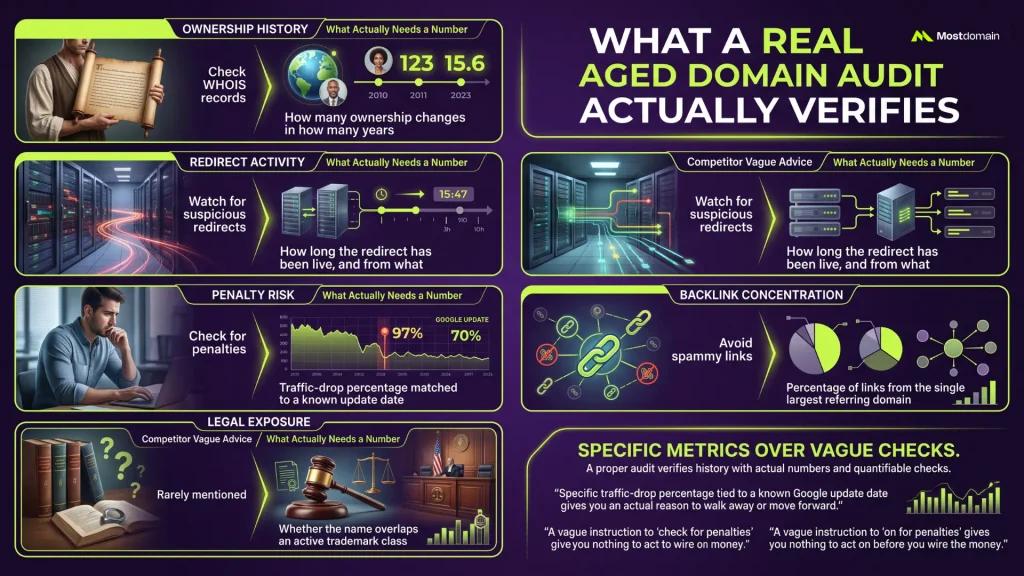
A proper audit verifies whether the domain’s history helps or hurts the site you’re about to build on it, and it does that by checking categories most checklists list but never quantify.
| Category | What competitors usually say | What actually needs a number |
| Ownership history | “Check WHOIS records” | How many ownership changes in how many years |
| Redirect activity | “Watch for suspicious redirects” | How long the redirect has been live, and from what |
| Penalty risk | “Check for penalties” | Traffic-drop percentage matched to a known update date |
| Backlink concentration | “Avoid spammy links” | Percentage of links from the single largest referring domain |
| Legal exposure | Rarely mentioned at all | Whether the name overlaps an active trademark class |
The gap between the middle and right columns is where most audits fall apart before a purchase goes wrong. A vague instruction to “check for penalties” gives you nothing to act on before you wire the money. A specific traffic-drop percentage tied to a known Google update date gives you an actual reason to walk away or move forward.
Confirming Ownership and Content History Before You Buy
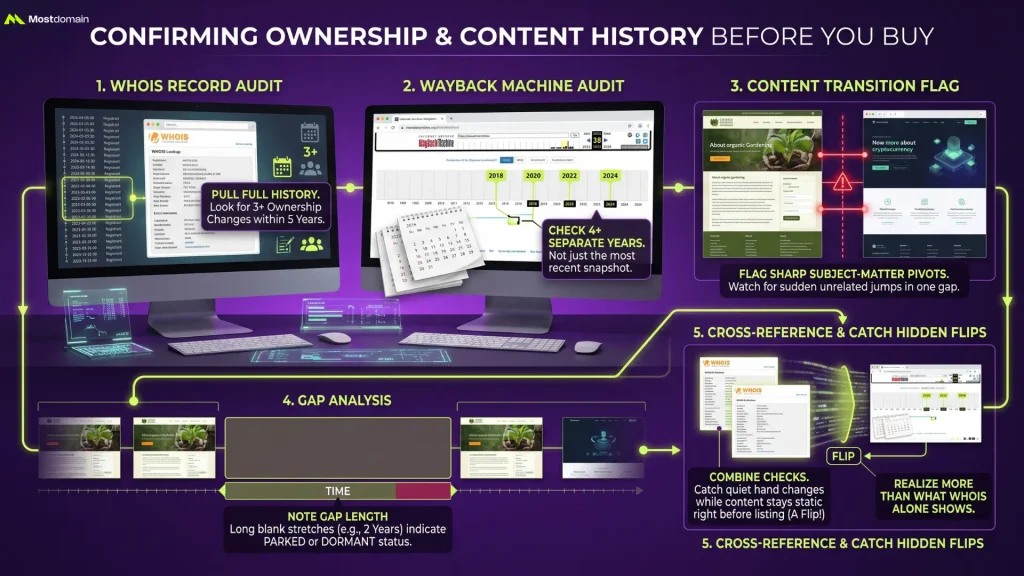
Ownership and content history get confirmed by cross-referencing WHOIS records against Wayback Machine snapshots, not by trusting either source alone or the seller’s word for it.
- Pull the full WHOIS history, not just the current registrant. Three or more ownership changes within five years is a pattern worth investigating further, not an automatic disqualifier
- Check Wayback Machine snapshots across at least four separate years, not just the most recent one before it went up for sale
- Flag any snapshot showing a sharp subject-matter pivot, a site that spent years covering one topic and then jumped to something unrelated within a single snapshot gap
- Note the gap length between snapshots. A two-year blank stretch usually means the domain sat parked or dormant before resurfacing on the market, which isn’t inherently bad but changes how you read everything else about it
A WHOIS lookup pulls the registration data itself. Cross-checking that against the content history is the step that actually catches something WHOIS alone can’t: a domain that changed hands quietly right before listing while the content stayed static, which usually means a flip rather than an organic ownership transition.
Spotting Manipulated Redirects and Inflated Metrics
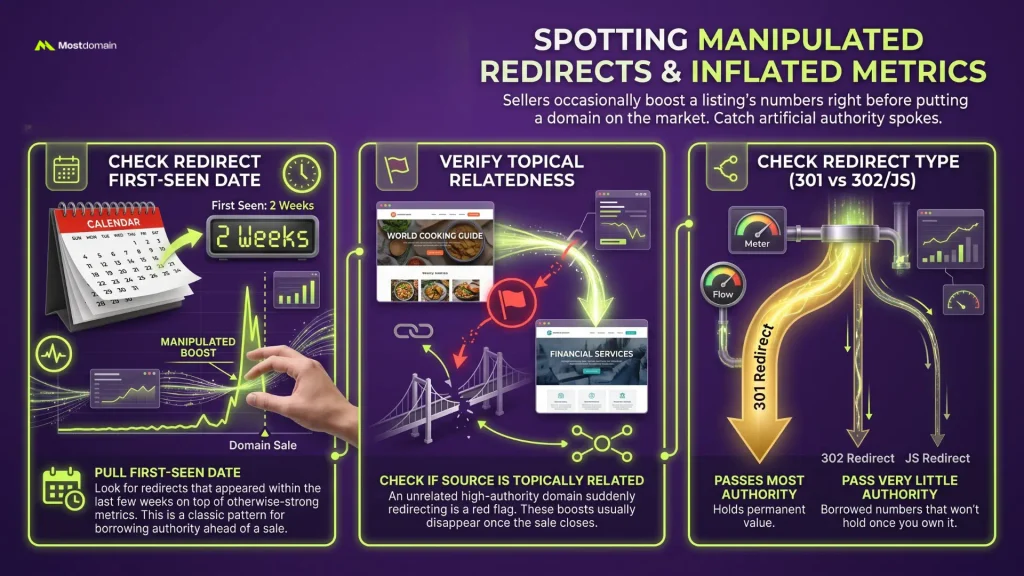
Manipulated redirects get caught by checking how long a redirect has been active and where it points from, since sellers occasionally boost a listing’s numbers right before putting a domain on the market.

- Pull the redirect’s first-seen date. A redirect that appeared within the last few weeks, sitting on top of otherwise-strong metrics, is the classic pattern for a seller borrowing authority just ahead of a sale
- Check whether the source of the redirect is topically related at all. An unrelated high-authority domain suddenly redirecting into the one you’re evaluating is a red flag on its own, and it usually disappears the moment the sale closes
- Verify the redirect type. A 301 passes most of its authority through; a 302 or a JavaScript redirect passes very little, so a domain leaning on either for its metrics is quietly borrowing numbers that won’t hold once you own it
The mechanics of implementing redirects properly, and how long search engines take to fully process one, get covered in more depth in the 301 vs 302 guide. What matters here is narrower: catching a redirect that exists purely to inflate a domain’s apparent authority before you buy it.
Checking for Penalty Signals and Index Health
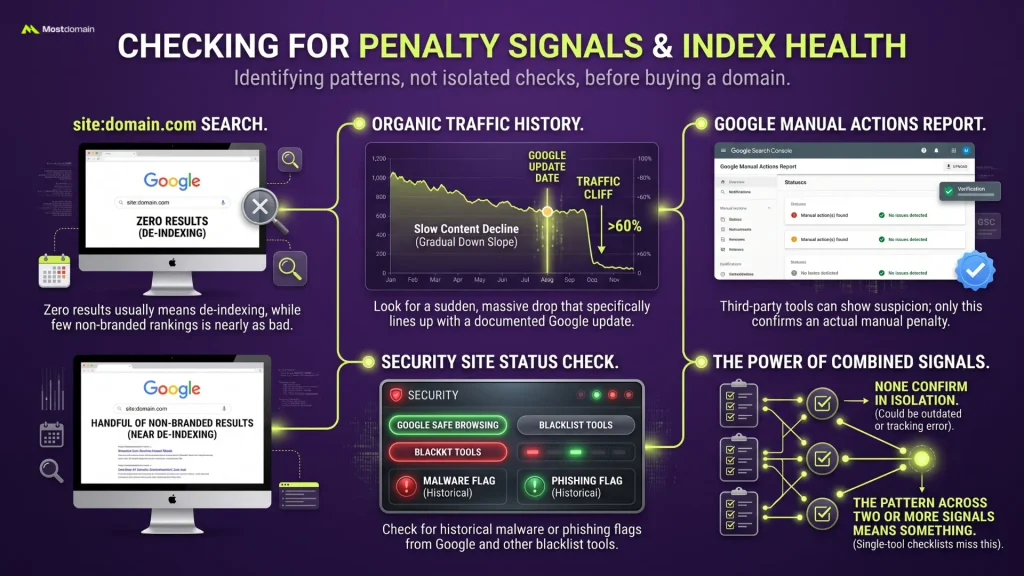
Penalty signals show up as a specific pattern: a traffic drop that lines up with a known algorithm update date, paired with a domain still technically indexed but functionally invisible in search.
- Run a site:domain.com search first. Zero results usually means de-indexing, though a handful of results with none ranking for the domain’s own brand name is nearly as bad
- Pull the organic traffic history and look for a cliff rather than a gradual decline. A sudden 60%+ drop that lines up with a documented Google update date points to an algorithmic hit specifically, not a slow content-quality slide the previous owner just let happen
- Check Google’s Manual Actions report if the seller will give you any access to it. Third-party tools can flag suspicion; only this report confirms an actual manual penalty
- Run the domain through Google Safe Browsing’s site status check and at least one blacklist tool for historical malware or phishing flags
None of these checks confirm a penalty in isolation. A traffic cliff without a matching update date could be a tracking error. A single blacklist hit could be outdated. The pattern across two or more of these signals is what actually means something, and that’s the piece most single-tool checklists miss because they only run one check before recommending you buy.




Reading the Inherited Backlink Profile Without Repeating the Referring Domain Math
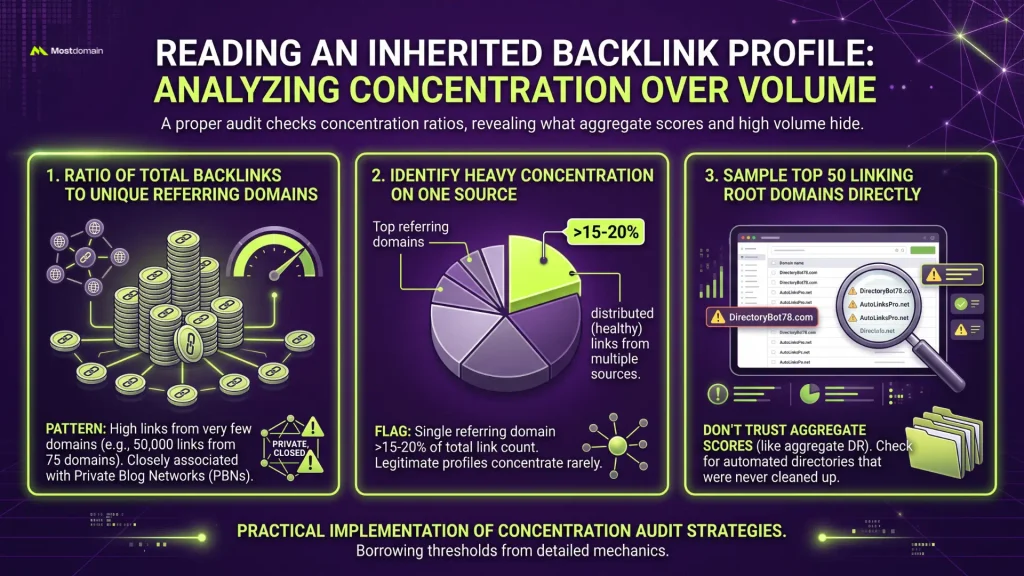
The backlink profile gets read by checking concentration, not volume, since a big link count on its own tells you almost nothing about what you’re actually inheriting.
- Pull the ratio of total backlinks to unique referring domains. A domain showing thousands of backlinks from under a hundred referring domains is the concentration pattern most closely associated with private blog networks
- Flag any single referring domain responsible for more than roughly 15-20% of the total link count. Legitimate link profiles rarely concentrate that heavily on one source
- Sample the top 50 linking root domains directly rather than trusting an aggregate authority score. A domain can show a respectable average DR while half its top links come from clearly automated directories the previous owner never bothered cleaning up
The full mechanics of why referring domain count matters more than raw backlink volume, along with the specific ratios that separate a healthy profile from a risky one, are already covered in depth in referring domains vs backlinks and what a referring domain actually is. This audit borrows the concentration threshold from there rather than re-deriving it.
Checking for Trademark and Legal Exposure
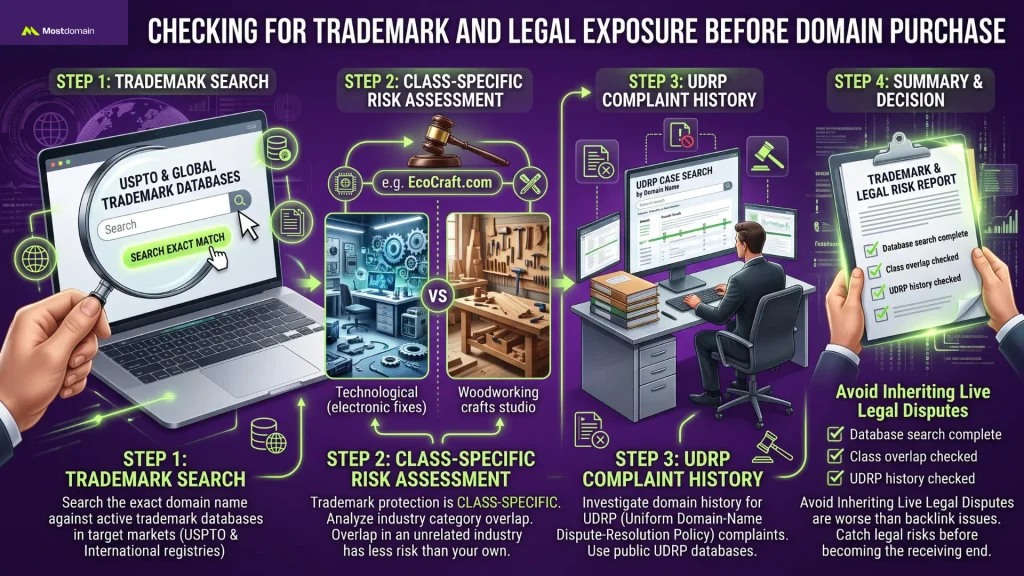
Trademark exposure gets checked by searching the domain name against active trademark databases in your target market, a step almost no aged-domain checklist includes at all.
- Search the exact name against USPTO’s trademark database if operating in the US, plus any target country’s equivalent registry
- Check whether the name closely resembles an existing brand in an unrelated industry. Trademark protection is class-specific, so a name overlapping a brand in a completely different category carries less risk than one in your own space
- Look for any history of UDRP complaints filed against the domain itself, which public UDRP case databases make searchable by domain name, since inheriting a domain with a live dispute history is worse than any backlink problem
This check gets skipped constantly because it sits outside typical SEO tooling entirely. The UDRP process guide covers what happens if a dispute actually gets filed against a domain you now own. The goal here is catching that risk before you’re the one on the receiving end of one.
Turning Findings Into a Score
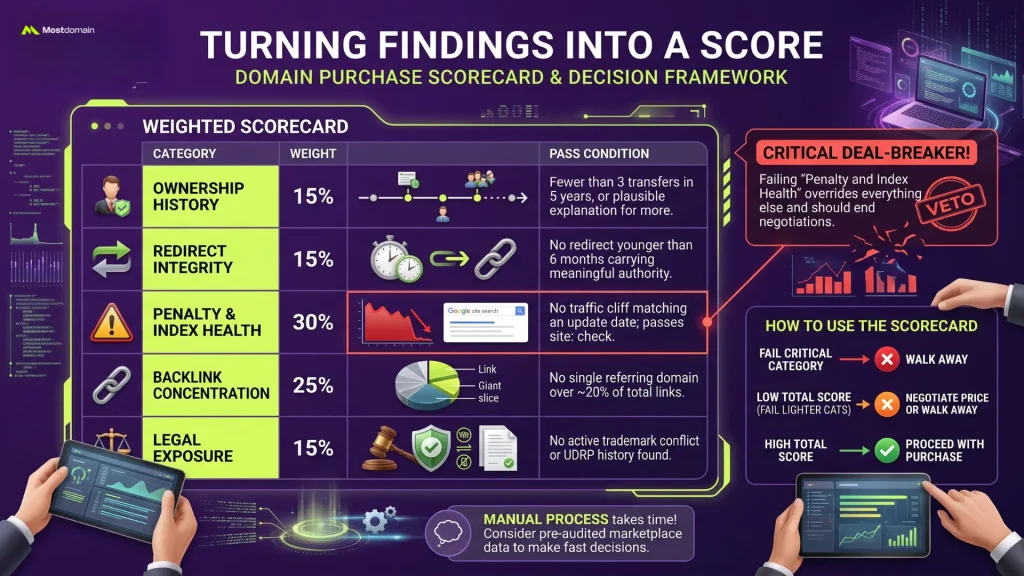
Findings turn into a usable purchase decision through a weighted scorecard, since a list of six separate checks with no way to combine them just produces analysis paralysis right when you need to decide.
| Category | Weight | Pass condition |
| Ownership history | 15% | Fewer than 3 transfers in 5 years, or a plausible explanation for more |
| Redirect integrity | 15% | No redirect younger than 6 months carrying meaningful authority |
| Penalty and index health | 30% | No traffic cliff matching an update date; passes site: check |
| Backlink concentration | 25% | No single referring domain over ~20% of total links |
| Legal exposure | 15% | No active trademark conflict or UDRP history found |
A domain failing the penalty and index health category alone should probably end the negotiation regardless of how well it scores elsewhere, since that’s the one category where a bad result tends to override everything else. Failing two or more of the lighter-weighted categories is a fair reason to negotiate the price down or walk away, not necessarily an automatic pass.
Running this whole process manually on every domain you’re considering takes real time, which is exactly why some buyers lean on marketplaces that publish this kind of audit upfront rather than starting from zero on each listing.
FAQ
How long does a proper aged domain audit actually take?
A single domain, checked manually against every category here, usually takes two to four hours for someone comfortable with the tools involved. Automated tools speed up the data pull significantly but still need a human pass to catch pattern-level red flags like redirect timing or content pivots that no dashboard flags automatically.
Is a low Domain Rating or Domain Authority score automatically disqualifying?
No. A low score just means less accumulated authority, not necessarily risk. A domain with a modest DR and a clean, concentrated-in-the-right-way backlink profile often carries less actual risk than a high-DR domain with a heavily manipulated link history.
What’s the single biggest red flag when auditing an aged domain?
A traffic cliff that lines up precisely with a documented Google algorithm update date, combined with the domain still technically indexed. That combination points to an algorithmic penalty specifically, which is far harder to reverse than a slow organic decline, and it rarely shows up in a seller’s own metrics screenshot.
Can third-party tools like Ahrefs or Semrush fully replace a manual check?
Not entirely. They’re essential for pulling the raw data, referring domain counts, traffic history, redirect chains, but they can’t confirm a manual Google penalty (only Search Console’s Manual Actions report does that, and you’d need the seller to share it) and they don’t check trademark databases at all.
Does a clean audit guarantee an aged domain will rank well after purchase?
No. It rules out inherited risk, which is a different thing from guaranteeing performance. A domain can pass every check here and still need genuinely good content and continued link-earning effort to actually rank for anything competitive once it’s yours.
References
- Google Search Console Help, Manual Actions Report
- Internet Archive, Wayback Machine
- Google Safe Browsing, Site Status Documentation