Strip away the jargon and a federated domain comes down to this: authentication happens somewhere other than Microsoft Entra ID, usually on an on-premises system like Active Directory Federation Services (ADFS), Okta, or PingFederate. Entra ID never touches the password. It just checks a signed token that gets handed back from that outside system.
If you run Microsoft 365 or anything hybrid on Azure, this term shows up sooner or later. And it’s not a switch you flip once and walk away from. Where authentication physically lives, who’s on the hook for keeping that infrastructure alive, what fails first when things go sideways, all of that shifts depending on the choice.
Defining a Federated Domain
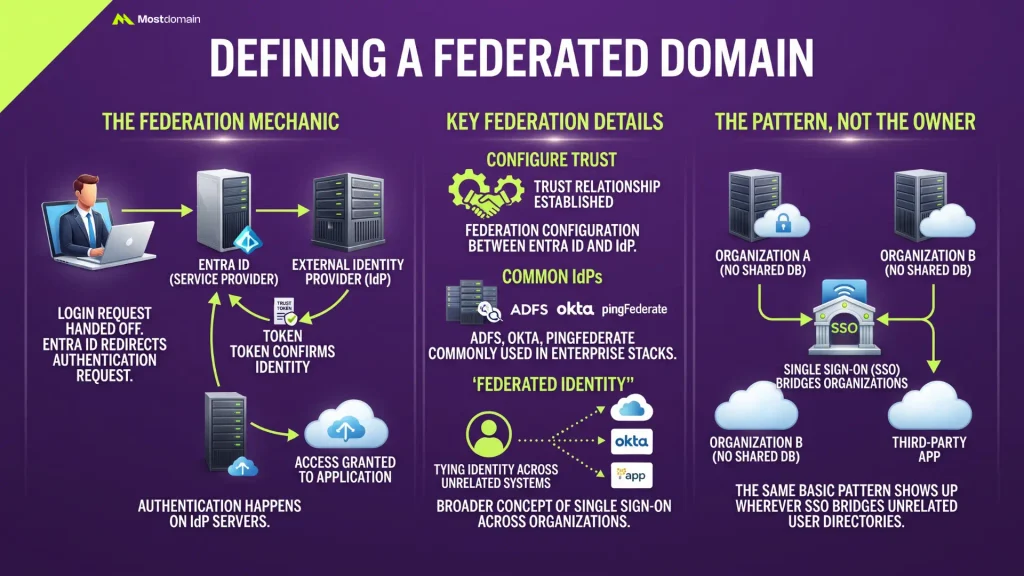
Here’s the mechanic underneath it: the entire login process gets handed off to an outside identity provider. Entra ID isn’t the one checking passwords. Someone signs in, Entra ID redirects that request elsewhere, and a trust token comes back confirming the person is who they claim to be.
A handful of details shape how this actually plays out day to day:
- Authentication happens on the identity provider’s servers, not inside Entra ID itself
- A trust relationship, what people call federation, has to be configured between the two systems first
- ADFS dominates in Microsoft shops, though Okta and PingFederate turn up plenty in larger enterprise stacks
- This whole setup is really just one application of federated identity, the broader idea of tying someone’s identity data across systems that otherwise have nothing to do with each other
Microsoft doesn’t own this concept, by the way. Wherever single sign-on bridges two organizations without a shared user database, the same basic pattern shows up.
Federated vs. Managed Domain: The Real Difference
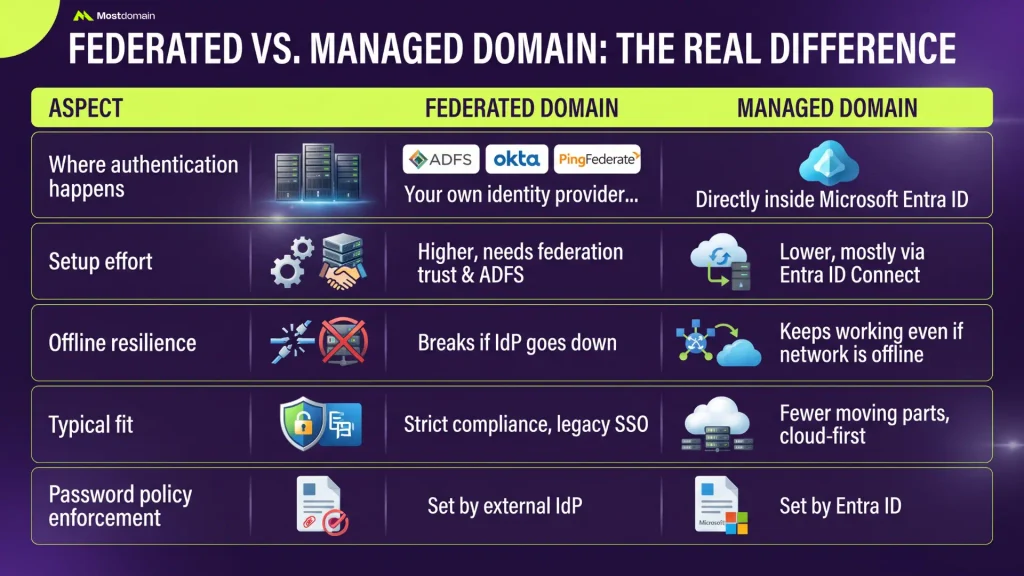
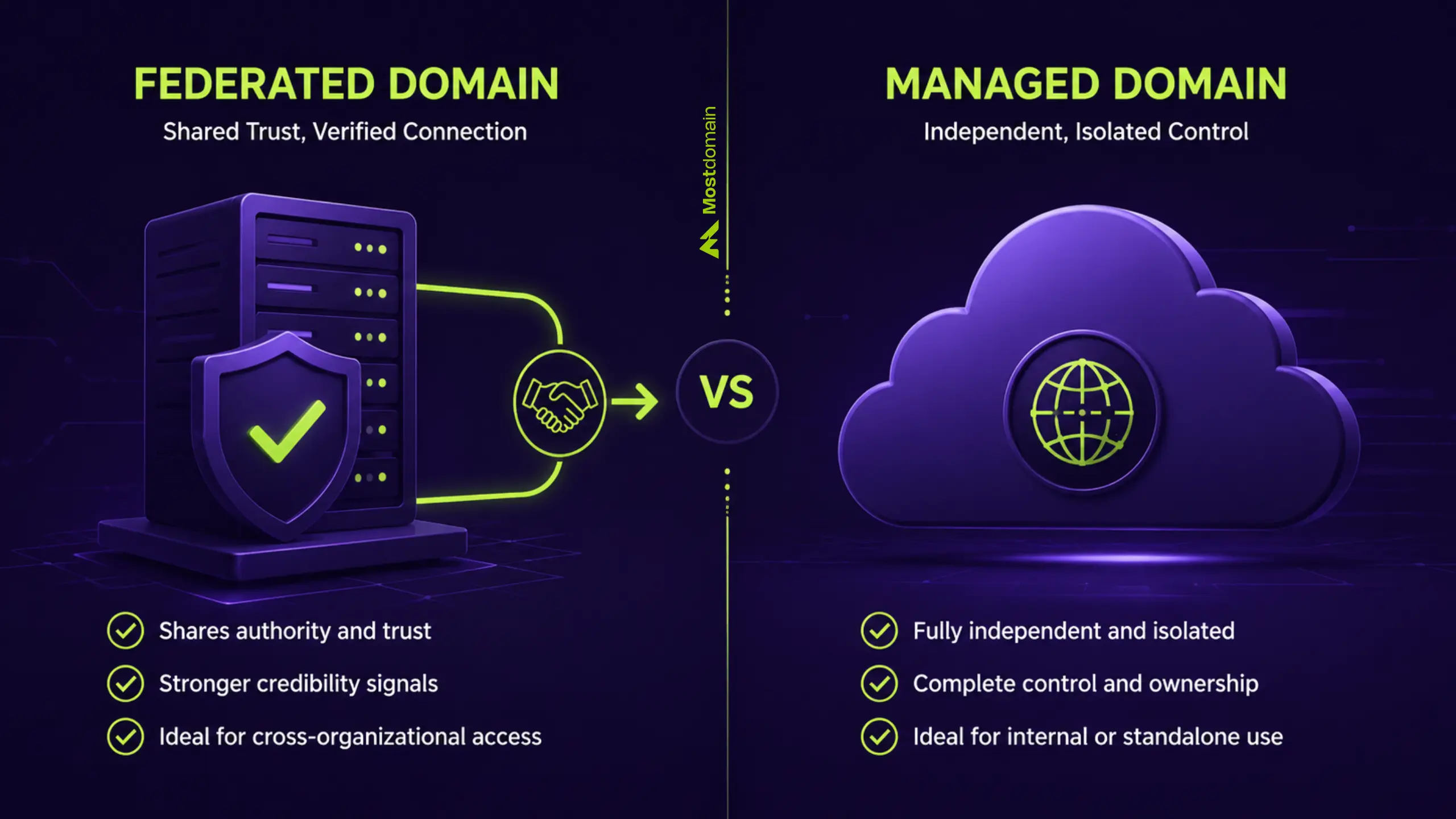
The core difference between a federated domain and a managed domain comes down to one question: where does authentication actually happen, on your own infrastructure or directly inside Entra ID?

| Aspect | Federated Domain | Managed Domain |
| Where authentication happens | Your own identity provider, ADFS, Okta, or PingFederate | Directly inside Microsoft Entra ID |
| Setup effort | Higher, needs a federation trust and often a dedicated ADFS server or cluster | Lower, mostly handled through Entra ID Connect |
| Offline resilience | Stays up even when the on-premises network drops… wait, breaks if the identity provider goes down | Keeps working even if the on-premises network is offline |
| Typical fit | Strict compliance rules or legacy SSO already in place | Teams that want fewer moving parts and a cloud-first setup |
| Password policy enforcement | Set by the external identity provider | Set by Entra ID |
Neither option wins outright. It comes down to what your organization already runs, and how much control your security team insists on keeping in-house.
How Federated Domain Authentication Works
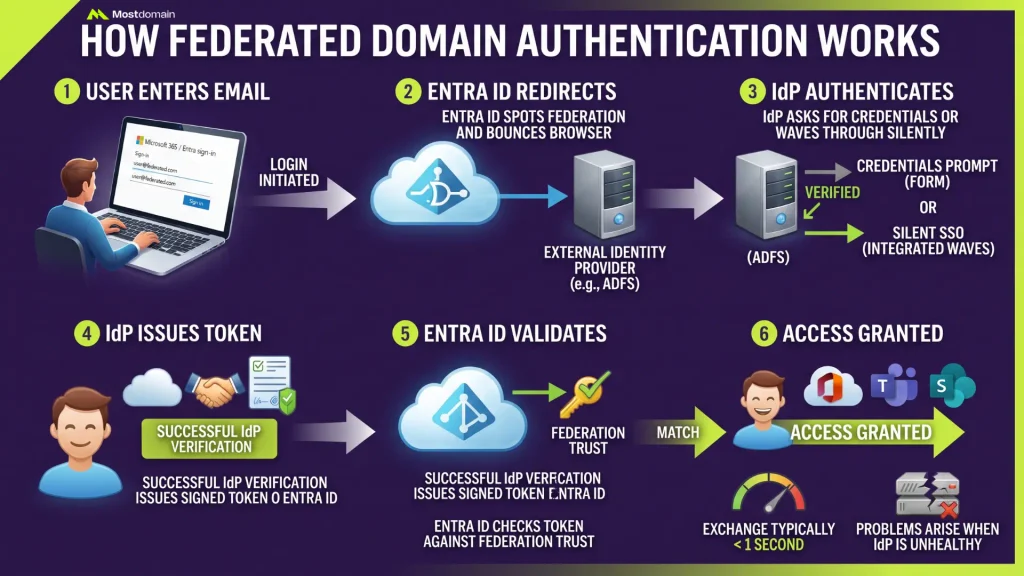
When someone signs into a federated domain, Entra ID never checks the password at all. Entra ID passes the request along, sits tight for a signed token, then lets the user in once that token checks out.
- Someone types their email into a Microsoft 365 or Entra sign-in screen.
- Entra ID spots that the domain is federated and bounces the browser over to whatever identity provider is configured, usually ADFS.
- From there the identity provider either asks for credentials outright, or, if the device already trusts the internal network, waves the sign-in through silently.
- Once verified, it issues a signed security token back to Entra ID.
- Entra ID checks that token against the federation trust and grants access.
The whole exchange typically finishes in under a second when the identity provider is healthy. When it isn’t, that’s usually where problems start.




Weighing the Pros and Cons of a Federated Domain
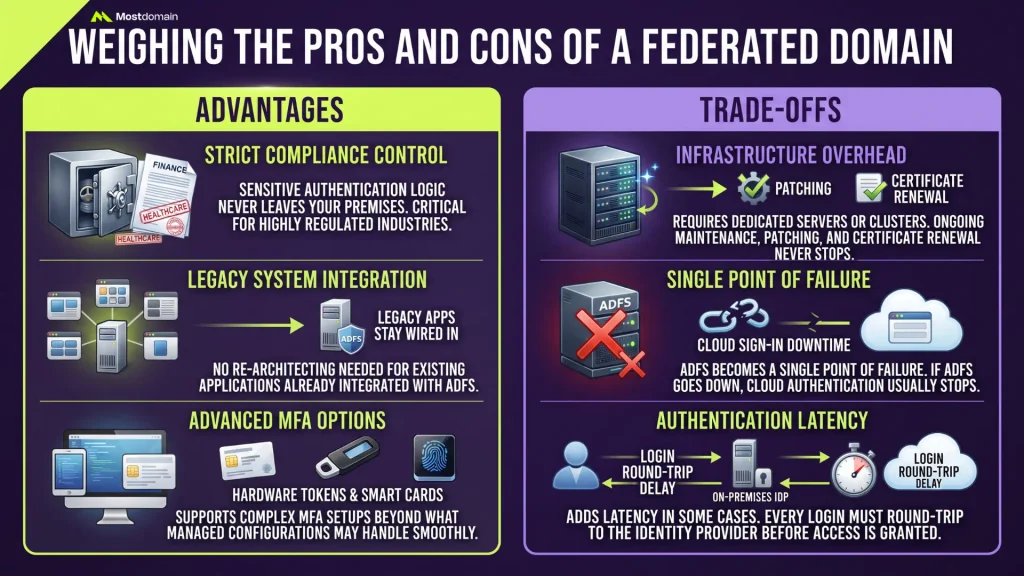
Tighter control over authentication and cleaner integration with legacy systems, that’s the upside of a federated domain. The cost is complexity, plus an ongoing dependency on infrastructure your own team has to babysit.
| Advantages | Trade-offs |
| Sensitive authentication logic never leaves your premises, which counts for a lot in finance, healthcare, or anywhere compliance is strict | A dedicated server or cluster is required, and patching plus certificate renewal never really stops |
| Legacy apps already wired into ADFS keep working without any re-architecting | Creates a single point of failure. If ADFS goes down, cloud sign-in usually goes down with it |
| Supports advanced MFA setups tied to smart cards or hardware tokens, something not every managed configuration handles as smoothly | Adds latency in some cases, since every login round-trips to the identity provider before Entra ID grants access |
Checking Whether a Domain Is Federated or Managed
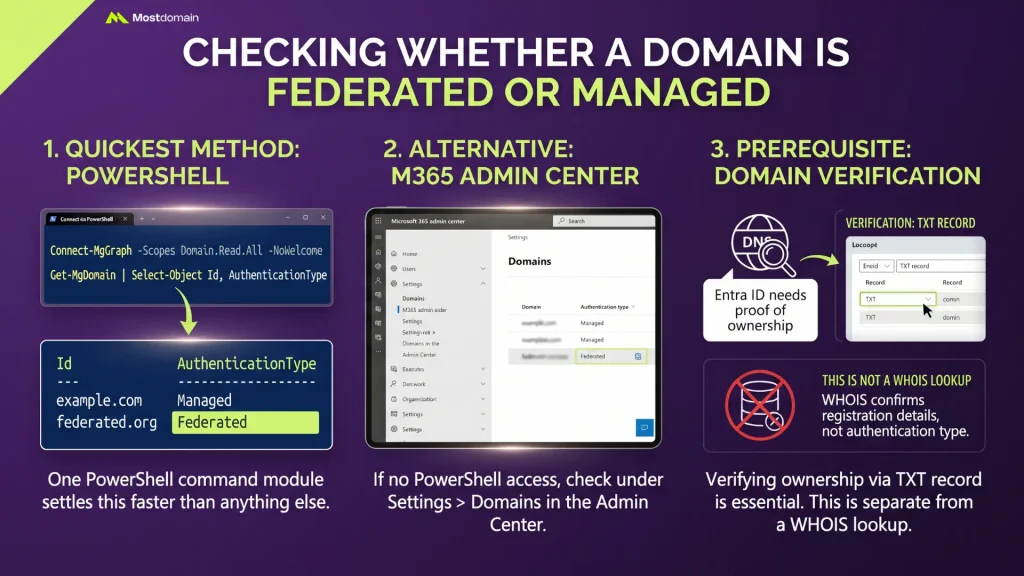
One PowerShell command through the Microsoft Graph module settles this faster than anything else: run it, and you’ll know immediately whether a federated domain or a managed one is in front of you.
Connect-MgGraph -Scopes Domain.Read.All -NoWelcome
Get-MgDomain | Select-Object Id, AuthenticationType
- The AuthenticationType column returns either Federated or Managed for each domain in the tenant
- No PowerShell access? The Microsoft 365 admin center shows the same detail under Settings, then Domains, next to each domain’s authentication type
- Before any of this works, Entra ID needs proof the domain belongs to you, usually through a TXT record confirmed with a quick DNS lookup
- That verification step is separate from a WHOIS lookup, which only confirms public registration details rather than authentication settings, though IT teams often check both when bringing a new domain online
Security Considerations of Federated Domains
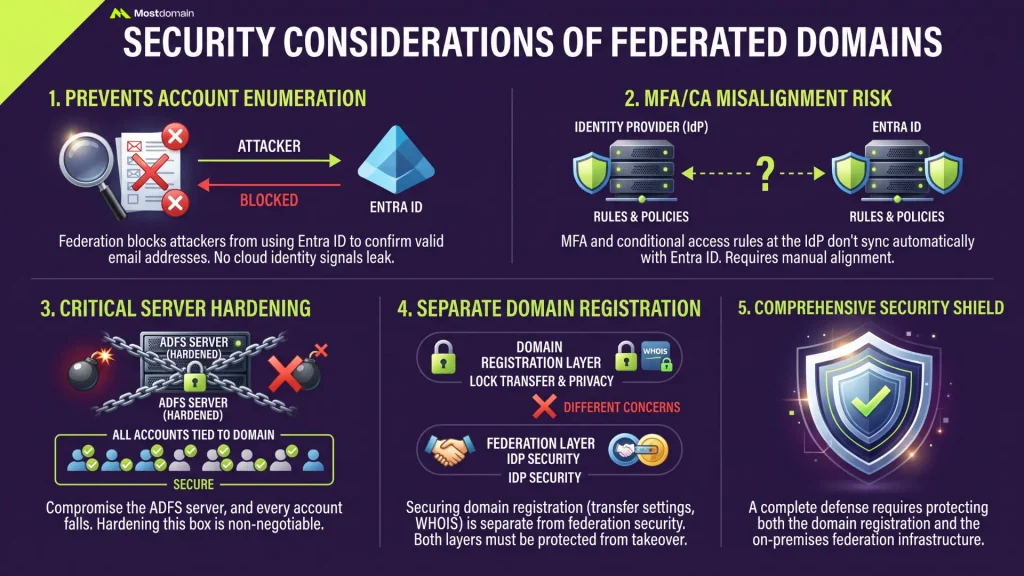
A federated domain can make certain attacks harder to pull off, mainly because Entra ID never gets the chance to confirm whether a given email address belongs to a real, active account.
That matters more than it sounds. Attackers running account enumeration or password-spraying campaigns often rely on cloud identity platforms leaking small signals about which addresses are valid. Federation blocks that path by routing everything through a system Entra ID has no visibility into.
- MFA and conditional access rules configured at the identity provider level don’t automatically sync with Entra ID’s own protections, so someone has to keep both sides aligned manually
- Compromise the ADFS server and every account tied to that domain goes down with it. That’s exactly why hardening this one box matters more than almost anything else in the setup
- That’s a separate concern from securing the domain registration itself, things like locking transfer settings or keeping WHOIS data private. Protecting a domain from takeover, start to finish, means handling both layers
Common Federated Domain Problems and How to Fix Them
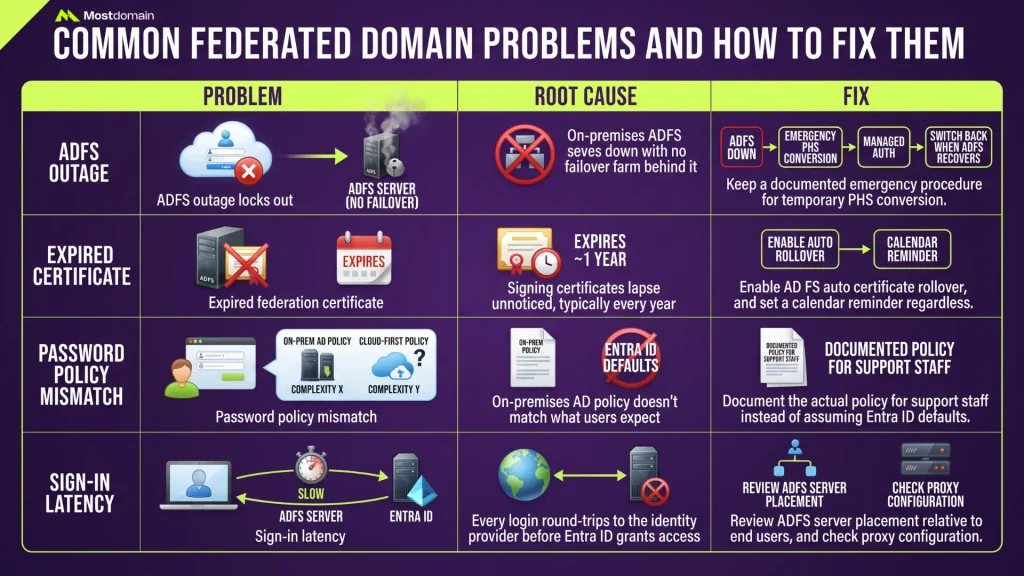
Most federated domain issues trace back to one root cause: something happened to the identity provider, whether that’s downtime, an expired certificate, or a broken trust configuration.
| Problem | Root Cause | Fix |
| ADFS outage locks out cloud sign-in | On-premises ADFS server goes down with no failover farm behind it | Keep a documented emergency procedure to temporarily convert the domain to managed authentication using Password Hash Sync, then switch back once ADFS recovers |
| Expired federation certificate | Signing certificates lapse unnoticed, typically every year or so depending on configuration | Enable AD FS auto certificate rollover, and set a calendar reminder regardless |
| Password policy mismatch | On-premises AD policy doesn’t match what users expect from a cloud-first product | Document the actual policy for support staff instead of assuming it mirrors Entra ID defaults |
| Sign-in latency | Every login round-trips to the identity provider before Entra ID grants access | Review ADFS server placement relative to end users, and check proxy configuration |
How to Migrate From a Federated Domain to a Managed Domain
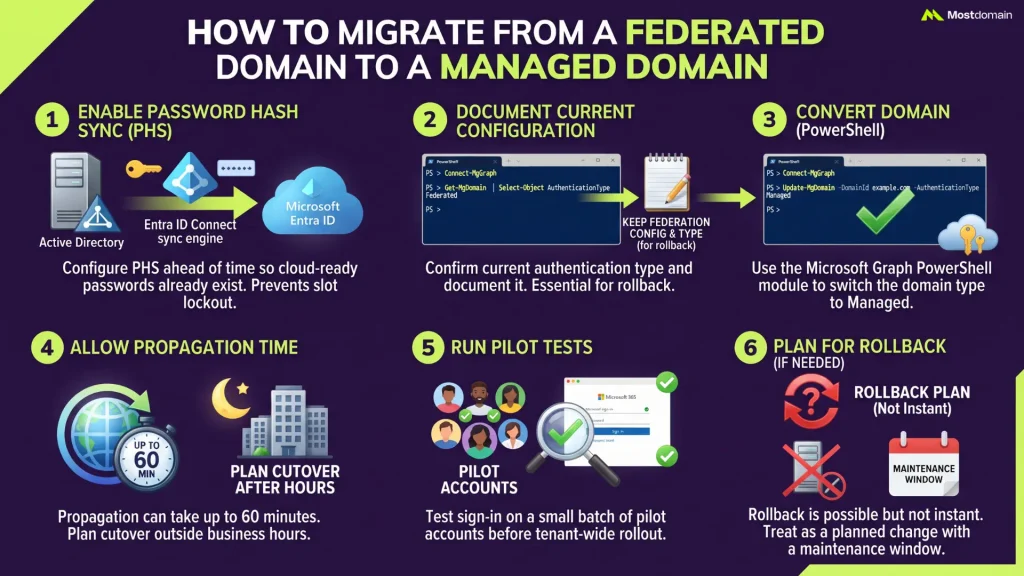
Migrating a federated domain to managed authentication mainly comes down to running a PowerShell command to switch the domain’s authentication type, paired with password hash sync so nobody gets locked out mid-migration.
- Enable Password Hash Sync (or Pass-through Authentication) through Entra ID Connect ahead of time, so cloud-ready passwords already exist before the switch.
- Run Get-MgDomain to confirm the current authentication type and keep it documented, useful if a rollback becomes necessary.
- Convert the domain using the Microsoft Graph PowerShell module. Keep a copy of the federation configuration handy, just in case New-MgDomainFederationConfiguration ends up being the rollback path.
- Propagation can take up to 60 minutes, so plan the cutover for outside business hours if you can.
- Run sign-in tests on a small batch of pilot accounts first, well before this goes tenant-wide.
Rollback works, but it isn’t instant. Treat this like a planned change with an actual maintenance window, not something you trigger on a Tuesday afternoon because it seemed convenient.
Deciding When a Federated Domain Makes Sense
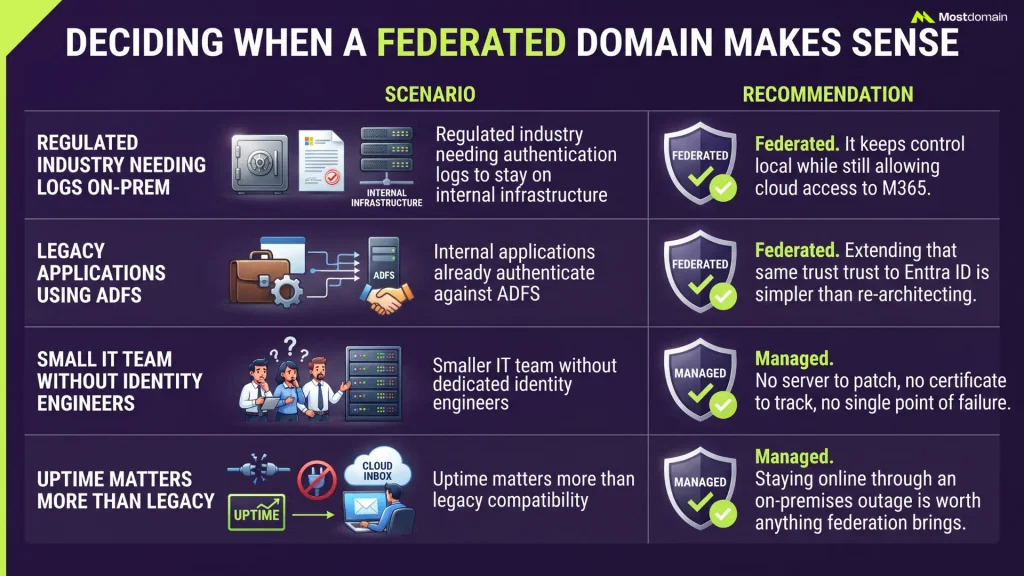
Choose a federated domain when your organization already depends on an existing identity provider, especially for compliance, legacy application support, or authentication methods Entra ID doesn’t fully replicate on its own.
| Scenario | Recommendation |
| Regulated industry needing authentication logs to stay on internal infrastructure | Federated. It keeps control local while still allowing cloud access to Microsoft 365 |
| Internal applications already authenticate against ADFS | Federated. Extending that same trust to Entra ID is usually simpler than re-architecting around a new identity model |
| Smaller IT team without dedicated identity engineers | Managed. No server to patch, no certificate to track, no single point of failure between users and their inbox |
| Uptime matters more than legacy compatibility | Managed. Staying online through an on-premises outage is worth more, on its own, than anything federation brings to the table |
Making the Right Call for Your Organization
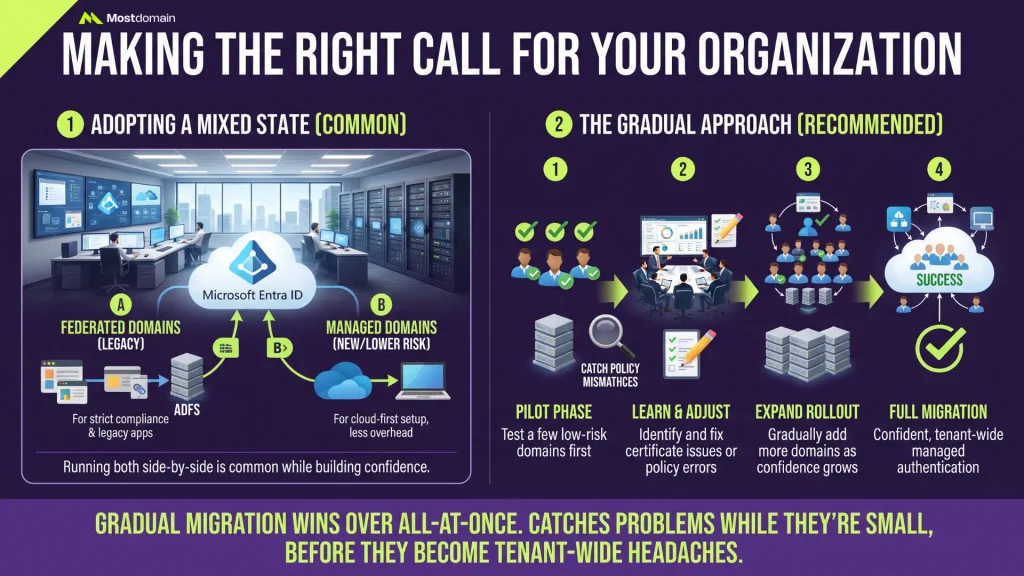
There isn’t a universal right answer here. Plenty of organizations don’t fully commit to one side right away, and running a mixed state for a while is fairly common: a handful of domains still federated for legacy reasons, while newer or lower-risk domains move to managed as confidence builds.
Going gradual tends to beat an all-at-once switch. Mostly because it gives IT room to catch policy mismatches and certificate problems while they’re still small, before they turn into headaches spanning the whole tenant.
FAQ
Is it possible for one domain to be federated and managed simultaneously?
Not the same domain. Authentication type is set per domain in Entra ID, so a tenant with multiple domains can run a mix, some federated, some managed, depending on what each one needs.
Is a federated domain more secure than a managed one?
Depends entirely on the threat model. Keeping authentication logic external blocks certain enumeration attacks, sure, but it also hands you a single point of failure. Compromise that one point, and every account on the domain goes with it.
How long does converting a federated domain to managed usually take?
The technical change itself takes up to 60 minutes to propagate. Planning it properly, including pilot testing, tends to add several days on top of that.
Does a small business actually need a federated domain?
Rarely, honestly. Managed authentication tends to serve small and mid-sized organizations better, mainly because running ADFS infrastructure without dedicated staff usually creates more risk than it removes.
What happens if the on-premises identity provider goes down for good?
Users on that federated domain lose the ability to sign in until the provider is restored, or the domain is converted to managed authentication as an emergency fallback.
Can a federated domain work with identity providers other than ADFS?
Yes. ADFS wins by default in Microsoft-heavy environments, but Okta, PingFederate, and other third-party identity providers support the exact same federation model.
References
- Microsoft Learn, “What Is Difference Between Federated Domain vs Managed Domain”
- Icewolf Blog, “The Difference Between Managed and Federated Domain”
- Matrixpost.net, “Azure AD, Federated Domain vs. Managed Domain”
- Wikipedia, “Federated Identity”
- War Room by RSM US, “Managed vs. Federated Office 365, What’s the Difference?”
- Bishnu Baliyase, “Federated Domain vs. Managed Domain, Understanding the Difference and Migration Process”