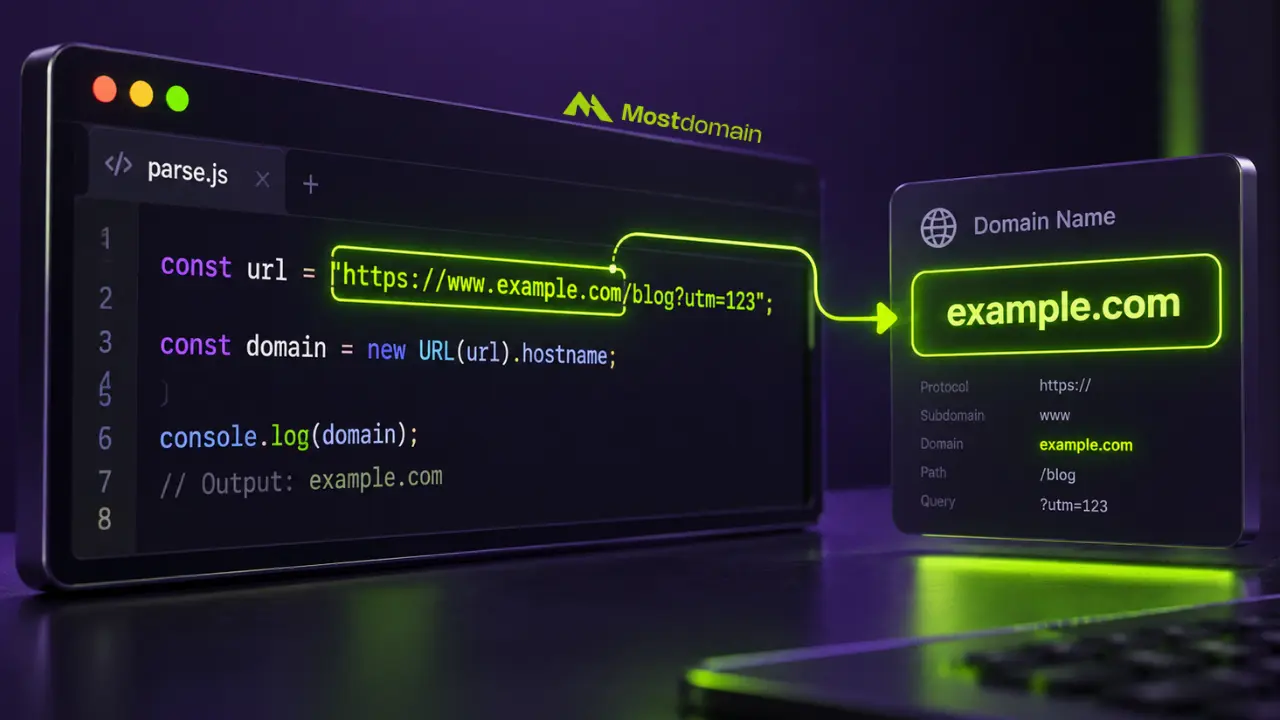
Context is everything with how to extract a domain name from a string. A quick one-off in a script calls for a completely different approach than a production pipeline churning through millions of URLs, and neither one resembles the regex someone’s hand-rolling at 2am under deadline pressure. Grab the wrong tool for the job, and that mismatch is usually the root cause behind extraction functions that quietly break on real data.
Most tutorials cover exactly one method, in exactly one language, then stop right before the part where .co.uk or a stray port number wrecks the whole thing. JavaScript, Python, and raw regex all get covered here side by side, along with the edge cases that actually cause bugs once code hits production.
Nothing here drifts into anything else domain-related outside this specific parsing problem. Just the methods, why some of them fail silently, and what to reach for depending on the situation.
What Actually Counts as “The Domain” When Extracting From a String
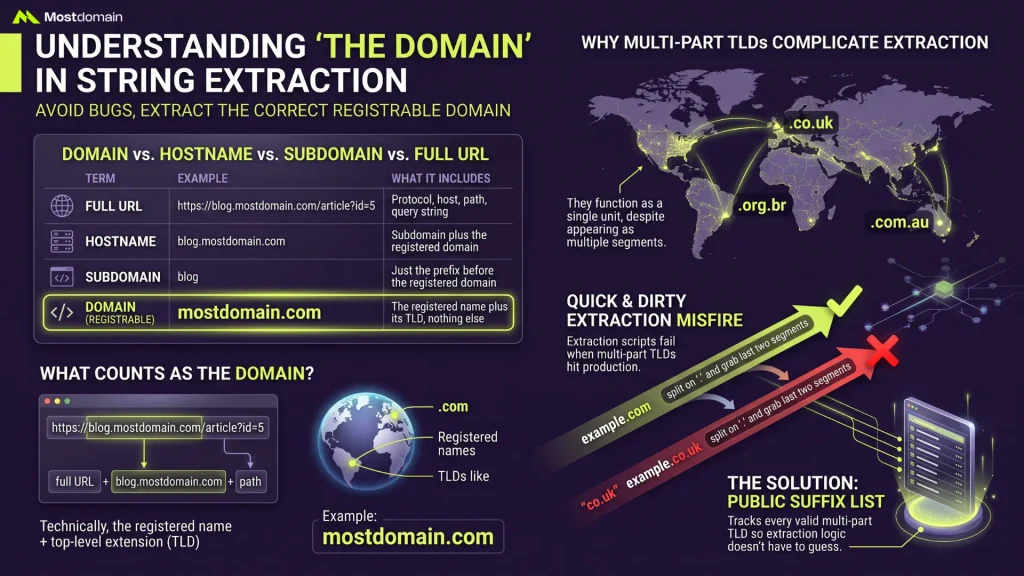
A domain, technically, is the registered name plus its top-level extension, mostdomain.com for instance, which is a narrower thing than the full hostname or URL a string usually contains.
Domain vs. Hostname vs. Subdomain vs. Full URL
Four terms get used almost interchangeably in casual conversation, and that looseness is exactly where extraction bugs tend to start.
| Term | Example | What It Includes |
| Full URL | https://blog.mostdomain.com/article?id=5 | Protocol, host, path, and query string |
| Hostname | blog.mostdomain.com | Subdomain plus the registered domain |
| Subdomain | blog | Just the prefix before the registered domain |
| Domain (registrable) | mostdomain.com | The registered name plus its TLD, nothing else |
Extracting “the domain” from a URL usually means landing on that last row, mostdomain.com, not blog.mostdomain.com and not the whole URL string.

Why Multi-Part TLDs Complicate Domain Extraction
A TLD isn’t always one segment after the last dot, and that single fact breaks more extraction code than any other edge case combined.
- Take .co.uk, .com.au, or .org.br. Each one functions as a single unit, dot in the middle and all, despite looking like it should split into two
- Split a hostname on “.” and grab the last two segments, and .com domains resolve fine while a UK domain instead spits back “co.uk” rather than the full “example.co.uk” anyone actually wanted
- A public suffix list exists specifically to solve this, tracking every valid multi-part TLD so extraction logic doesn’t have to guess
- This exact blind spot is why so many “quick and dirty” extraction scripts sail through testing and then misfire the first time a real .co.uk URL hits production
JavaScript Handles Most of This Automatically
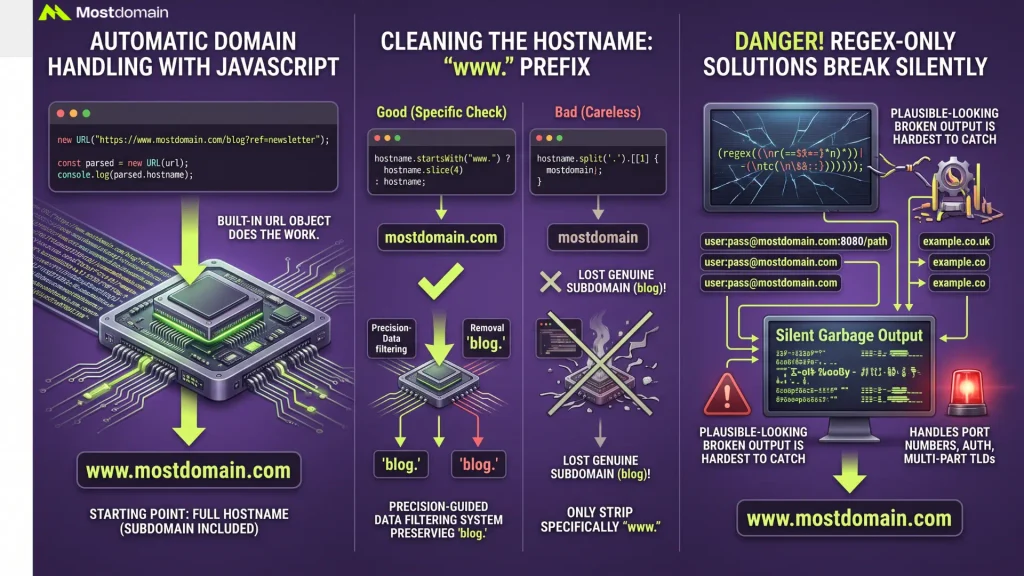
No regex needed. That’s the short version of using the built-in URL object in JavaScript, and it’s worth defaulting to for anything beyond the absolute simplest case.
Using the Built-In URL Object
javascript


const url = “https://www.mostdomain.com/blog?ref=newsletter”;
const parsed = new URL(url);
console.log(parsed.hostname); // www.mostdomain.com
The .hostname property returns the full host, subdomain included, which is usually the starting point rather than the final answer.
Stripping the “www” Prefix Correctly
javascript
const hostname = parsed.hostname;
const domain = hostname.startsWith(“www.”) ? hostname.slice(4) : hostname;
console.log(domain); // mostdomain.com
Checking specifically for “www.” rather than blindly removing everything before the first dot matters here, since a genuine subdomain like blog.mostdomain.com would lose the “blog” part under a careless approach.
Why Regex-Only JavaScript Solutions Often Break
Match everything between “://” and the next “/”, and a pattern like that looks fine on paper. Add a port number, a username and password, or a multi-part TLD into the mix, though, and it starts returning garbage silently, no error thrown anywhere. That silence is what makes it dangerous. Plausible-looking broken output is far harder to catch than an outright crash.
Python Covers the Basics With urllib.parse
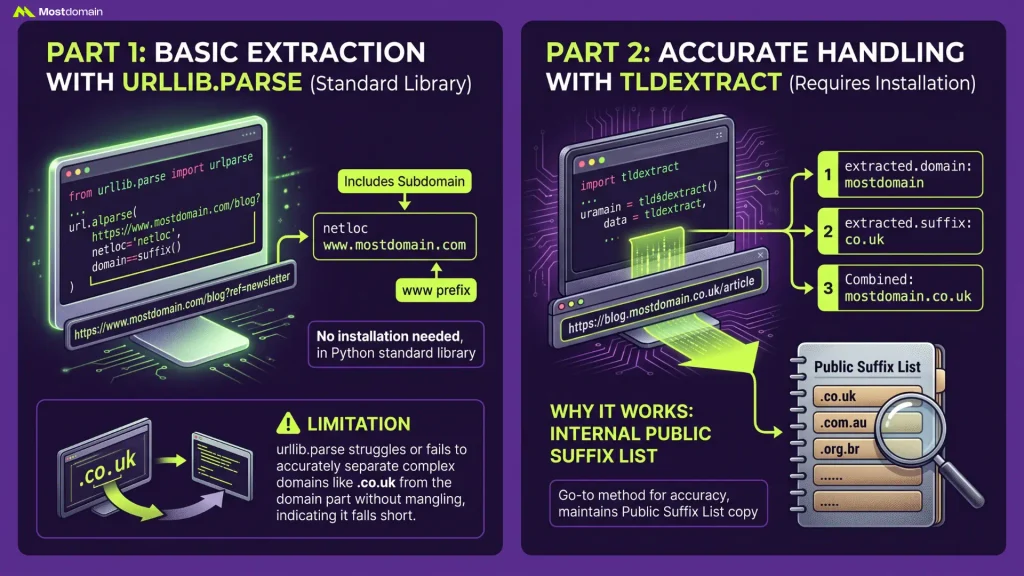
No extra installation needed here. urllib.parse, built into Python’s standard library, covers basic domain extraction out of the box, though multi-part TLDs are exactly where it falls short on its own.
Using urllib.parse for Basic Extraction
python
from urllib.parse import urlparse
url = “https://www.mostdomain.com/blog?ref=newsletter”
parsed = urlparse(url)
print(parsed.netloc) # www.mostdomain.com
netloc behaves a lot like JavaScript’s hostname, including the “www” prefix and any subdomain that happens to be present.
Using tldextract for Accurate Results With Multi-Part TLDs
python
import tldextract
extracted = tldextract.extract(“https://blog.mostdomain.co.uk/article”)
print(extracted.domain) # mostdomain
print(extracted.suffix) # co.uk
print(f”{extracted.domain}.{extracted.suffix}”) # mostdomain.co.uk
So how does it separate “mostdomain” from “co.uk” without mangling either piece? By maintaining its own internal copy of the public suffix list. That’s what makes tldextract the go-to Python method whenever multi-part TLDs might turn up in the data.
What Regex Alone Can and Can’t Do
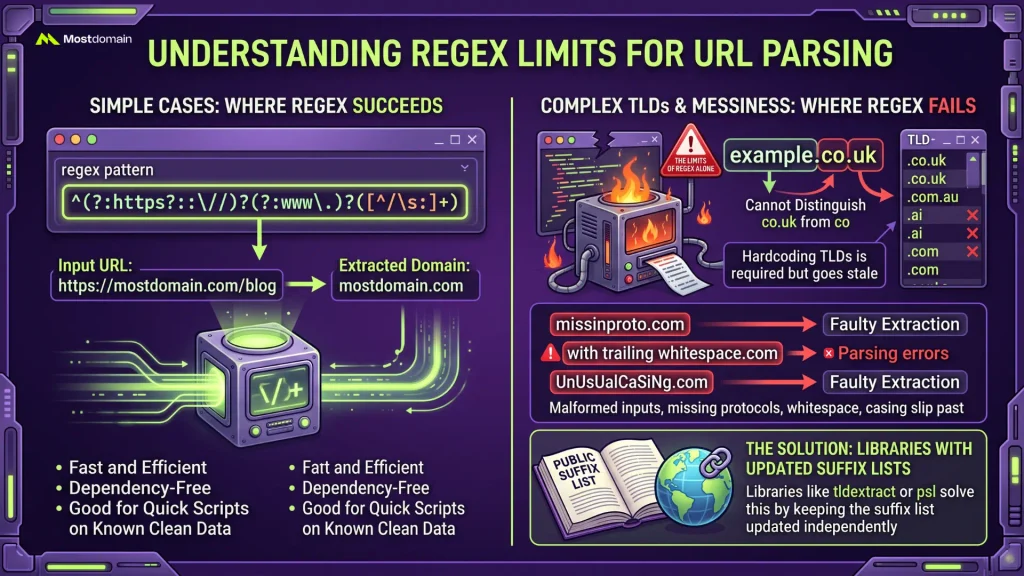
A basic regex pattern handles simple, well-formed URLs reasonably well, but “reasonably well” stops applying the moment real-world messiness enters the picture.
A Basic Regex Pattern for Simple Cases
^(?:https?:\/\/)?(?:www\.)?([^\/\s:]+)
Feed it a clean URL like https://mostdomain.com/blog, and it captures mostdomain.com without a fight. Fast, dependency-free, good enough for a quick script running against data already known to be clean.
Where Regex Runs Out of Road on TLDs
- No regex pattern can distinguish “co.uk” as a suffix from “co” as a second-level domain without hardcoding a list of known multi-part TLDs somewhere
- Any hardcoded regex list goes stale over time, since new TLDs keep getting added to the public suffix list on an ongoing basis
- Malformed input, missing protocols, stray whitespace, unusual casing, tends to slip past regex patterns that weren’t written with those cases in mind
- A library like tldextract or psl solves this by keeping the suffix list updated independently, decoupled entirely from the parsing logic itself
Edge Cases That Trip Up Extraction Logic
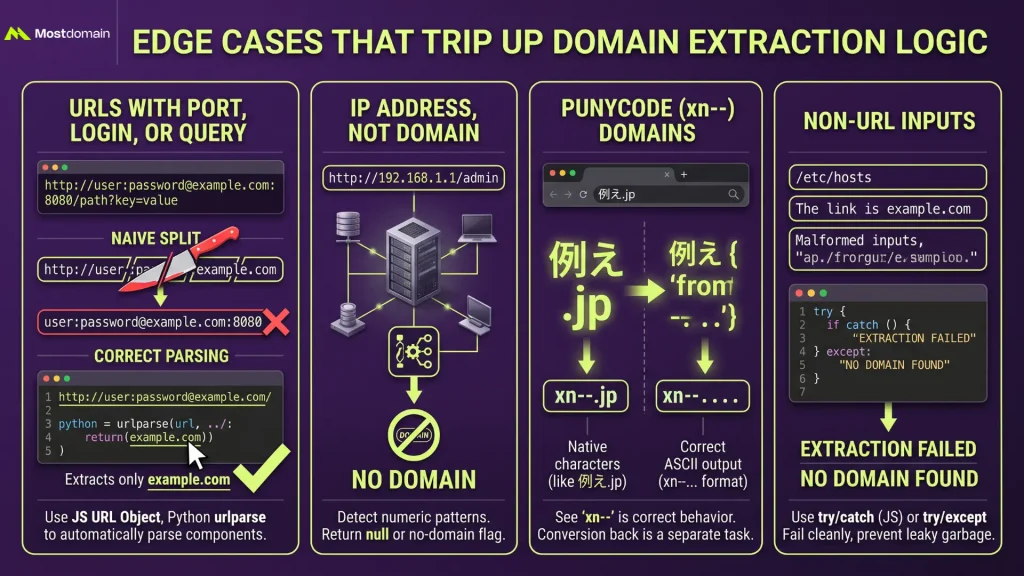
Bugs in domain extraction rarely come out of nowhere. A short, predictable list of input patterns causes nearly all of them, and running code against each one ahead of shipping heads off most trouble before it starts.
When a URL Carries a Port, Login, or Query String
http://user:[email protected]:8080/path?key=value
Grab everything before the next slash with a naive split, and this returns “user:[email protected]:8080” as “the domain,” port and credentials included. example.com was the actual target the whole time. JavaScript’s URL object and Python’s urlparse both dodge this trap automatically, one more reason to skip manual string splitting.
When the String Is an IP Address, Not a Domain
http://192.168.1.1/admin has no domain name in it anywhere, full stop, since it routes straight to a numeric address instead. The fix is flagging this pattern explicitly and returning null, rather than forcing something IP-shaped to look like a domain.
When a Domain Shows Up as Punycode Instead of Real Characters
Take 例え.jp as an example. Browsers and most parsing libraries convert that non-Latin domain into Punycode, the xn-- format, before extraction logic ever touches it. Seeing “xn--” in the output isn’t broken behavior. It’s the correct ASCII stand-in for that domain, and converting it back to native characters is a separate task entirely, one that’s only necessary if it’s genuinely needed.
When the String Isn’t a URL At All
A file path. A plain sentence. Malformed input missing a protocol entirely. All three should fail extraction cleanly, not return some nonsensical partial match. A try/catch in JavaScript or a try/except in Python catches exactly this, instead of letting a broken string quietly leak garbage further down a pipeline.
Pulling Several Domains Out of One Block of Text
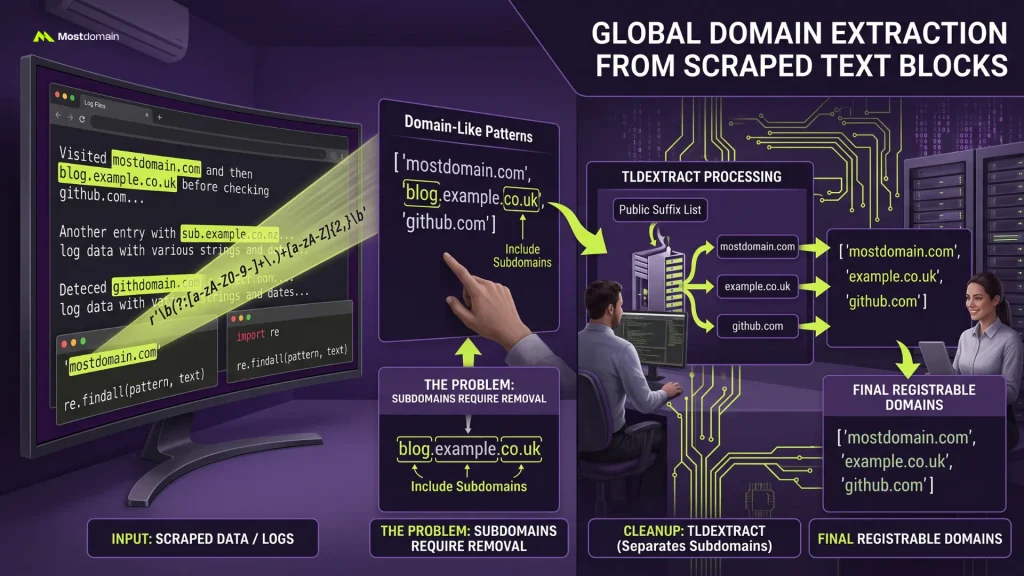
One known URL is one thing. A whole paragraph of scraped text with domains scattered through it is another, and that calls for a global regex match plus cleanup logic rather than any of the single-URL methods covered so far.
Extracting Domains From Log Files or Scraped Data
python
import re
text = “Visited mostdomain.com and then blog.example.co.uk before checking github.com”
pattern = r’\b(?:[a-zA-Z0-9-]+\.)+[a-zA-Z]{2,}\b’
matches = re.findall(pattern, text)
print(matches) # [‘mostdomain.com’, ‘blog.example.co.uk’, ‘github.com’]
Scanning log files or scraped datasets for domain-like patterns works well with this approach, though results should still get run through tldextract afterward to properly separate the registrable domain from any subdomain still riding along with it.
Matching the Method to the Job
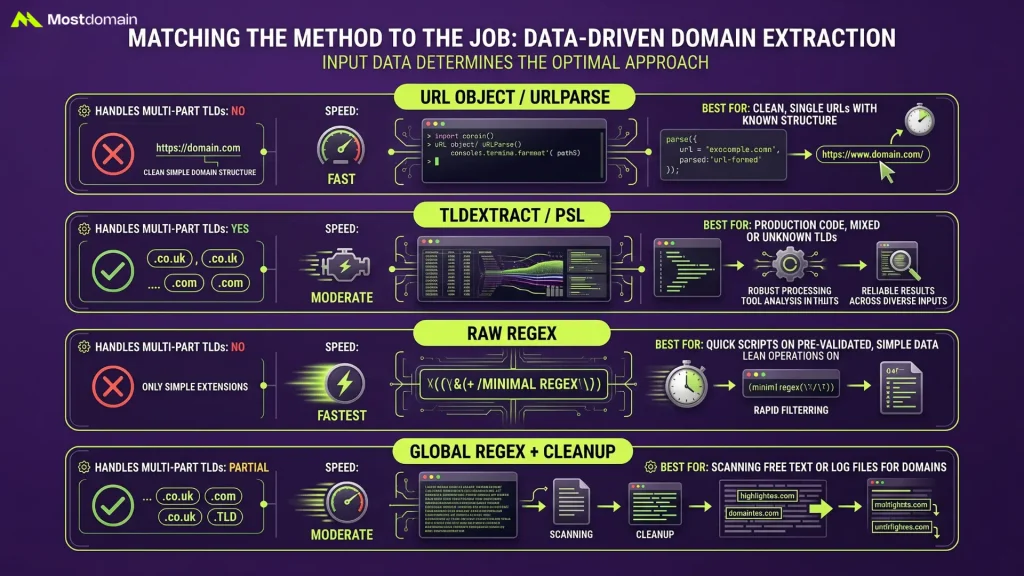
What the input data actually looks like matters far more here than which programming language happens to be in use.
| Method | Handles Multi-Part TLDs | Speed | Best For |
| URL object / urlparse | No | Fast | Clean, single URLs with known structure |
| tldextract / psl | Yes | Moderate | Production code, mixed or unknown TLDs |
| Raw regex | No | Fastest | Quick scripts on pre-validated, simple data |
| Global regex + cleanup | Partial | Moderate | Scanning free text or log files for domains |
FAQ
Is there a single regex that handles every possible domain correctly?
A structural limitation, not a skill gap, is why the answer is no. New TLDs get added on a regular basis, and no static pattern can keep up with a list that keeps changing without being updated right alongside it.
Does extracting a domain name require an internet connection?
An internet connection isn’t required by any method described here. Periodic updates do pull a fresh suffix list into tldextract from a remote source, sure, but a cached copy ships alongside it too, keeping everything running just fine offline between those refreshes.
What’s the fastest way to extract a domain from a huge dataset?
Raw string operations win the speed race, skipping the pattern-matching overhead regex carries with it. Once multi-part TLDs start showing up in the dataset, though, something like tldextract tends to be worth the small speed hit for the accuracy it buys back.
Can this same logic extract an email domain instead of a URL domain?
Splitting the string on the “@” symbol first gets most of the way there. Whatever comes after “@” is a domain in its own right and can run through the exact same extraction logic covered earlier.
Why does my extracted domain still include “www”?
“www” is technically a subdomain rather than part of the registrable domain itself, and most parsing tools hand it back by default unless told otherwise, which is the exact extra step this article covered earlier.
References
- Michael Burrows, Get the domain name from a string containing a URL in JavaScript
- Medium (glee8804), Extracting Domains from URLs in Python
- Medium (Ryan Arjun), Python – Extracting Domain Name From URLs Using Regular Expressions
- DEV Community, Daily Challenge #89 – Extract domain name from URL